> ## Documentation Index
> Fetch the complete documentation index at: https://auth0.generaltranslation.app/llms.txt
> Use this file to discover all available pages before exploring further.

> Describes how to install and configure the AD/LDAP Connector.

# Install and Configure AD/LDAP Connector

export const InlineImage = ({src, alt = '', height = '1.6em'}) => {
  return <img noZoom src={src} alt={alt} style={{
    display: 'inline',
    verticalAlign: 'start',
    height: height,
    margin: '0'
  }} />;
};

export const AuthCodeBlock = ({filename, icon, language, highlight, children}) => {
  const [processedChildren, setProcessedChildren] = useState(children);
  useEffect(() => {
    let unsubscribe = null;
    function init() {
      unsubscribe = window.autorun(() => {
        let processedChildren = children;
        for (const [key, value] of window.rootStore.variableStore.values.entries()) {
          processedChildren = processedChildren.replace(new RegExp(key, "g"), value);
        }
        setProcessedChildren(processedChildren);
      });
    }
    if (window.rootStore) {
      init();
    } else {
      window.addEventListener("adu:storeReady", init);
    }
    return () => {
      window.removeEventListener("adu:storeReady", init);
      unsubscribe?.();
    };
  }, [children]);
  return <CodeBlock filename={filename} icon={icon} language={language} lines highlight={highlight}>
      {processedChildren}
    </CodeBlock>;
};

export const codeExample = `{
   "LDAP_URL": "ldap://{yourLdapServerFqdn}",
   "LDAP_BASE": "dc={yourDomain},dc=com",
   "LDAP_BIND_USER":"{yourLdapUser}",
   "LDAP_BIND_PASSWORD":"{yourLdapUserPassword}" //cleartextpassword
}`;

## Prerequisites

* Ensure that your system meets the [system requirements](/docs/authenticate/identity-providers/enterprise-identity-providers/active-directory-ldap/ad-ldap-connector/ad-ldap-connector-requirements).
* Ensure that you have already installed [Git](https://git-scm.com/downloads), [Node.js](https://nodejs.org), and [npm](http://blog.npmjs.org/post/85484771375/how-to-install-npm).
* For most platforms, you will need to have root and/or administrator privileges.

## Install the connector for Windows

### Download the installer

Download the **Auth0 Active Directory/LDAP Connector for Windows** (MSI) file:

* [<InlineImage src="https://cdn.auth0.com/docs/img/node-windows.png" /> Auth0 Active Directory/LDAP Connector for Windows](https://cdn.auth0.com/adldap.msi) - <small>Current version: 6.1.8 Checksum (SHA1): faf28ef46d1776802128e4f702bc755f3102abd7</small>

### Run the installer

Run the installer and follow the instructions.

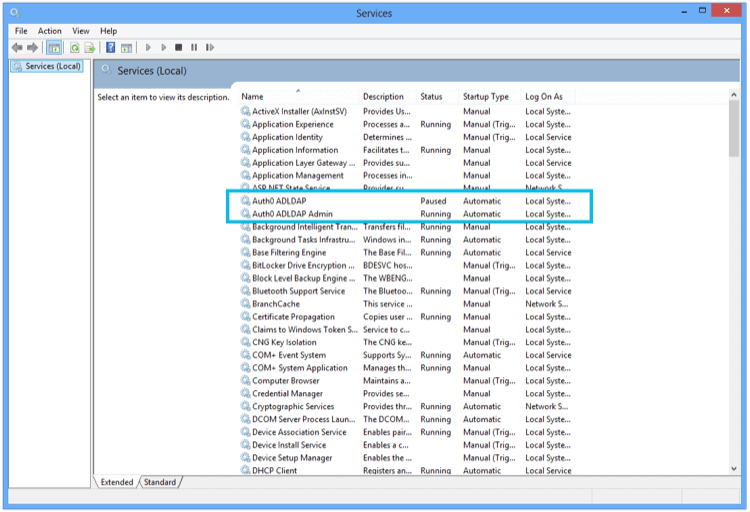
The **AD/LDAP Connector** is installed as a Windows Service.

<Frame>
  <img src="https://mintcdn.com/generaltranslationinc/PZqXjqHIg9BH1QX1/docs/images/cdy7uua7fh8z/MPMfLmJsXoPAzpPQhGAv5/25fb39ac7cef7a125110b8fa9f2dff01/adldap-connector-services.png?fit=max&auto=format&n=PZqXjqHIg9BH1QX1&q=85&s=52fecc6ca10afcb9a47bce5f52163f37" alt="AD/LDAP Connector Services" width="750" height="512" data-path="docs/images/cdy7uua7fh8z/MPMfLmJsXoPAzpPQhGAv5/25fb39ac7cef7a125110b8fa9f2dff01/adldap-connector-services.png" />
</Frame>

### Link to Auth0

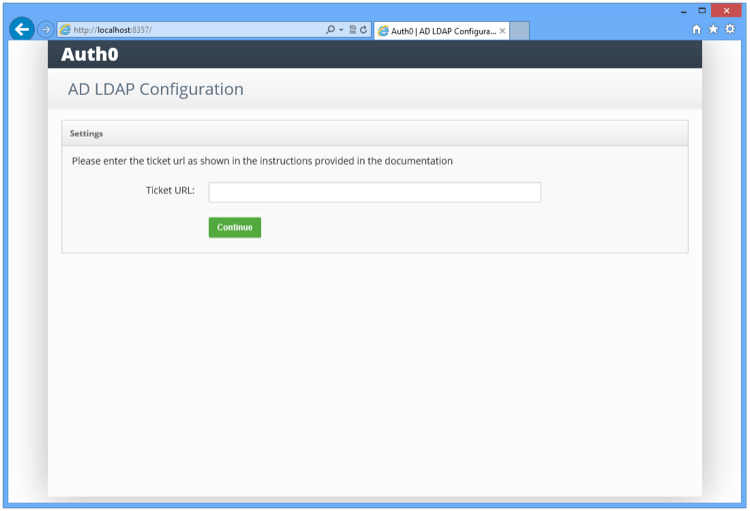
Once the installation is complete, you will see a screen in a browser pointing to localhost:
<Frame>
  <img src="https://mintcdn.com/generaltranslationinc/RMdEvk9xid_26wCJ/docs/images/cdy7uua7fh8z/3biSuxJYQ4swMGJkOZtC3R/cab77cb763ad3b9ff47710bc406c527b/adldap-connector-admin-ticket.png?fit=max&auto=format&n=RMdEvk9xid_26wCJ&q=85&s=aaad2a7a27e9715a716332cfab83a61f" alt="AD/LDAP Connector Admin Ticket" width="750" height="511" data-path="docs/images/cdy7uua7fh8z/3biSuxJYQ4swMGJkOZtC3R/cab77cb763ad3b9ff47710bc406c527b/adldap-connector-admin-ticket.png" />
</Frame>

Enter the **TICKET URL** provided when you provisioned the connection. The **TICKET URL** uniquely identifies this connector in Auth0. The Connector will use this to communicate with Auth0 Server and automatically complete the configuration.

### Link to LDAP

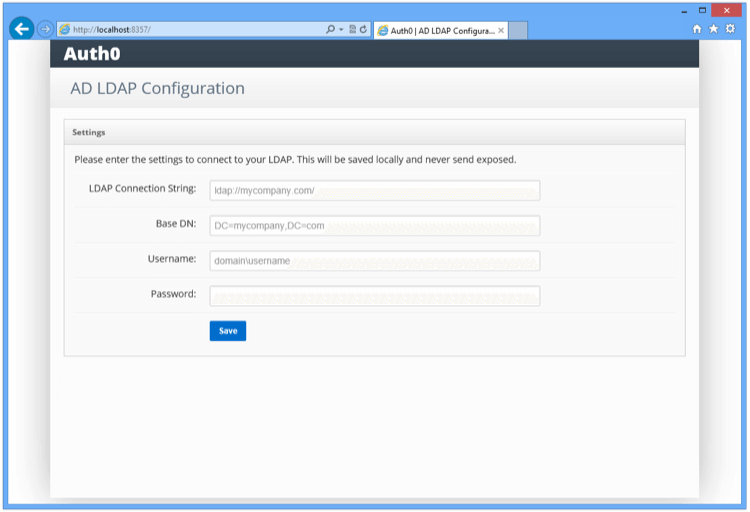
Enter the LDAP settings:
<Frame>
  <img src="https://mintcdn.com/generaltranslationinc/eTnlaUmP9KiNe1Wi/docs/images/cdy7uua7fh8z/2mHaknek0qyBxGmsanb30L/600b0259ed6db3fe9c526aa9f57a76bd/adldap-connector-admin-settings.png?fit=max&auto=format&n=eTnlaUmP9KiNe1Wi&q=85&s=cf0fd7b86b4e6ac0929289707e256b4a" alt="adldap-connector-admin-settings" width="750" height="512" data-path="docs/images/cdy7uua7fh8z/2mHaknek0qyBxGmsanb30L/600b0259ed6db3fe9c526aa9f57a76bd/adldap-connector-admin-settings.png" />
</Frame>

<table class="table">
  <thead>
    <tr>
      <th>Setting</th>
      <th>Description</th>
    </tr>
  </thead>

  <tbody>
    <tr>
      <td><strong>LDAP Connection String</strong></td>
      <td>For example, <code>ldap\://ldap.internal.contoso.com</code>. This is the protocol + the domain name or ip address of your LDAP server. Your LDAP server is the local domain controller where Active Directory is installed. The protocol can be either <code>ldap</code> or <code>ldaps</code>. If you need to use <code>ldaps</code> make sure that the certificate is valid in the current server.</td>
    </tr>

    <tr>
      <td><strong>Base DN</strong></td>
      <td>For example, <code>dc=contoso,dc=com</code>. This is the base container for all the queries performed by the connector.</td>
    </tr>

    <tr>
      <td><strong>Username</strong></td>
      <td>For example, <code>cn=svcauth0,dc=services,dc=contoso,dc=com</code> The full distinguish name of a user to perform queries.</td>
    </tr>

    <tr>
      <td><strong>Password</strong></td>
      <td>The password of the user.</td>
    </tr>
  </tbody>
</table>

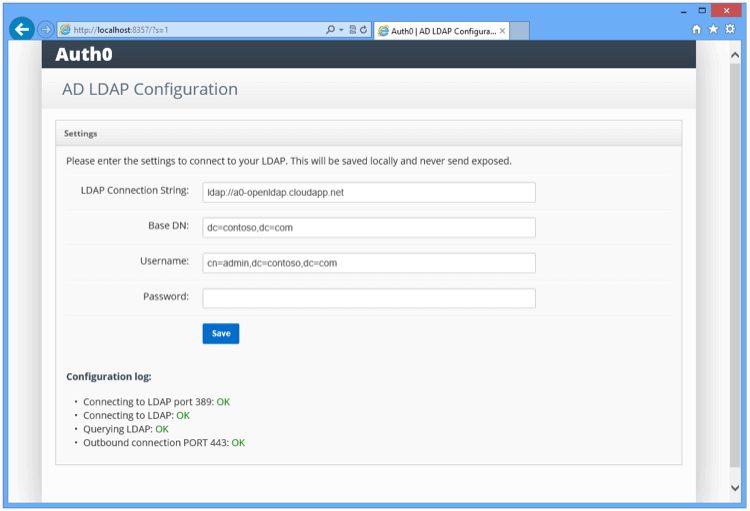
Once you submit the above information, the connector will perform a series of tests to validate the information you entered. The results are displayed under **Configuration Log** in the console screen.

<Frame>
  <img src="https://mintcdn.com/generaltranslationinc/IhLUvTv5J5eZ1VeH/docs/images/cdy7uua7fh8z/7kezId8mhvyYDbuovvi9FM/c2f3b2188fdfebc460458daf7247c124/adldap-connector-admin-settings-ok.png?fit=max&auto=format&n=IhLUvTv5J5eZ1VeH&q=85&s=72533fd43d5256c0dde6d5923e401f6b" alt="adldap-connector-admin-settings-ok" width="750" height="511" data-path="docs/images/cdy7uua7fh8z/7kezId8mhvyYDbuovvi9FM/c2f3b2188fdfebc460458daf7247c124/adldap-connector-admin-settings-ok.png" />
</Frame>

Make sure that all tests are green.

<table class="table">
  <thead>
    <tr>
      <th>Test</th>
      <th>Description</th>
      <th>Troubleshoot</th>
    </tr>
  </thead>

  <tbody>
    <tr>
      <td>Test 1</td>
      <td>Attempts to establish a TCP connection to the LDAP server and port specified.</td>
      <td>Check basic network connectivity and firewall settings that might prevent such a connection.</td>
    </tr>

    <tr>
      <td>Test 2</td>
      <td>Attempts to perform an LDAP bind on the LDAP server and port specified and with the username and password provided.</td>
      <td>Check the LDAP connection string, search path, username and password.</td>
    </tr>

    <tr>
      <td>Test 3</td>
      <td>Attempts to perform an LDAP search against the directory to check the privileges of the specified username.</td>
      <td>Check the privileges of the username in the target directory.</td>
    </tr>

    <tr>
      <td>Test 4</td>
      <td>Attempts to establish a connection to the Auth0 server.</td>
      <td>Check network connectivity and firewall settings that might prevent such a connection.</td>
    </tr>
  </tbody>
</table>

## Install the connector for other platforms

1. Download the **Auth0 Active Directory/LDAP Connector** package to `/tmp`:

   **Curl example:**

2. Expand the package and install its dependencies:

   ```text lines theme={null}
   mkdir /opt/auth0-adldap
   tar -xzf /tmp/adldap.tar.gz -C /opt/auth0-adldap --strip-components=1
   cd /opt/auth0-adldap
   npm install
   ```

3. Start your server.
   `node server.js`When prompted for the ticket number, enter the full ticket URL from the **Settings** tab of the **Setup AD/LDAP connector** screen in the Auth0 Management Dashboard.

4. You will be prompted to edit the `config.json` configuration file with your LDAP connection and authentication details:

   <AuthCodeBlock children={codeExample} language="json" lines />

5. Run `node server.js` once more to start the Connector. Note that the `LDAP_BIND_PASSWORD` line in `config.json` changes to `LDAP_BIND_CREDENTIALS` at this point.

6. Once the Connector is running, you will need to daemonize the Connector (if you don't already have a tool selected, you can consider [upstart](http://upstart.ubuntu.com/) or [systemd](https://www.freedesktop.org/wiki/Software/systemd/)). For example, for using systemd with Ubuntu Xenial, the file `/lib/systemd/system/auth0-adldap.service` could contain the following:

   ```json lines theme={null}
   [Unit]
   Description=Auth0 AD LDAP Agent
   After=network.target

   [Service]
   Type=simple
   Restart=always
   User=ubuntu
   WorkingDirectory=/opt/auth0-adldap
   ExecStart=/usr/bin/node server.js
   ```

7. Run `node admin/server.js` to access the admin UI. The admin UI will be running and available on `http://localhost:8357`.

If you get an `Invalid Ticket` message when configuring the Connector for the first time, the most likely cause is a network issue (for example, you have the Connector running behind a proxy).

## Learn more

* [Troubleshoot AD/LDAP Connector](/docs/troubleshoot/integration-extensibility-issues/troubleshoot-ad-ldap-connector)
* [AD/LDAP Connector System Requirements](/docs/authenticate/identity-providers/enterprise-identity-providers/active-directory-ldap/ad-ldap-connector/ad-ldap-connector-requirements)
* [Point AD/LDAP Connector to Auth0 Connections](/docs/authenticate/identity-providers/enterprise-identity-providers/active-directory-ldap/ad-ldap-connector/ad-ldap-connector-to-auth0)
* [Configure AD/LDAP Connector Authentication with Client Certificates](/docs/authenticate/identity-providers/enterprise-identity-providers/active-directory-ldap/ad-ldap-connector/configure-ad-ldap-connector-client-certificates)
* [Configure AD/LDAP Connector Authentication with Kerberos](/docs/authenticate/identity-providers/enterprise-identity-providers/active-directory-ldap/ad-ldap-connector/configure-ad-ldap-connector-with-kerberos)
* [Update AD/LDAP Connectors](/docs/authenticate/identity-providers/enterprise-identity-providers/active-directory-ldap/ad-ldap-connector/update-ad-ldap-connectors)