> ## Documentation Index
> Fetch the complete documentation index at: https://auth0.generaltranslation.app/llms.txt
> Use this file to discover all available pages before exploring further.

# Cas d’utilisation : Configurer un formulaire de profil progressif à l’aide des formulaires

> Apprenez à configurer un formulaire de profil progressif à l’aide de Formulaires pour actions

<Card title="Avant de commencer">
  1. Créez une [application machine-machine](https://auth0.com/docs/get-started/auth0-overview/create-applications/machine-to-machine-apps) avec les permissions suivantes activées :

  * `read:users`
  * `update:users`
  * `create:users`
  * `read:users_app_metadata`
  * `update:users_app_metadata`
  * `create:users_app_metadata`

  2. Ajoutez une [Connexion au coffre-fort](/docs/fr-CA/fr-ca/customize/forms/vault) en utilisant les informations d’identification de l’application machine-machine (M-M).
</Card>

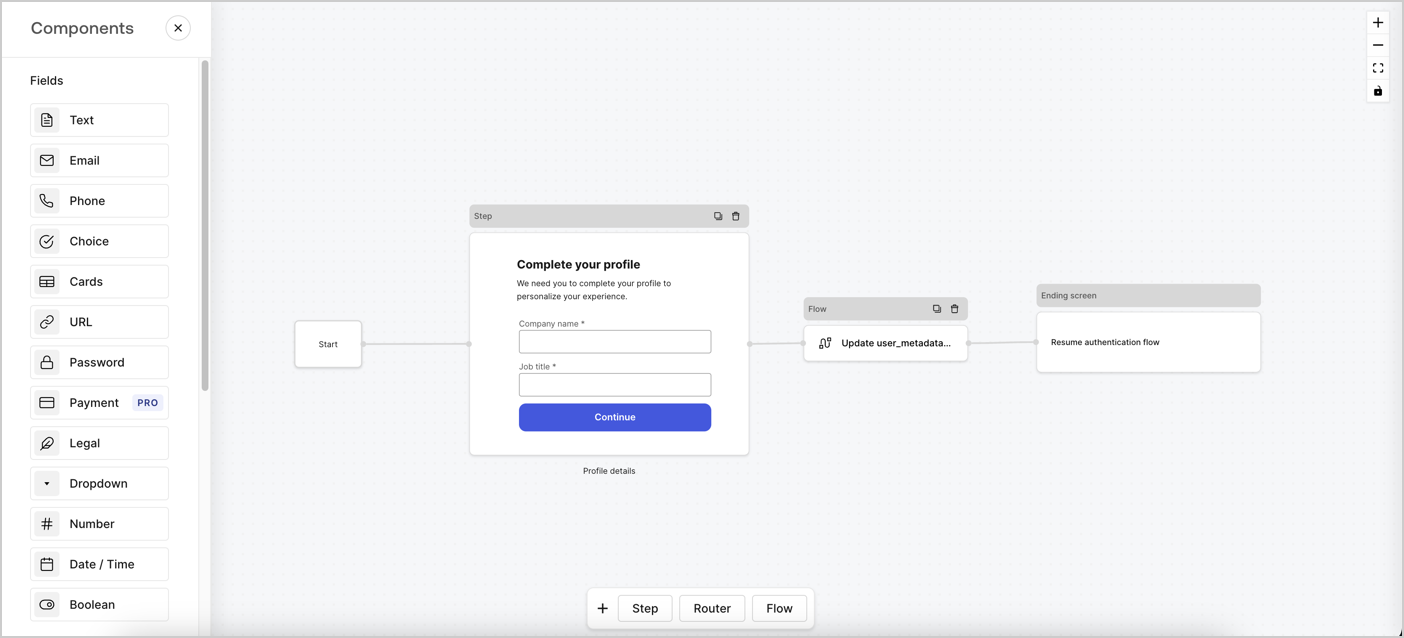
Les formulaires pour les actions vous permettent de créer des flux de profilage progressif pour décider quand inviter les utilisateurs à fournir des informations manquantes, telles que le nom de l’entreprise et le poste, et de les stocker en tant qu’attributs `user_metadata`.
<Frame>
  <img src="https://mintcdn.com/generaltranslationinc/_yZhqP1ULj_YXQKh/docs/images/fr-ca/cdy7uua7fh8z/xUx9YmnHvnAqL19JvNtNP/60dae88f893d4ebe8e3523421e960596/Progressive-profle-overview.png?fit=max&auto=format&n=_yZhqP1ULj_YXQKh&q=85&s=10c5cb517f0dca6f9d32f8a686d72c01" alt="Dashboard > Actions > Forms > Form" data-og-width="1404" width="1404" data-og-height="638" height="638" data-path="docs/images/fr-ca/cdy7uua7fh8z/xUx9YmnHvnAqL19JvNtNP/60dae88f893d4ebe8e3523421e960596/Progressive-profle-overview.png" data-optimize="true" data-opv="3" srcset="https://mintcdn.com/generaltranslationinc/_yZhqP1ULj_YXQKh/docs/images/fr-ca/cdy7uua7fh8z/xUx9YmnHvnAqL19JvNtNP/60dae88f893d4ebe8e3523421e960596/Progressive-profle-overview.png?w=280&fit=max&auto=format&n=_yZhqP1ULj_YXQKh&q=85&s=7ec9fce4d5b38e794a100041548ae407 280w, https://mintcdn.com/generaltranslationinc/_yZhqP1ULj_YXQKh/docs/images/fr-ca/cdy7uua7fh8z/xUx9YmnHvnAqL19JvNtNP/60dae88f893d4ebe8e3523421e960596/Progressive-profle-overview.png?w=560&fit=max&auto=format&n=_yZhqP1ULj_YXQKh&q=85&s=141423ed1e61bf81334324a2e831a301 560w, https://mintcdn.com/generaltranslationinc/_yZhqP1ULj_YXQKh/docs/images/fr-ca/cdy7uua7fh8z/xUx9YmnHvnAqL19JvNtNP/60dae88f893d4ebe8e3523421e960596/Progressive-profle-overview.png?w=840&fit=max&auto=format&n=_yZhqP1ULj_YXQKh&q=85&s=2e65409b69264a5a3a871e99dff93e65 840w, https://mintcdn.com/generaltranslationinc/_yZhqP1ULj_YXQKh/docs/images/fr-ca/cdy7uua7fh8z/xUx9YmnHvnAqL19JvNtNP/60dae88f893d4ebe8e3523421e960596/Progressive-profle-overview.png?w=1100&fit=max&auto=format&n=_yZhqP1ULj_YXQKh&q=85&s=54a7bc0081d9ba8d5eb2c261780003a0 1100w, https://mintcdn.com/generaltranslationinc/_yZhqP1ULj_YXQKh/docs/images/fr-ca/cdy7uua7fh8z/xUx9YmnHvnAqL19JvNtNP/60dae88f893d4ebe8e3523421e960596/Progressive-profle-overview.png?w=1650&fit=max&auto=format&n=_yZhqP1ULj_YXQKh&q=85&s=311409a3ca895d46fae16e50fd136676 1650w, https://mintcdn.com/generaltranslationinc/_yZhqP1ULj_YXQKh/docs/images/fr-ca/cdy7uua7fh8z/xUx9YmnHvnAqL19JvNtNP/60dae88f893d4ebe8e3523421e960596/Progressive-profle-overview.png?w=2500&fit=max&auto=format&n=_yZhqP1ULj_YXQKh&q=85&s=c042c18adf93f9495719ac373a6ad176 2500w" />
</Frame>

Les sections ci-dessous décrivent comment créer un Formulaire de profil progressif en utilisant des nœuds et des flux, ainsi que les étapes pour ajouter votre formulaire à une action [post-connexion](/docs/fr-CA/fr-ca/customize/actions/explore-triggers/signup-and-login-triggers/login-trigger).

<div id="create-a-form-from-scratch">
  ## Créer un formulaire à partir de zéro
</div>

Suivez ces étapes pour créer un formulaire afin de recueillir des informations :

1. Ouvrez l’éditeur de formulaires en sélectionnant **Auth0 Dashboard (tableau de bord Auth0) > Actions > Forms (formulaires).**
2. Sélectionnez **Créer un formulaire** > **Commencer à partir de zéro**.

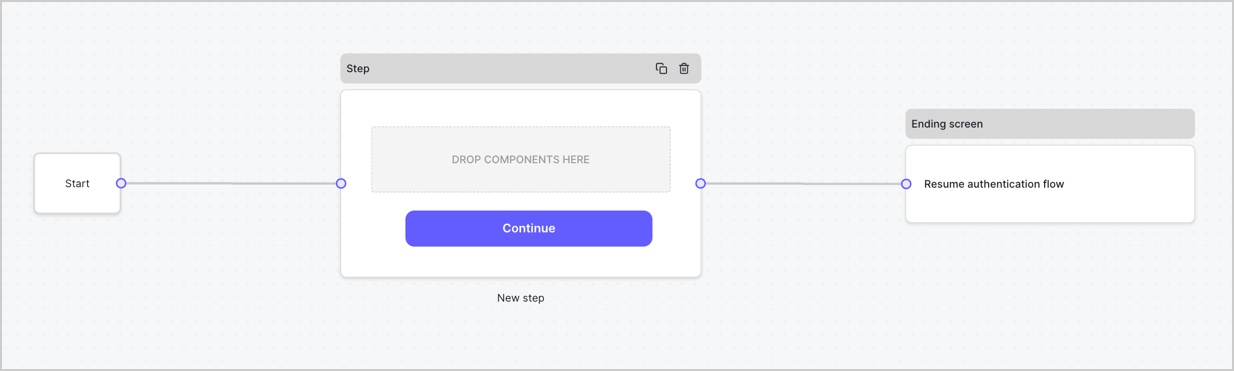
Par défaut, un nouveau formulaire contient un nœud Début, un nœud Étape et un nœud Éran fin.
<Frame>
  <img src="https://mintcdn.com/generaltranslationinc/I3Fs4t2ino3YdzfZ/docs/images/fr-ca/cdy7uua7fh8z/2TZ9jSjgEcARFpULI6hz4R/a4319a1bd482f2ee5cc23100fdb2f42c/New-form-Forms-for-action-use-case.png?fit=max&auto=format&n=I3Fs4t2ino3YdzfZ&q=85&s=aad421b6b99f929915f5c5410aa52c8b" alt="Dashboard > Forms > Use Cases > Form" data-og-width="1234" width="1234" data-og-height="371" height="371" data-path="docs/images/fr-ca/cdy7uua7fh8z/2TZ9jSjgEcARFpULI6hz4R/a4319a1bd482f2ee5cc23100fdb2f42c/New-form-Forms-for-action-use-case.png" data-optimize="true" data-opv="3" srcset="https://mintcdn.com/generaltranslationinc/I3Fs4t2ino3YdzfZ/docs/images/fr-ca/cdy7uua7fh8z/2TZ9jSjgEcARFpULI6hz4R/a4319a1bd482f2ee5cc23100fdb2f42c/New-form-Forms-for-action-use-case.png?w=280&fit=max&auto=format&n=I3Fs4t2ino3YdzfZ&q=85&s=b8d31ba5ed9a64f5657ee6ba62e8fe19 280w, https://mintcdn.com/generaltranslationinc/I3Fs4t2ino3YdzfZ/docs/images/fr-ca/cdy7uua7fh8z/2TZ9jSjgEcARFpULI6hz4R/a4319a1bd482f2ee5cc23100fdb2f42c/New-form-Forms-for-action-use-case.png?w=560&fit=max&auto=format&n=I3Fs4t2ino3YdzfZ&q=85&s=77d18a5847a6f6748a181683d732a40f 560w, https://mintcdn.com/generaltranslationinc/I3Fs4t2ino3YdzfZ/docs/images/fr-ca/cdy7uua7fh8z/2TZ9jSjgEcARFpULI6hz4R/a4319a1bd482f2ee5cc23100fdb2f42c/New-form-Forms-for-action-use-case.png?w=840&fit=max&auto=format&n=I3Fs4t2ino3YdzfZ&q=85&s=c2b14ab52d5c20e28db14f1ae8d5a89e 840w, https://mintcdn.com/generaltranslationinc/I3Fs4t2ino3YdzfZ/docs/images/fr-ca/cdy7uua7fh8z/2TZ9jSjgEcARFpULI6hz4R/a4319a1bd482f2ee5cc23100fdb2f42c/New-form-Forms-for-action-use-case.png?w=1100&fit=max&auto=format&n=I3Fs4t2ino3YdzfZ&q=85&s=6197cdf2a496b0815ca8a5a869cd6ad1 1100w, https://mintcdn.com/generaltranslationinc/I3Fs4t2ino3YdzfZ/docs/images/fr-ca/cdy7uua7fh8z/2TZ9jSjgEcARFpULI6hz4R/a4319a1bd482f2ee5cc23100fdb2f42c/New-form-Forms-for-action-use-case.png?w=1650&fit=max&auto=format&n=I3Fs4t2ino3YdzfZ&q=85&s=8455bcf17131e5034dd2b043349260b7 1650w, https://mintcdn.com/generaltranslationinc/I3Fs4t2ino3YdzfZ/docs/images/fr-ca/cdy7uua7fh8z/2TZ9jSjgEcARFpULI6hz4R/a4319a1bd482f2ee5cc23100fdb2f42c/New-form-Forms-for-action-use-case.png?w=2500&fit=max&auto=format&n=I3Fs4t2ino3YdzfZ&q=85&s=8703d7fe7453c32f3cf8504df530c883 2500w" />
</Frame>

<div id="configure-the-step-node">
  ### Configurer le nœud d’étape
</div>

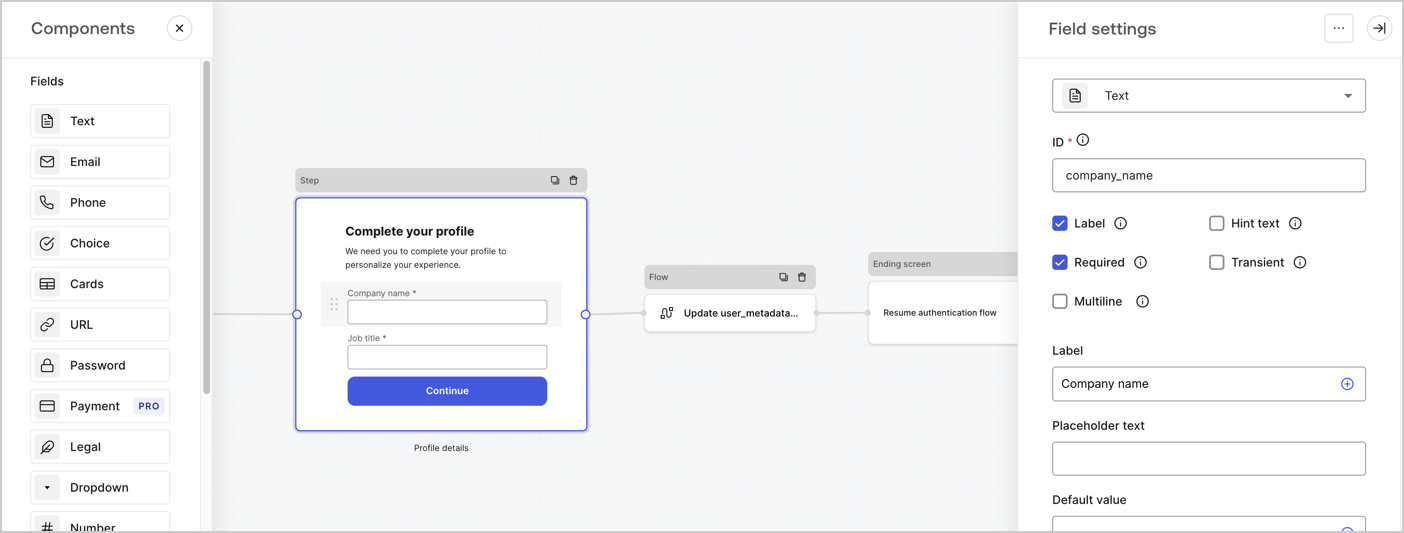
Le nœud d’étape est l’interface graphique présentée aux utilisateurs. Ajoutez des [Champs](/docs/fr-CA/fr-ca/customize/forms/nodes-and-components) au nœud d’étape pour obtenir le nom de l’entreprise de l’utilisateur et les valeurs d’intitulé de son poste en procédant comme suit :

1. Faites glisser un champ **Rich text (Texte enrichi)** depuis le **Components menu (Menu composants)** dans le nœud **d’étape**.

   * **Rich text (Texte enrichi)** : saisissez un message personnalisé.

     * **Exemple** : `Complétez votre profil! Nous avons besoin que vous complétiez votre profil pour personnaliser votre expérience.`
   * Sélectionnez **Save (Enregistrer)**.
2. Faites glisser un champ **Text (Texte)** dans le nœud **Step (Étape)**.

   * **ID** : Saisissez `company_name`.
   * **Label (Étiquette)** : activez la case à cocher.
   * **Label (Étiquette)** : Saisissez `Company name`.
   * **Required (Requis)** : activez la case à cocher.
   * Sélectionnez **Save (Enregistrer)**.
3. Faites glisser un champ **Text (Texte)** dans le nœud **Step (Étape)**.

   1. **ID** : saisissez `job_title`.
   2. **Label (Étiquette)** : Saisissez `Job title`.
   3. **Label (Étiquette)** : activez la case à cocher.
   4. **Required (Requis)** : activez la case à cocher.
   5. Sélectionnez **Save (Enregistrer)**.
4. Sélectionnez **Publish (Publier)** pour enregistrer.
<Frame>
  <img src="https://mintcdn.com/generaltranslationinc/xKtz0qd7GsCqdbWa/docs/images/fr-ca/cdy7uua7fh8z/6H1lRzwKyYioQyQJ9MtIoM/aa248e92fc028a68a5b92ff361a11644/progressive-profile-step.png?fit=max&auto=format&n=xKtz0qd7GsCqdbWa&q=85&s=b7a07819845798d09ec0313129a48d70" alt="Dashboard > Actions > Forms > Form > Step node" data-og-width="1404" width="1404" data-og-height="533" height="533" data-path="docs/images/fr-ca/cdy7uua7fh8z/6H1lRzwKyYioQyQJ9MtIoM/aa248e92fc028a68a5b92ff361a11644/progressive-profile-step.png" data-optimize="true" data-opv="3" srcset="https://mintcdn.com/generaltranslationinc/xKtz0qd7GsCqdbWa/docs/images/fr-ca/cdy7uua7fh8z/6H1lRzwKyYioQyQJ9MtIoM/aa248e92fc028a68a5b92ff361a11644/progressive-profile-step.png?w=280&fit=max&auto=format&n=xKtz0qd7GsCqdbWa&q=85&s=2a9e75656247260874abf22aad150762 280w, https://mintcdn.com/generaltranslationinc/xKtz0qd7GsCqdbWa/docs/images/fr-ca/cdy7uua7fh8z/6H1lRzwKyYioQyQJ9MtIoM/aa248e92fc028a68a5b92ff361a11644/progressive-profile-step.png?w=560&fit=max&auto=format&n=xKtz0qd7GsCqdbWa&q=85&s=6f7fa62c1919d44944f3183553d2c3e0 560w, https://mintcdn.com/generaltranslationinc/xKtz0qd7GsCqdbWa/docs/images/fr-ca/cdy7uua7fh8z/6H1lRzwKyYioQyQJ9MtIoM/aa248e92fc028a68a5b92ff361a11644/progressive-profile-step.png?w=840&fit=max&auto=format&n=xKtz0qd7GsCqdbWa&q=85&s=70dcebcd58509907f1255413c9a2a917 840w, https://mintcdn.com/generaltranslationinc/xKtz0qd7GsCqdbWa/docs/images/fr-ca/cdy7uua7fh8z/6H1lRzwKyYioQyQJ9MtIoM/aa248e92fc028a68a5b92ff361a11644/progressive-profile-step.png?w=1100&fit=max&auto=format&n=xKtz0qd7GsCqdbWa&q=85&s=133e851f9591db47aa6f50336d64e15b 1100w, https://mintcdn.com/generaltranslationinc/xKtz0qd7GsCqdbWa/docs/images/fr-ca/cdy7uua7fh8z/6H1lRzwKyYioQyQJ9MtIoM/aa248e92fc028a68a5b92ff361a11644/progressive-profile-step.png?w=1650&fit=max&auto=format&n=xKtz0qd7GsCqdbWa&q=85&s=fa6efa100adc8d43fd797d83bf2593dc 1650w, https://mintcdn.com/generaltranslationinc/xKtz0qd7GsCqdbWa/docs/images/fr-ca/cdy7uua7fh8z/6H1lRzwKyYioQyQJ9MtIoM/aa248e92fc028a68a5b92ff361a11644/progressive-profile-step.png?w=2500&fit=max&auto=format&n=xKtz0qd7GsCqdbWa&q=85&s=9c56edc29a22341786a47f888fca027b 2500w" />
</Frame>

<div id="configure-the-flow-node">
  ### Configurer le nœud Flow (Flux)
</div>

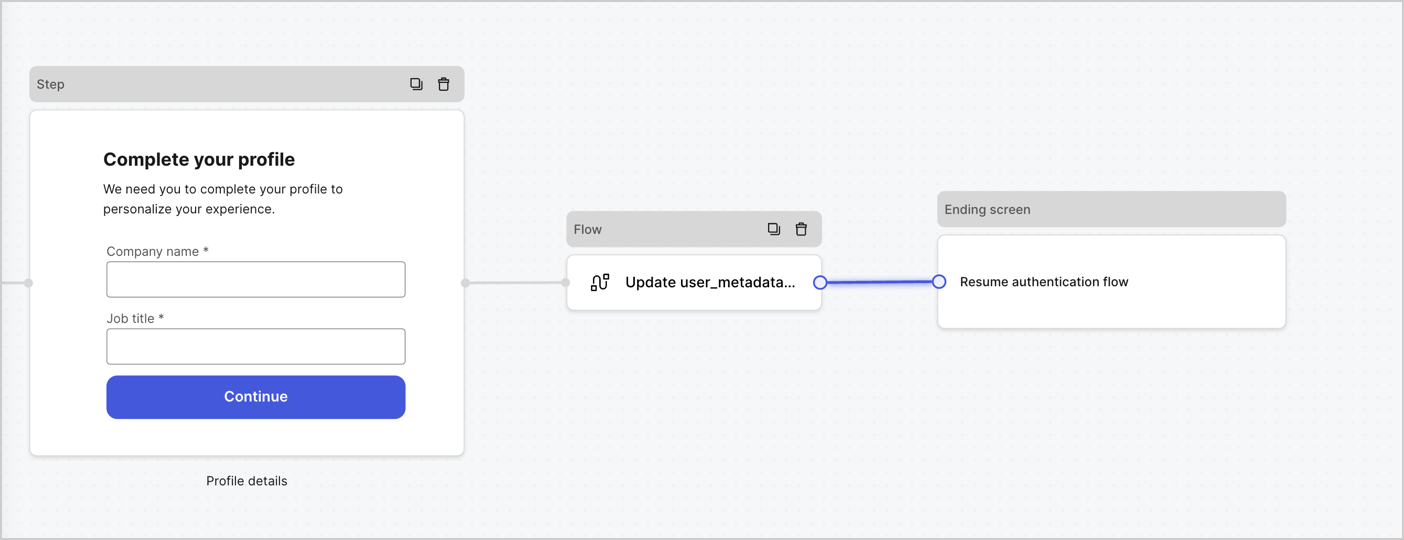
Ajoutez un nœud **Flow (Flux)** après le nœud **Step (Étape)** pour mettre à jour les `user_metadata` et reprenez le flux d’authentification en procédant comme suit :

1. Sélectionnez **Flow (Flux)** en bas de Form Editor (Éditeur de formulaire).
2. Supprimez le lien existant entre les nœuds **Step (Étape)** et **Ending Screen (Écran de fin)**.
3. Sélectionnez le nouveau **Flow (Flux)** > **Click to add a flow (Cliquer pour ajouter un flux)** > **Create a new flow (Créer un nouveau flux).**

   * Saisissez `Update user_metadata (Mettre à jour user_metadata)` dans le champ **Name (Nom)**.
   * Sélectionnez **Create (Créer)**.
   * Sélectionnez **Save (Enregistrer)**.
4. Liez le nœud **Flow (Flux)** aux nœuds **Step (Étape)** et **Ending Screen (Écran de fin)** comme illustré ci-dessous.
5. Sélectionnez **Publish (Publier)** pour enregistrer.
<Frame>
  <img src="https://mintcdn.com/generaltranslationinc/op3qeo8SlxWCJLLV/docs/images/fr-ca/cdy7uua7fh8z/5C91DaWn4LGtJT9BF87ssu/095171d0c452a287c44bfde12fd6d13f/link-nodes.png?fit=max&auto=format&n=op3qeo8SlxWCJLLV&q=85&s=977d7aad69eaf6511f87b24f61d112f1" alt="Dashboard > Actions > Forms > Form" data-og-width="1404" width="1404" data-og-height="540" height="540" data-path="docs/images/fr-ca/cdy7uua7fh8z/5C91DaWn4LGtJT9BF87ssu/095171d0c452a287c44bfde12fd6d13f/link-nodes.png" data-optimize="true" data-opv="3" srcset="https://mintcdn.com/generaltranslationinc/op3qeo8SlxWCJLLV/docs/images/fr-ca/cdy7uua7fh8z/5C91DaWn4LGtJT9BF87ssu/095171d0c452a287c44bfde12fd6d13f/link-nodes.png?w=280&fit=max&auto=format&n=op3qeo8SlxWCJLLV&q=85&s=3de1a9b6d12f8332c1719f095e59f9f8 280w, https://mintcdn.com/generaltranslationinc/op3qeo8SlxWCJLLV/docs/images/fr-ca/cdy7uua7fh8z/5C91DaWn4LGtJT9BF87ssu/095171d0c452a287c44bfde12fd6d13f/link-nodes.png?w=560&fit=max&auto=format&n=op3qeo8SlxWCJLLV&q=85&s=e219eb97d0a47ec0ffe24488f6a18ef5 560w, https://mintcdn.com/generaltranslationinc/op3qeo8SlxWCJLLV/docs/images/fr-ca/cdy7uua7fh8z/5C91DaWn4LGtJT9BF87ssu/095171d0c452a287c44bfde12fd6d13f/link-nodes.png?w=840&fit=max&auto=format&n=op3qeo8SlxWCJLLV&q=85&s=c931db4ad59778d969b6865b1e798739 840w, https://mintcdn.com/generaltranslationinc/op3qeo8SlxWCJLLV/docs/images/fr-ca/cdy7uua7fh8z/5C91DaWn4LGtJT9BF87ssu/095171d0c452a287c44bfde12fd6d13f/link-nodes.png?w=1100&fit=max&auto=format&n=op3qeo8SlxWCJLLV&q=85&s=b44a3f445f81fb474e557cda531873ba 1100w, https://mintcdn.com/generaltranslationinc/op3qeo8SlxWCJLLV/docs/images/fr-ca/cdy7uua7fh8z/5C91DaWn4LGtJT9BF87ssu/095171d0c452a287c44bfde12fd6d13f/link-nodes.png?w=1650&fit=max&auto=format&n=op3qeo8SlxWCJLLV&q=85&s=0c1a257b3b6e801af92b3093b90cedc1 1650w, https://mintcdn.com/generaltranslationinc/op3qeo8SlxWCJLLV/docs/images/fr-ca/cdy7uua7fh8z/5C91DaWn4LGtJT9BF87ssu/095171d0c452a287c44bfde12fd6d13f/link-nodes.png?w=2500&fit=max&auto=format&n=op3qeo8SlxWCJLLV&q=85&s=19654cd4f72706c7df121e078a3d76ea 2500w" />
</Frame>

Ajoutez une action de mise à jour d’utilisateur Auth0 au flux en suivant ces étapes :

1. Sélectionnez le flux **Update user\_metadata** puis sélectionnez **Edit Flow (Modifier le flux)** pour ouvrir l’éditeur de flux dans un nouvel onglet.
2. Sous l’action **Start (Démarrage)** , sélectionnez l’icône **+** pour ajouter une action **Update user (Mise à jour de l’utilisateur)**. Remplissez les champs ci-dessous, puis sélectionnez **Save (Enregistrer)** pour continuer.

   * **Connection** : dans la liste déroulante, sélectionnez la connexion au coffre-fort de votre application de communication entre machines.

   * **User ID** (ID utilisateur) : Saisissez `{{context.user.user_id}}`.

   * **Body (Corps)** : Copiez et collez le code suivant pour mettre à jour user\_metadata avec les propriétés `job_title` et `company_name`.

     ```
     {
       "user_metadata": {
         "job_title": "{{fields.job_title}}",
         "company_name": "{{fields.company_name}}"
       }
     }
     ```

   * Sélectionnez **Save (Enregistrer)**.
3. Sélectionnez **Publish (Publier)** pour enregistrer.

<Frame>
  <img src="https://mintcdn.com/generaltranslationinc/xKtz0qd7GsCqdbWa/docs/images/fr-ca/cdy7uua7fh8z/65Jx4W5oIZJyyvA8z4HqIx/0661b1a8ca6361c54fc4fef07ba59f0b/update-user.png?fit=max&auto=format&n=xKtz0qd7GsCqdbWa&q=85&s=9c57ea3565be105c3509dd093734f907" alt="Dashboard > Actions > Forms > Flows" data-og-width="1404" width="1404" data-og-height="244" height="244" data-path="docs/images/fr-ca/cdy7uua7fh8z/65Jx4W5oIZJyyvA8z4HqIx/0661b1a8ca6361c54fc4fef07ba59f0b/update-user.png" data-optimize="true" data-opv="3" srcset="https://mintcdn.com/generaltranslationinc/xKtz0qd7GsCqdbWa/docs/images/fr-ca/cdy7uua7fh8z/65Jx4W5oIZJyyvA8z4HqIx/0661b1a8ca6361c54fc4fef07ba59f0b/update-user.png?w=280&fit=max&auto=format&n=xKtz0qd7GsCqdbWa&q=85&s=c3381ba3dae42709c2ae597bdb022aa5 280w, https://mintcdn.com/generaltranslationinc/xKtz0qd7GsCqdbWa/docs/images/fr-ca/cdy7uua7fh8z/65Jx4W5oIZJyyvA8z4HqIx/0661b1a8ca6361c54fc4fef07ba59f0b/update-user.png?w=560&fit=max&auto=format&n=xKtz0qd7GsCqdbWa&q=85&s=afbbeb7472412da661a918e78fccc2e2 560w, https://mintcdn.com/generaltranslationinc/xKtz0qd7GsCqdbWa/docs/images/fr-ca/cdy7uua7fh8z/65Jx4W5oIZJyyvA8z4HqIx/0661b1a8ca6361c54fc4fef07ba59f0b/update-user.png?w=840&fit=max&auto=format&n=xKtz0qd7GsCqdbWa&q=85&s=64c487afe5945c65306aacfa27337a92 840w, https://mintcdn.com/generaltranslationinc/xKtz0qd7GsCqdbWa/docs/images/fr-ca/cdy7uua7fh8z/65Jx4W5oIZJyyvA8z4HqIx/0661b1a8ca6361c54fc4fef07ba59f0b/update-user.png?w=1100&fit=max&auto=format&n=xKtz0qd7GsCqdbWa&q=85&s=c76196f7ead596472fed41c4f520fb35 1100w, https://mintcdn.com/generaltranslationinc/xKtz0qd7GsCqdbWa/docs/images/fr-ca/cdy7uua7fh8z/65Jx4W5oIZJyyvA8z4HqIx/0661b1a8ca6361c54fc4fef07ba59f0b/update-user.png?w=1650&fit=max&auto=format&n=xKtz0qd7GsCqdbWa&q=85&s=7b78a0de500aded13355a664a9cdde98 1650w, https://mintcdn.com/generaltranslationinc/xKtz0qd7GsCqdbWa/docs/images/fr-ca/cdy7uua7fh8z/65Jx4W5oIZJyyvA8z4HqIx/0661b1a8ca6361c54fc4fef07ba59f0b/update-user.png?w=2500&fit=max&auto=format&n=xKtz0qd7GsCqdbWa&q=85&s=8840d9b35d564316cc1f18e2bf89c80e 2500w" />
</Frame>

<div id="retrieve-the-form-render-code">
  ### Récupérer le code de rendu du formulaire
</div>

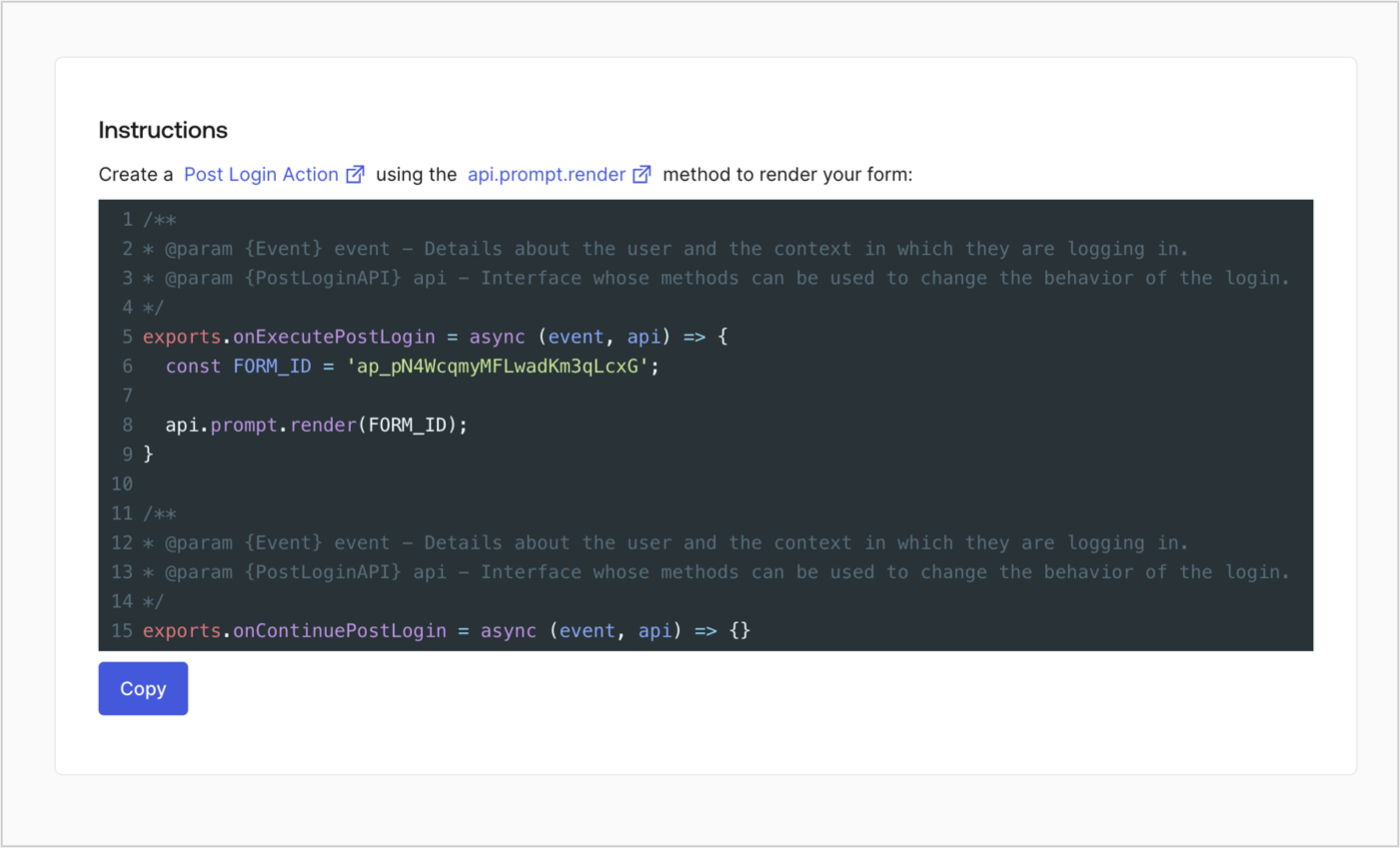
Récupérez le code de rendu du formulaire pour afficher visuellement le formulaire avec une Action post-connexion personnalisée en suivant ces étapes :

* Dans l’éditeur de formulaires, sélectionnez **\<> Render (Rendre)**.
* Sélectionnez **Copy (Copier)**.
<Frame>
  <img src="https://mintcdn.com/generaltranslationinc/I3Fs4t2ino3YdzfZ/docs/images/fr-ca/cdy7uua7fh8z/2EIUzc539sq9lwoTKbjoJv/496a864c0fc44a782c9cadca119dbfb0/embed.png?fit=max&auto=format&n=I3Fs4t2ino3YdzfZ&q=85&s=a2f2d20cce8bffbe7983b345ce78fa9e" alt="Dashboard > Actions > Forms > Form > Embed" data-og-width="1400" width="1400" data-og-height="848" height="848" data-path="docs/images/fr-ca/cdy7uua7fh8z/2EIUzc539sq9lwoTKbjoJv/496a864c0fc44a782c9cadca119dbfb0/embed.png" data-optimize="true" data-opv="3" srcset="https://mintcdn.com/generaltranslationinc/I3Fs4t2ino3YdzfZ/docs/images/fr-ca/cdy7uua7fh8z/2EIUzc539sq9lwoTKbjoJv/496a864c0fc44a782c9cadca119dbfb0/embed.png?w=280&fit=max&auto=format&n=I3Fs4t2ino3YdzfZ&q=85&s=2b3730c9b1df876977fe26389b310c78 280w, https://mintcdn.com/generaltranslationinc/I3Fs4t2ino3YdzfZ/docs/images/fr-ca/cdy7uua7fh8z/2EIUzc539sq9lwoTKbjoJv/496a864c0fc44a782c9cadca119dbfb0/embed.png?w=560&fit=max&auto=format&n=I3Fs4t2ino3YdzfZ&q=85&s=34bee3dc6ca48f15d3c51c1fa6dbae82 560w, https://mintcdn.com/generaltranslationinc/I3Fs4t2ino3YdzfZ/docs/images/fr-ca/cdy7uua7fh8z/2EIUzc539sq9lwoTKbjoJv/496a864c0fc44a782c9cadca119dbfb0/embed.png?w=840&fit=max&auto=format&n=I3Fs4t2ino3YdzfZ&q=85&s=66eaffae7b5fabe7515f4522adff61d6 840w, https://mintcdn.com/generaltranslationinc/I3Fs4t2ino3YdzfZ/docs/images/fr-ca/cdy7uua7fh8z/2EIUzc539sq9lwoTKbjoJv/496a864c0fc44a782c9cadca119dbfb0/embed.png?w=1100&fit=max&auto=format&n=I3Fs4t2ino3YdzfZ&q=85&s=1881e11ad5611b578921e212357efd15 1100w, https://mintcdn.com/generaltranslationinc/I3Fs4t2ino3YdzfZ/docs/images/fr-ca/cdy7uua7fh8z/2EIUzc539sq9lwoTKbjoJv/496a864c0fc44a782c9cadca119dbfb0/embed.png?w=1650&fit=max&auto=format&n=I3Fs4t2ino3YdzfZ&q=85&s=36715e1d3425120cdf328a44cad8368e 1650w, https://mintcdn.com/generaltranslationinc/I3Fs4t2ino3YdzfZ/docs/images/fr-ca/cdy7uua7fh8z/2EIUzc539sq9lwoTKbjoJv/496a864c0fc44a782c9cadca119dbfb0/embed.png?w=2500&fit=max&auto=format&n=I3Fs4t2ino3YdzfZ&q=85&s=3f477834fe8af631fd7ef61445d67f93 2500w" />
</Frame>

<div id="create-a-post-login-action">
  ## Créer une action post-connexion
</div>

Créez une action post-connexion pour afficher votre formulaire en suivant ces étapes :

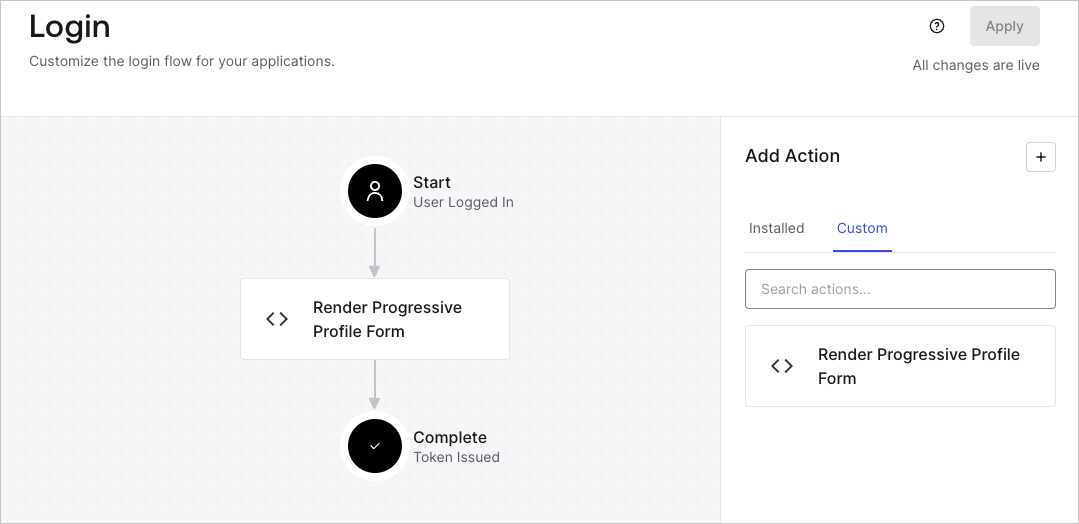
1. Rendez-vous à **Auth0 Dashboard > Actions > Flows (Flux) > Login (Connexion).**
2. Sélectionnez l’icône **+**, puis **Build from scratch (Créer de A à Z)** :

   * **Name (Nom)** : Saisissez `Render Progressive Profile Form (Rendre le formulaire de profil progressif)`.
   * **Trigger (Déclencheur)** : sélectionnez `Login / Post Login`.
   * **Runtime (Temps d’exécution)** : sélectionnez la version recommandée.
3. Sélectionnez **Create (Créer)**.

Pour configurer l’action post-connexion :

1. Supprimez le code existant dans l’éditeur de code.

2. Collez le code d’intégration du formulaire dans l’éditeur de code.

3. Modifiez le code pour définir la logique conditionnelle d’affichage du formulaire.

   ```javascript lines theme={null}
   /**
   * @param {Event} event - Details about the user and the context in which they are logging in.
   * @param {PostLoginAPI} api - Interface whose methods can be used to change the behavior of the login.
   */
   exports.onExecutePostLogin = async (event, api) => {
     const FORM_ID = 'REPLACE_WITH_YOUR_FORM_ID';

     if (
       event.stats.logins_count > 2 &&
       !event.user.user_metadata.company_name &&
       !event.user.user_metadata.job_title
     ) {
       api.prompt.render(FORM_ID);
     }
   }

   exports.onContinuePostLogin = async (event, api) => { }
   ```

   <Callout icon="file-lines" color="#0EA5E9" iconType="regular">
     L’exemple de code ci-dessus affiche le formulaire lorsqu’un utilisateur a un nombre de connexions supérieur à 2 et que les propriétés company\_name et job\_title des métadonnées de l’utilisateur sont manquantes.
   </Callout>

4. Sélectionnez **Deploy (Déployer)**.

5. Glissez et déposez l’Action **Render Progressive Profile Form (Rendre le formulaire de profil progressif)** dans le flux **Login (Connexion)**.
   <Frame>
     <img src="https://mintcdn.com/generaltranslationinc/BynIOvi9RMYsRJQw/docs/images/fr-ca/cdy7uua7fh8z/1QjjZdpTqTxx012UDN4xk9/99fba5ef4068a5688f1762eea7f42976/renderprogessiveprofile.png?fit=max&auto=format&n=BynIOvi9RMYsRJQw&q=85&s=06234fb2b671c8481e341ea5da810285" alt="Dashboard > Forms > Use Cases Progressive Profile Login Action" data-og-width="1079" width="1079" data-og-height="524" height="524" data-path="docs/images/fr-ca/cdy7uua7fh8z/1QjjZdpTqTxx012UDN4xk9/99fba5ef4068a5688f1762eea7f42976/renderprogessiveprofile.png" data-optimize="true" data-opv="3" srcset="https://mintcdn.com/generaltranslationinc/BynIOvi9RMYsRJQw/docs/images/fr-ca/cdy7uua7fh8z/1QjjZdpTqTxx012UDN4xk9/99fba5ef4068a5688f1762eea7f42976/renderprogessiveprofile.png?w=280&fit=max&auto=format&n=BynIOvi9RMYsRJQw&q=85&s=290455a136042df72bc878dac2cc2edf 280w, https://mintcdn.com/generaltranslationinc/BynIOvi9RMYsRJQw/docs/images/fr-ca/cdy7uua7fh8z/1QjjZdpTqTxx012UDN4xk9/99fba5ef4068a5688f1762eea7f42976/renderprogessiveprofile.png?w=560&fit=max&auto=format&n=BynIOvi9RMYsRJQw&q=85&s=40f5a18ec46dcbde596e7d5f9bfbac72 560w, https://mintcdn.com/generaltranslationinc/BynIOvi9RMYsRJQw/docs/images/fr-ca/cdy7uua7fh8z/1QjjZdpTqTxx012UDN4xk9/99fba5ef4068a5688f1762eea7f42976/renderprogessiveprofile.png?w=840&fit=max&auto=format&n=BynIOvi9RMYsRJQw&q=85&s=fc28be230d752dce67cfc2f53e5cb246 840w, https://mintcdn.com/generaltranslationinc/BynIOvi9RMYsRJQw/docs/images/fr-ca/cdy7uua7fh8z/1QjjZdpTqTxx012UDN4xk9/99fba5ef4068a5688f1762eea7f42976/renderprogessiveprofile.png?w=1100&fit=max&auto=format&n=BynIOvi9RMYsRJQw&q=85&s=a4247c4061e86a4a7ab485a44fae0c11 1100w, https://mintcdn.com/generaltranslationinc/BynIOvi9RMYsRJQw/docs/images/fr-ca/cdy7uua7fh8z/1QjjZdpTqTxx012UDN4xk9/99fba5ef4068a5688f1762eea7f42976/renderprogessiveprofile.png?w=1650&fit=max&auto=format&n=BynIOvi9RMYsRJQw&q=85&s=48dbc4c78af7ecd3b18f626e608cbea2 1650w, https://mintcdn.com/generaltranslationinc/BynIOvi9RMYsRJQw/docs/images/fr-ca/cdy7uua7fh8z/1QjjZdpTqTxx012UDN4xk9/99fba5ef4068a5688f1762eea7f42976/renderprogessiveprofile.png?w=2500&fit=max&auto=format&n=BynIOvi9RMYsRJQw&q=85&s=dbe651623b4eaad7725aee1d47dd308c 2500w" />
   </Frame>

6. Sélectionnez **Apply (Appliquer)**.

<div id="test-implementation">
  ### Tester la mise en œuvre
</div>

Testez la mise en œuvre en procédant comme suit :

1. Se connecter avec un utilisateur existant dont le nombre de connexions est supérieur à 2 et dont les attributs `user_metadata` `company_name` et `job_title` n’ont pas de valeurs.
2. L’action post-connexion dans le flux de connexion affichera le formulaire et demandera des informations.
3. Sélectionnez **Auth0 Dashboard > User Management (Gestion des utilisateurs) > Users (Utilisateurs),** localisez l’utilisateur et vérifiez que les attributs `user_metadata` `company_name` et `job_title` contiennent des informations.
