> ## Documentation Index
> Fetch the complete documentation index at: https://auth0.generaltranslation.app/llms.txt
> Use this file to discover all available pages before exploring further.

# Nœuds et composants

> Découvrez les nœuds de formulaire et les composants proposés.

Les formulaires vous permettent d’ajouter des nœuds et composants, tels que des champs, des blocs et des gadgets logiciels, pour que vos utilisateurs interagissent avec le formulaire. Vous pouvez ensuite faire référence aux données saisies dans les composants de vos formulaires et flux.

<div id="form-nodes">
  ## Nœuds de formulaire
</div>

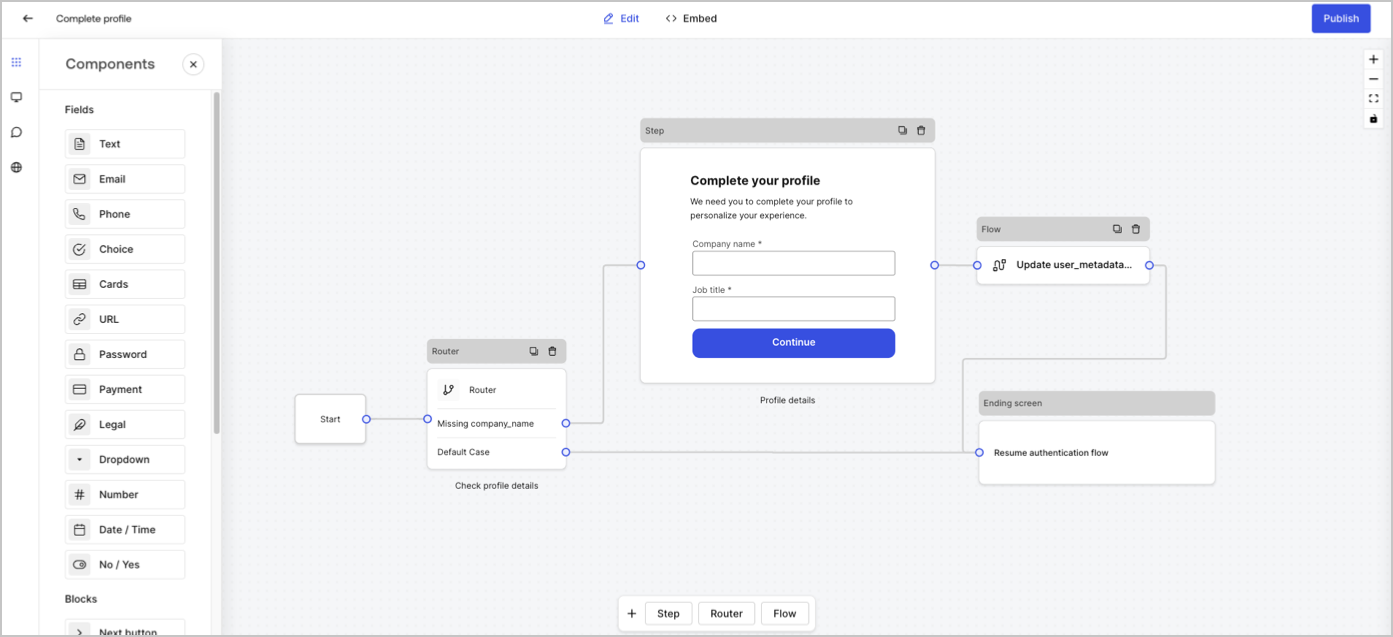
Il existe cinq types de nœuds de formulaire : Départ, Étape, Flux, Routeur et Écran de fin. Ces nœuds ont un objectif très précis pour la structure du formulaire.
<Frame>
  <img src="https://mintcdn.com/generaltranslationinc/2HoSdIVVjMeJSj5n/docs/images/fr-ca/cdy7uua7fh8z/5V4GsHxxC2cjxx1aODCxPd/309850c72bbce224e7a8d3f5af34114c/form-editor-preview.png?fit=max&auto=format&n=2HoSdIVVjMeJSj5n&q=85&s=4330209a30d59b25fb9c86fdf5ce5bec" alt="Dashboard >  Forms > Form Editor" data-og-width="1393" width="1393" data-og-height="637" height="637" data-path="docs/images/fr-ca/cdy7uua7fh8z/5V4GsHxxC2cjxx1aODCxPd/309850c72bbce224e7a8d3f5af34114c/form-editor-preview.png" data-optimize="true" data-opv="3" srcset="https://mintcdn.com/generaltranslationinc/2HoSdIVVjMeJSj5n/docs/images/fr-ca/cdy7uua7fh8z/5V4GsHxxC2cjxx1aODCxPd/309850c72bbce224e7a8d3f5af34114c/form-editor-preview.png?w=280&fit=max&auto=format&n=2HoSdIVVjMeJSj5n&q=85&s=24fa933d399b3e5810cb2e86a6361891 280w, https://mintcdn.com/generaltranslationinc/2HoSdIVVjMeJSj5n/docs/images/fr-ca/cdy7uua7fh8z/5V4GsHxxC2cjxx1aODCxPd/309850c72bbce224e7a8d3f5af34114c/form-editor-preview.png?w=560&fit=max&auto=format&n=2HoSdIVVjMeJSj5n&q=85&s=8490f8f81bd3ad8d90836cceaa84dabc 560w, https://mintcdn.com/generaltranslationinc/2HoSdIVVjMeJSj5n/docs/images/fr-ca/cdy7uua7fh8z/5V4GsHxxC2cjxx1aODCxPd/309850c72bbce224e7a8d3f5af34114c/form-editor-preview.png?w=840&fit=max&auto=format&n=2HoSdIVVjMeJSj5n&q=85&s=636c325fe075e3d22a1511a1a22d8ca4 840w, https://mintcdn.com/generaltranslationinc/2HoSdIVVjMeJSj5n/docs/images/fr-ca/cdy7uua7fh8z/5V4GsHxxC2cjxx1aODCxPd/309850c72bbce224e7a8d3f5af34114c/form-editor-preview.png?w=1100&fit=max&auto=format&n=2HoSdIVVjMeJSj5n&q=85&s=ed4c0f655422c6f974fc79cd036d54aa 1100w, https://mintcdn.com/generaltranslationinc/2HoSdIVVjMeJSj5n/docs/images/fr-ca/cdy7uua7fh8z/5V4GsHxxC2cjxx1aODCxPd/309850c72bbce224e7a8d3f5af34114c/form-editor-preview.png?w=1650&fit=max&auto=format&n=2HoSdIVVjMeJSj5n&q=85&s=174c186e667bda0bf88c3645a35f4197 1650w, https://mintcdn.com/generaltranslationinc/2HoSdIVVjMeJSj5n/docs/images/fr-ca/cdy7uua7fh8z/5V4GsHxxC2cjxx1aODCxPd/309850c72bbce224e7a8d3f5af34114c/form-editor-preview.png?w=2500&fit=max&auto=format&n=2HoSdIVVjMeJSj5n&q=85&s=994253cd357b16e8fb96f634bfb04fc7 2500w" />
</Frame>

<div id="step-node">
  ## Nœud d’étape
</div>

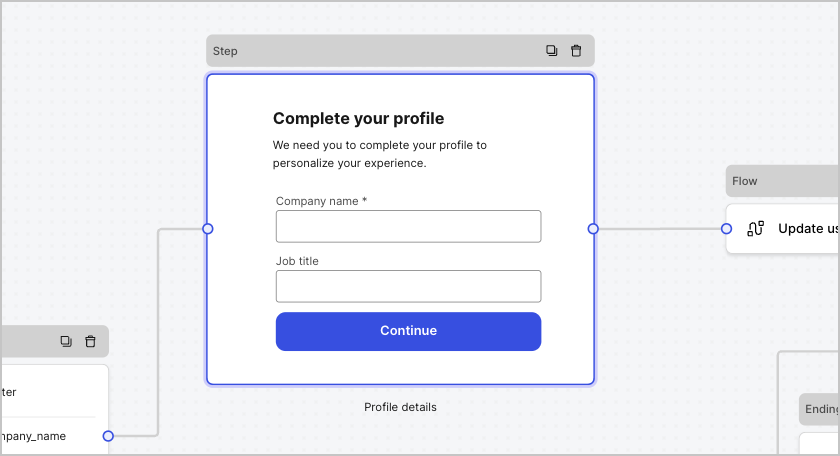
Les nœuds d’étape sont la représentation visuelle du formulaire. Ils peuvent contenir un nombre quelconque de composants, tels que des champs, des blocs et des gadgets logiciels, où l’utilisateur peut remplir ses données.
<Frame>
  <img src="https://mintcdn.com/generaltranslationinc/3aRX_yPVEOtgRzDg/docs/images/fr-ca/cdy7uua7fh8z/2tbkcXkVon0BawCvYgnvIz/e2ce566320af18a6b08702f04f763126/form-step-node.png?fit=max&auto=format&n=3aRX_yPVEOtgRzDg&q=85&s=b9c7540fcf786b57255478a0fea85d49" alt="Dashboard > Foms > Step node" data-og-width="840" width="840" data-og-height="456" height="456" data-path="docs/images/fr-ca/cdy7uua7fh8z/2tbkcXkVon0BawCvYgnvIz/e2ce566320af18a6b08702f04f763126/form-step-node.png" data-optimize="true" data-opv="3" srcset="https://mintcdn.com/generaltranslationinc/3aRX_yPVEOtgRzDg/docs/images/fr-ca/cdy7uua7fh8z/2tbkcXkVon0BawCvYgnvIz/e2ce566320af18a6b08702f04f763126/form-step-node.png?w=280&fit=max&auto=format&n=3aRX_yPVEOtgRzDg&q=85&s=d81415b01d3c6b75e046c36e870e37a2 280w, https://mintcdn.com/generaltranslationinc/3aRX_yPVEOtgRzDg/docs/images/fr-ca/cdy7uua7fh8z/2tbkcXkVon0BawCvYgnvIz/e2ce566320af18a6b08702f04f763126/form-step-node.png?w=560&fit=max&auto=format&n=3aRX_yPVEOtgRzDg&q=85&s=2174f89e3dc0485f5316ba8e35e2c03b 560w, https://mintcdn.com/generaltranslationinc/3aRX_yPVEOtgRzDg/docs/images/fr-ca/cdy7uua7fh8z/2tbkcXkVon0BawCvYgnvIz/e2ce566320af18a6b08702f04f763126/form-step-node.png?w=840&fit=max&auto=format&n=3aRX_yPVEOtgRzDg&q=85&s=47c4a69dad47d572655d3561da5b39c1 840w, https://mintcdn.com/generaltranslationinc/3aRX_yPVEOtgRzDg/docs/images/fr-ca/cdy7uua7fh8z/2tbkcXkVon0BawCvYgnvIz/e2ce566320af18a6b08702f04f763126/form-step-node.png?w=1100&fit=max&auto=format&n=3aRX_yPVEOtgRzDg&q=85&s=f297b3000be93eb43dd70c044af44b56 1100w, https://mintcdn.com/generaltranslationinc/3aRX_yPVEOtgRzDg/docs/images/fr-ca/cdy7uua7fh8z/2tbkcXkVon0BawCvYgnvIz/e2ce566320af18a6b08702f04f763126/form-step-node.png?w=1650&fit=max&auto=format&n=3aRX_yPVEOtgRzDg&q=85&s=df551d0fd8bd136c97d79161bf48546d 1650w, https://mintcdn.com/generaltranslationinc/3aRX_yPVEOtgRzDg/docs/images/fr-ca/cdy7uua7fh8z/2tbkcXkVon0BawCvYgnvIz/e2ce566320af18a6b08702f04f763126/form-step-node.png?w=2500&fit=max&auto=format&n=3aRX_yPVEOtgRzDg&q=85&s=366dc65a6aa8422aee6e428d8646c436 2500w" />
</Frame>

<div id="field-components">
  ### Composants de champ
</div>

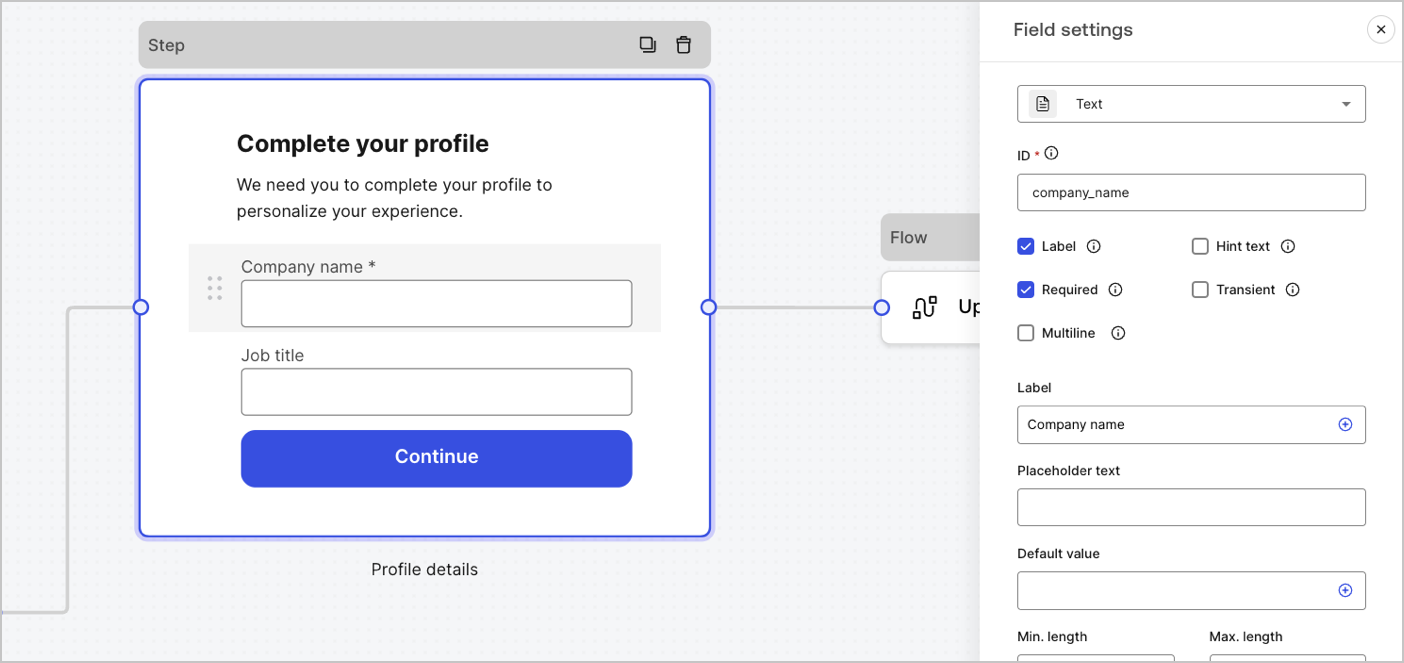
Les champs sont des composants d’interface utilisateur où les utilisateurs saisissent leurs informations dans les formulaires.
<Frame>
  <img src="https://mintcdn.com/generaltranslationinc/9lDbWecp3mLK18lk/docs/images/fr-ca/cdy7uua7fh8z/6fuBdJcbDybzcVaiByUkoQ/2ad29c8dbbcc6ddf850f5efc004a75e0/forms-fields.png?fit=max&auto=format&n=9lDbWecp3mLK18lk&q=85&s=5940de6c2d648d8264e19fcc2fe80548" alt="Dashboard > Forms > Fields" data-og-width="1404" width="1404" data-og-height="663" height="663" data-path="docs/images/fr-ca/cdy7uua7fh8z/6fuBdJcbDybzcVaiByUkoQ/2ad29c8dbbcc6ddf850f5efc004a75e0/forms-fields.png" data-optimize="true" data-opv="3" srcset="https://mintcdn.com/generaltranslationinc/9lDbWecp3mLK18lk/docs/images/fr-ca/cdy7uua7fh8z/6fuBdJcbDybzcVaiByUkoQ/2ad29c8dbbcc6ddf850f5efc004a75e0/forms-fields.png?w=280&fit=max&auto=format&n=9lDbWecp3mLK18lk&q=85&s=93f488f87723c23874ce38a9e14fb64b 280w, https://mintcdn.com/generaltranslationinc/9lDbWecp3mLK18lk/docs/images/fr-ca/cdy7uua7fh8z/6fuBdJcbDybzcVaiByUkoQ/2ad29c8dbbcc6ddf850f5efc004a75e0/forms-fields.png?w=560&fit=max&auto=format&n=9lDbWecp3mLK18lk&q=85&s=f38f4bdb7a80f9507c375f21eab702d4 560w, https://mintcdn.com/generaltranslationinc/9lDbWecp3mLK18lk/docs/images/fr-ca/cdy7uua7fh8z/6fuBdJcbDybzcVaiByUkoQ/2ad29c8dbbcc6ddf850f5efc004a75e0/forms-fields.png?w=840&fit=max&auto=format&n=9lDbWecp3mLK18lk&q=85&s=ea626e6925de911435be597026e5c4c0 840w, https://mintcdn.com/generaltranslationinc/9lDbWecp3mLK18lk/docs/images/fr-ca/cdy7uua7fh8z/6fuBdJcbDybzcVaiByUkoQ/2ad29c8dbbcc6ddf850f5efc004a75e0/forms-fields.png?w=1100&fit=max&auto=format&n=9lDbWecp3mLK18lk&q=85&s=c403d05894d09d0fd698f8da2910a4fa 1100w, https://mintcdn.com/generaltranslationinc/9lDbWecp3mLK18lk/docs/images/fr-ca/cdy7uua7fh8z/6fuBdJcbDybzcVaiByUkoQ/2ad29c8dbbcc6ddf850f5efc004a75e0/forms-fields.png?w=1650&fit=max&auto=format&n=9lDbWecp3mLK18lk&q=85&s=aea8c7787eacac16b7f11d3cd2a7094b 1650w, https://mintcdn.com/generaltranslationinc/9lDbWecp3mLK18lk/docs/images/fr-ca/cdy7uua7fh8z/6fuBdJcbDybzcVaiByUkoQ/2ad29c8dbbcc6ddf850f5efc004a75e0/forms-fields.png?w=2500&fit=max&auto=format&n=9lDbWecp3mLK18lk&q=85&s=2d8f0466bee97212fb559c7dfe2ec646 2500w" />
</Frame>

<div id="field-settings">
  #### Paramètres des champs
</div>

Les champs disposent d’un certain nombre de paramètres par défaut que vous pouvez configurer pour répondre à vos exigences.

Les paramètres par défaut des champs sont :

<table class="table">
  <thead>
    <tr>
      <th><strong>Paramètres</strong></th>
      <th><strong>Description</strong></th>
    </tr>
  </thead>

  <tbody>
    <tr>
      <td>ID</td>
      <td>L’ID unique</td>
    </tr>

    <tr>
      <td>Balise</td>
      <td>Afficher ou masquer une balise</td>
    </tr>

    <tr>
      <td>Requis</td>
      <td>La valeur d’entrée est requise</td>
    </tr>

    <tr>
      <td>Texte d’aide</td>
      <td>Afficher un texte d’aide</td>
    </tr>

    <tr>
      <td>Texte placeholder</td>
      <td>Texte visible par l’utilisateur</td>
    </tr>

    <tr>
      <td>Valeur par défaut</td>
      <td>Valeur par défaut visible par l’utilisateur</td>
    </tr>

    <tr>
      <td>Transitoire</td>
      <td>Activer ou désactiver le masque de données</td>
    </tr>
  </tbody>
</table>

<div id="field-validation-rules">
  #### Règles de validation des champs
</div>

<table class="table">
  <thead>
    <tr>
      <th><strong>Settings (Paramètres)</strong></th>
      <th><strong>Description</strong></th>
    </tr>
  </thead>

  <tbody>
    <tr>
      <td>Longueur min. / Longueur max.</td>
      <td>Exiger une valeur de longueur d’entrée.</td>
    </tr>

    <tr>
      <td>Valeur min. / Valeur max.</td>
      <td>Exiger une longueur de valeur numérique.</td>
    </tr>
  </tbody>
</table>

<div id="available-fields-in-forms">
  #### Champs proposés dans les formulaires
</div>

Les champs proposés avec leurs paramètres particuliers et types de sortie de données sont :

<Accordion title="Champ de texte">
  La saisie standard permet à l’utilisateur de saisir n’importe quelle valeur sous forme de chaîne de caractères.

  ##### Paramètres du champ de texte

  Le paramètre du champ de texte est :

  <table class="table">
    <thead>
      <tr>
        <th><strong>Paramètres</strong></th>
        <th><strong>Description</strong></th>
      </tr>
    </thead>

    <tbody>
      <tr>
        <td>Multiligne</td>
        <td>Activer le texte d’entrée multiligne.</td>
      </tr>
    </tbody>
  </table>

  ##### Valeur de sortie du champ de texte

  Le type de données de la valeur de sortie du champ de texte est une `chaîne de caractères`.

  ```json lines theme={null}
  {
    "text_field_id": "Auth0"
  }
  ```
</Accordion>

<Accordion title="Champ de courriel">
  Le champ de saisie standard permet à l’utilisateur de saisir des valeurs sous forme de chaîne de caractères pour le courriel.

  ##### Valeur de sortie du champ de courriel

  Le type de données de la valeur de sortie du champ de courriel est une `string`.

  ```json lines theme={null}
  {
    "email_field_id": "username@domain.com"
  }
  ```
</Accordion>

<Accordion title="Champ de téléphone">
  La saisie standard permet à l’utilisateur de saisir des valeurs de numéro de téléphone.

  ##### Paramètres du champ de téléphone

  Les paramètres du champ de téléphone sont :

  <table class="table">
    <thead>
      <tr>
        <th><strong>Paramètre</strong></th>
        <th><strong>Description</strong></th>
      </tr>
    </thead>

    <tbody>
      <tr>
        <td>Sélecteur de pays</td>
        <td>Active/désactive le sélecteur de pays. Par défaut, affiche l’emplacement IP de l’utilisateur.</td>
      </tr>

      <tr>
        <td>Texte du paramètre fictif du filtre</td>
        <td>Texte visible par l’utilisateur dans la fenêtre de recherche de pays.</td>
      </tr>
    </tbody>
  </table>

  ##### Valeur de sortie du champ de téléphone

  Le type de données de la valeur de sortie du champ de téléphone est une `string` ou, si le sélecteur de pays est activé, un `object`.

  La valeur du type de données de sortie du champ de téléphone en tant que `string` :

  ```json lines theme={null}
  {
    "phone_field_id": "8005550175"
  }
  ```

  La valeur du type de données de sortie du champ de téléphone en tant qu'`object` :

  ```json lines theme={null}
  {
    "phone_field_id": {
      "national_number": "8005550175",
      "national_format": "(800) 555-0175",
      "international_number": "+18005550175",
      "international_format": "+1 800-555-0175",
      "country_code_iso": "US",
      "country_code_number": "1"
    }
  }
  ```
</Accordion>

<Accordion title="Champ de choix">
  Champ de saisie standard permettant à l’utilisateur de sélectionner une ou plusieurs valeurs de choix.

  ##### Paramètres du champ de choix

  Les paramètres du champ de choix sont :

  <table class="table">
    <thead>
      <tr>
        <th><strong>Paramètres</strong></th>
        <th><strong>Description</strong></th>
      </tr>
    </thead>

    <tbody>
      <tr>
        <td>Choix multiples</td>
        <td>Activer les choix multiples.</td>
      </tr>

      <tr>
        <td>Autre option</td>
        <td>Laisser les utilisateurs saisir leur propre option.</td>
      </tr>

      <tr>
        <td>Avancé > Valeurs internes</td>
        <td>Attribuer une valeur interne à chaque option de choix.</td>
      </tr>

      <tr>
        <td>Avancé > > Modification en masse</td>
        <td>Modifier en masse les valeurs des balises et des options de choix internes.</td>
      </tr>
    </tbody>
  </table>

  ##### Valeur de sortie du champ de choix

  Le type de données de la valeur de sortie du champ de choix est soit une `string` soit, si le choix multiple est activé, un `array of strings`.

  La valeur du type de données de sortie du champ de choix est une`string` :

  ```json lines theme={null}
  {
    "choice_field_id": "Option A"
  }
  ```

  La valeur du type de données de sortie du champ de choix est un `array of strings`:

  ```json lines theme={null}
  {
    "choice_field_id": ["Option A", "Option B"]
  }
  ```
</Accordion>

<Accordion title="Champ de cartes">
  Saisie standard permettant à l’utilisateur de sélectionner une ou plusieurs valeurs de choix d’image.

  ##### Paramètres du champ de cartes

  Les paramètres du champ de cartes sont :

  <table class="table">
    <thead>
      <tr>
        <th><strong>Paramètres</strong></th>
        <th><strong>Description</strong></th>
      </tr>
    </thead>

    <tbody>
      <tr>
        <td>Choix multiple</td>
        <td>Activer plusieurs options de choix.</td>
      </tr>

      <tr>
        <td>Masquer les étiquettes</td>
        <td>Masquer les étiquettes des cartes.</td>
      </tr>

      <tr>
        <td>Avancé > Valeurs internes</td>
        <td>Attribuez une valeur interne à chaque option.</td>
      </tr>
    </tbody>
  </table>

  ##### Valeur de sortie du champ de cartes

  Le type de données de la valeur de sortie du champ de cartes est soit une `string` soit, si le choix multiple est activé, un  `array of strings`.

  La valeur du type de données de sortie du champ de cartes est une`string` :

  ```json lines theme={null}
  {
    "card_field_id": "Option A"
  }
  ```

  La valeur du type de données de sortie du champ de cartes est un `array of strings` :

  ```json lines theme={null}
  {
    "card_field_id": ["Option A", "Option B"]
  }
  ```
</Accordion>

<Accordion title="Champ d’URL">
  La saisie standard permet à l’utilisateur de saisir une valeur d’URL

  ##### Valeur de sortie du champ d’URL

  Le type de données de la valeur de sortie du champ d’URL est une chaîne de caractères :

  ```json lines theme={null}
  {
    "url_field_id": "https://auth0.com"
  }
  ```
</Accordion>

<Accordion title="Champ de mot de passe">
  La saisie standard permet à l’utilisateur de saisir un mot de passe ou une valeur secrète.

  ##### Paramètres du champ relatif au mot de passe :

  Les paramètres du champ de mot de passe sont :

  <table class="table">
    <thead>
      <tr>
        <th><strong>Paramètres</strong></th>
        <th><strong>Description</strong></th>
      </tr>
    </thead>

    <tbody>
      <tr>
        <td>Exige un mot de passe complexe</td>
        <td>Les mots de passe doivent contenir une majuscule, une minuscule, un symbole et un chiffre.</td>
      </tr>

      <tr>
        <td>Appliquer les directives du NIST</td>
        <td>Le mot de passe ne peut pas comporter moins de 8 caractères, mots de passe obtenus à partir de corpus de violations précédentes, mots du dictionnaire, caractères répétitifs ou séquentiels, mots spécifiques au contenu.</td>
      </tr>

      <tr>
        <td>Ajouter un indicateur de force</td>
        <td>Un indicateur graphique avec une échelle rouge, jaune et verte s’affiche sous le champ du mot de passe pour afficher la force du mot de passe saisi.</td>
      </tr>

      <tr>
        <td>Hachage</td>
        <td>Sélectionnez un algorithme pour hacher la valeur d’entrée directement dans le navigateur.</td>
      </tr>
    </tbody>
  </table>

  ##### Valeur de sortie du champ de mot de passe

  Le type de données de la valeur de sortie du champ de mot de passe est une`chaîne de caractères`masquée :

  ```json lines theme={null}
  {
    "password_field_id": "███"
  }
  ```
</Accordion>

<Accordion title="Champ de paiement">
  La saisie standard permet à un utilisateur de saisir des informations de paiement en utilisant un fournisseur de paiement. Les paiements sont traités avant le nœud de fin.

  ##### Paramètres des champs de paiement

  Les paramètres du champ de paiement sont :

  <table class="table">
    <thead>
      <tr>
        <th><strong>Paramètres</strong></th>
        <th><strong>Description</strong></th>
      </tr>
    </thead>

    <tbody>
      <tr>
        <td>Type de paiement</td>
        <td>Sélectionnez un paiement unique (frais) ou récurrent (abonnement).</td>
      </tr>

      <tr>
        <td>Montant</td>
        <td>Spécifiez le montant du paiement unique (frais).</td>
      </tr>

      <tr>
        <td>Devise</td>
        <td>Spécifiez la devise pour un paiement unique (frais).</td>
      </tr>

      <tr>
        <td>Action d’abonnement</td>
        <td>Choisissez de créer ou de mettre à jour un abonnement existant.</td>
      </tr>

      <tr>
        <td>Action client</td>
        <td>Sélectionnez cette action pour créer ou mettre à jour un client existant.</td>
      </tr>

      <tr>
        <td>Afficher et modifier le numéro de la carte, la date d’expiration, les étiquettes du code de sécurité et les marques de confiance.</td>

        <td />
      </tr>
    </tbody>
  </table>

  ##### Valeur de sortie du champ de paiement

  Le type de données de la valeur de sortie du champ de paiement est soit une chaîne de caractères, soit un objet pour les flux d’après soumission.

  Le type de données de la valeur de sortie du champ de paiement est une`string` :

  ```json lines theme={null}
  {
    "payment_field_id": "pm_1P19e..."
  }
  ```

  Le type de données de la valeur de sortie du champ de paiement pour les abonnements en tant qu'`object` :

  ```json lines theme={null}
  {
    "payment_field_id": {
      "payment_method_id": "pm_1P19e...",
      "customer_id": "cus_PqrM...",
      "price_ids": [
        "price_1ONHR..."
      ],
      "subscription_id": "sub_1P1A...",
      "payment_intent_id": "pi_3P19e5..."
    }
  }
  ```

  Le type de données de la valeur de sortie du champ de paiement pour la charge en tant qu'`object`  :

  ```json lines theme={null}
  {
    "payment_field_id": {
      "payment_method_id": "pm_1P19e...",
      "customer_id": "cus_PqrM...",
      "amount": 100,
      "payment_intent_id": "pi_3P19e5..."
    }
  }
  ```
</Accordion>

<Accordion title="Champ légal">
  Saisie standard qui ajoute un texte juridique et une entrée de vérification.

  ##### Valeur de sortie du champ légal

  Le type de donnée de la valeur de sortie du champ légal est un`boolean`.

  ```json lines theme={null}
  {
    "legal_field_id": true
  }
  ```
</Accordion>

<Accordion title="Champ de liste déroulante">
  Champ de saisie standard permettant à l’utilisateur de sélectionner une ou plusieurs options dans une liste déroulante.

  ##### Paramètres du champ de liste déroulante

  Les paramètres du champ de liste déroulante sont :

  <table class="table">
    <thead>
      <tr>
        <th><strong>Paramètres</strong></th>
        <th><strong>Description</strong></th>
      </tr>
    </thead>

    <tbody>
      <tr>
        <td>Sélecteur multiple</td>
        <td>Activer plusieurs options.</td>
      </tr>

      <tr>
        <td>Avancé > Valeurs internes</td>
        <td>Attribuer une valeur interne à chaque option.</td>
      </tr>

      <tr>
        <td>Avancé > Modification en masse</td>
        <td>Étiquette de modification en masse et valeurs internes.</td>
      </tr>
    </tbody>
  </table>

  ##### Valeur de sortie du champ de liste déroulante

  Le type de données de la valeur de sortie du champ de liste déroulante est soit une `string` soit, si le choix multiple est activé, un `array of strings`.

  La valeur du type de données de sortie du champ de liste déroulante en tant que `string`:

  ```json lines theme={null}
  {
    "dropdown_field_id": "Option A"
  }
  ```

  La valeur du type de données de sortie du champ de liste déroulante en tant que `array of strings` :

  ```json lines theme={null}
  {
    "dropdown_field_id": ["Option A", "Option B"]
  }
  ```
</Accordion>

<Accordion title="Champ numérique">
  .

  ##### Valeur de sortie du champ numérique

  Le type de données de la valeur de sortie du champ numérique est un `number`.

  ```json lines theme={null}
  {
    "number_field_id": 123
  }
  ```
</Accordion>

<Accordion title="Champ Date / Heure">
  Saisie standard qui permet à un utilisateur de saisir soit des valeurs de date ou d’heure.

  ##### Paramètres du champ Date / Heure

  Les paramètres du champ Date / Heure sont :

  <table class="table">
    <thead>
      <tr>
        <th><strong>Key (Clé)</strong></th>
        <th><strong>Description</strong></th>
      </tr>
    </thead>

    <tbody>
      <tr>
        <td>Format</td>
        <td>Sélectionnez le format Date ou Heure.</td>
      </tr>
    </tbody>
  </table>

  ##### Valeur de sortie du champ Date / Heure

  La valeur du type de données de sortie du champ Date / Heure est une `string` :

  ```json lines theme={null}
  {
    "date_time_field_id": "2023-04-11"
  }
  ```

  La valeur du type de données de sortie du champ Date / Heure est, en ce qui concerne l’heure, une `string`:

  ```json lines theme={null}
  {
    "date_time_field_id": "23:15"
  }
  ```
</Accordion>

<Accordion title="Champ booléen">
  Saisie standard qui permet à un utilisateur de saisir des valeurs vraies ou fausses.

  ##### Valeur de sortie du champ booléen

  Le type de donnée de la valeur de sortie du champ booléen est un nombre booléen.

  ```json lines theme={null}
  {
    "boolean_field_id": true
  }
  ```
</Accordion>

<Accordion title="Champ personnalisé">
  Champ standard que vous pouvez personnaliser pour créer votre propre champ.

  ##### Paramètres des champs personnalisés

  La configuration de champ personnalisé est :

  <table class="table">
    <thead>
      <tr>
        <th><strong>Paramètres</strong></th>
        <th><strong>Description</strong></th>
      </tr>
    </thead>

    <tbody>
      <tr>
        <td>Params</td>
        <td>Ajouter des paires clé-valeur pour référence dans le code source du champ personnalisé.</td>
      </tr>

      <tr>
        <td>Code source</td>
        <td>Ajouter du code JavaScript dans le champ personnalisé.</td>
      </tr>

      <tr>
        <td>Schéma JSON</td>
        <td>Par défaut, le champ personnalisé accepte tous les formats de valeurs. Toutefois, vous pouvez utiliser le schéma JSON pour valider les valeurs.</td>
      </tr>
    </tbody>
  </table>

  Pour en savoir plus, consultez [Composants de champ personnalisé pour les formulaires](/docs/fr-CA/fr-ca/customize/forms/custom-field-components).
</Accordion>

<div id="blocks-components">
  ### Composants de blocs
</div>

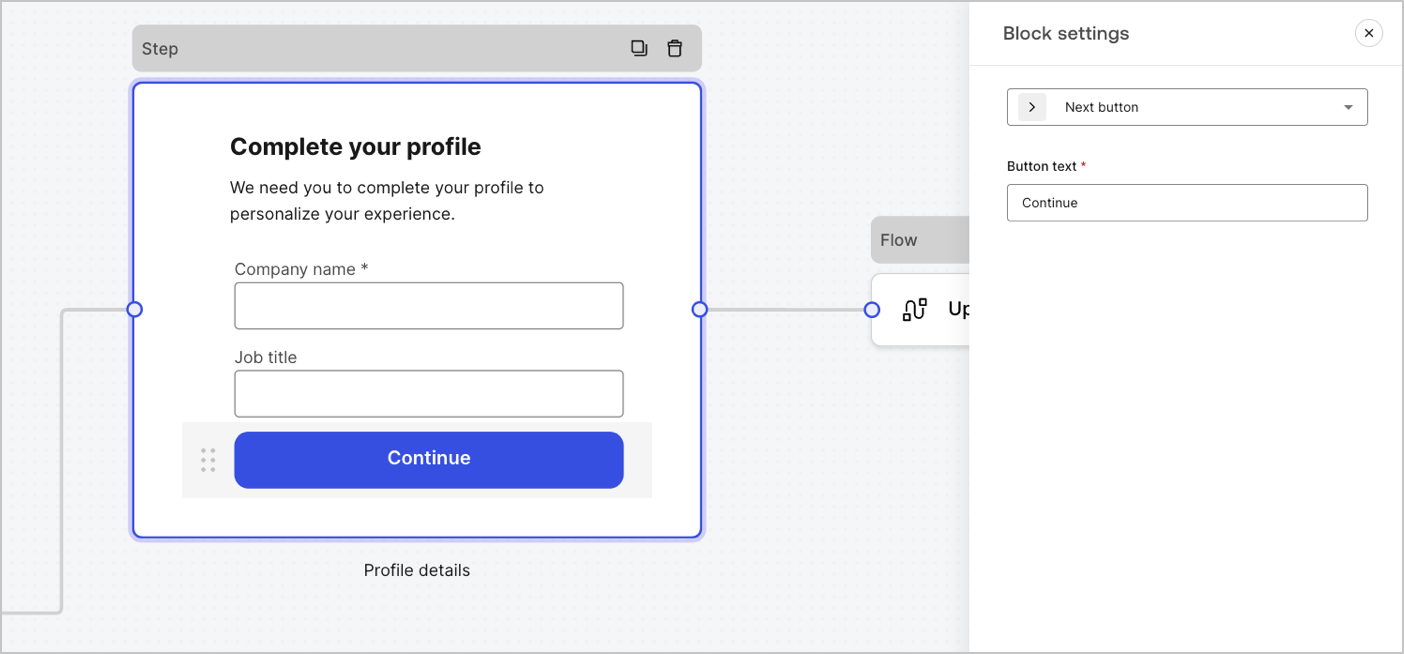
Les blocs sont des composants d’interface utilisateur qui ajoutent des fonctionnalités à vos formulaires sans recueillir d’informations de l'utilisateur.
<Frame>
  <img src="https://mintcdn.com/generaltranslationinc/iMSUsmCu8vn-vzpZ/docs/images/fr-ca/cdy7uua7fh8z/7IijftJnuwcevL4bdHiaKw/f0376ca75303bb58d0df87e6af75e347/forms-block.png?fit=max&auto=format&n=iMSUsmCu8vn-vzpZ&q=85&s=9489dd3dadff7c0099a30e024f709937" alt="Dashboard > Forms > Components > Blocks" data-og-width="1404" width="1404" data-og-height="654" height="654" data-path="docs/images/fr-ca/cdy7uua7fh8z/7IijftJnuwcevL4bdHiaKw/f0376ca75303bb58d0df87e6af75e347/forms-block.png" data-optimize="true" data-opv="3" srcset="https://mintcdn.com/generaltranslationinc/iMSUsmCu8vn-vzpZ/docs/images/fr-ca/cdy7uua7fh8z/7IijftJnuwcevL4bdHiaKw/f0376ca75303bb58d0df87e6af75e347/forms-block.png?w=280&fit=max&auto=format&n=iMSUsmCu8vn-vzpZ&q=85&s=68207d959f220f58dca68bf5f5471874 280w, https://mintcdn.com/generaltranslationinc/iMSUsmCu8vn-vzpZ/docs/images/fr-ca/cdy7uua7fh8z/7IijftJnuwcevL4bdHiaKw/f0376ca75303bb58d0df87e6af75e347/forms-block.png?w=560&fit=max&auto=format&n=iMSUsmCu8vn-vzpZ&q=85&s=1b57b7de107b4292192b9b40d34bb5e0 560w, https://mintcdn.com/generaltranslationinc/iMSUsmCu8vn-vzpZ/docs/images/fr-ca/cdy7uua7fh8z/7IijftJnuwcevL4bdHiaKw/f0376ca75303bb58d0df87e6af75e347/forms-block.png?w=840&fit=max&auto=format&n=iMSUsmCu8vn-vzpZ&q=85&s=9061000b4f5e948a7f043cd18c01cb7e 840w, https://mintcdn.com/generaltranslationinc/iMSUsmCu8vn-vzpZ/docs/images/fr-ca/cdy7uua7fh8z/7IijftJnuwcevL4bdHiaKw/f0376ca75303bb58d0df87e6af75e347/forms-block.png?w=1100&fit=max&auto=format&n=iMSUsmCu8vn-vzpZ&q=85&s=44b515c7f0500fe10a2ecd3a350e2951 1100w, https://mintcdn.com/generaltranslationinc/iMSUsmCu8vn-vzpZ/docs/images/fr-ca/cdy7uua7fh8z/7IijftJnuwcevL4bdHiaKw/f0376ca75303bb58d0df87e6af75e347/forms-block.png?w=1650&fit=max&auto=format&n=iMSUsmCu8vn-vzpZ&q=85&s=e25e4d4395ad6a412abb164c8b23a2a7 1650w, https://mintcdn.com/generaltranslationinc/iMSUsmCu8vn-vzpZ/docs/images/fr-ca/cdy7uua7fh8z/7IijftJnuwcevL4bdHiaKw/f0376ca75303bb58d0df87e6af75e347/forms-block.png?w=2500&fit=max&auto=format&n=iMSUsmCu8vn-vzpZ&q=85&s=4c47e206e7a625b7241d0eed28a16cf8 2500w" />
</Frame>

<div id="available-blocks-in-forms">
  #### Blocs proposés dans les formulaires
</div>

Les blocs proposés sont les suivant :

<Accordion title="Bloc de bouton suivant">
  Un bouton qui permet aux utilisateurs de continuer vers le nœud de formulaire suivant.

  <Callout icon="file-lines" color="#0EA5E9" iconType="regular">
    * Avant de poursuivre, les règles de validation des champs sont appliquées et validées côté client et côté serveur. Si les règles de validation des champs échouent, un message d’erreur s’affiche pour permettre à l’utilisateur de vérifier.
    * Si le nœud suivant est un nœud de flux, un chargeur spinner s’affiche jusqu’à ce que le flux soit terminé. Si le flux échoue ou renvoie un message d’erreur personnalisé, un message d’erreur s’affiche.
  </Callout>
</Accordion>

<Accordion title="Bloc de bouton précédent">
  Un bouton qui permet aux utilisateurs de revenir au nœud de l’étape précédente

  <Callout icon="file-lines" color="#0EA5E9" iconType="regular">
    Si un utilisateur sélectionne le bouton précédent, les règles de validation des champs sont réexécutées même si aucune modification n’est apportée aux données saisies avant de continuer.
  </Callout>
</Accordion>

<Accordion title="Bloc de bouton de saut">
  Un bouton qui permet aux utilisateurs de sauter l’étape actuelle et de passer directement au nœud de destination.

  <Callout icon="file-lines" color="#0EA5E9" iconType="regular">
    Si l’étape en cours est ignorée, aucune information n’est validée ni collectée pour cette étape.
  </Callout>
</Accordion>

<Accordion title="Resend button block">
  A component that lets users re-run a flow to generate and send a new OTP code

  <Callout icon="file-lines" color="#0EA5E9" iconType="regular">
    if a user selects the resend button, the associated flow will generate and send a new OTP code.
  </Callout>

  <table class="table">
    <thead>
      <tr>
        <th><strong>Settings</strong></th>
        <th><strong>Description</strong></th>
      </tr>
    </thead>

    <tbody>
      <tr>
        <td>Text alignment</td>
        <td>Select text alignment, left, center, or right</td>
      </tr>

      <tr>
        <td>Text</td>
        <td>Default text displayed when users select the resend button</td>
      </tr>

      <tr>
        <td>Button text</td>
        <td>Button text</td>
      </tr>

      <tr>
        <td>Waiting text</td>
        <td>Text displayed when users have selected the resend button. Replaces `Text` and the `Button text` settings.  Use the `“{{remaining_seconds}}”` variable to dynamically display the remaining number of seconds until the send button is enabled again.  For example: “Resend in `{{remaining_seconds}}` seconds”.</td>
      </tr>

      <tr>
        <td>Flow</td>
        <td>Flow executed after the user selects the resend button.</td>
      </tr>

      <tr>
        <td>Max attempts</td>
        <td>The maximum number of attempts the user can select the resend button</td>
      </tr>

      <tr>
        <td>Waiting time</td>
        <td>The waiting time between attempts in seconds.</td>
      </tr>
    </tbody>
  </table>
</Accordion>

<Accordion title="Bloc de texte enrichi">
  Un bloc de texte enrichi pour personnaliser le nœud d’étape avec des informations supplémentaires.
</Accordion>

<Accordion title="Bloc diviseur">
  Une ligne pour diviser les différentes sections du nœud d’étape. Elle peut contenir un petit texte.
</Accordion>

<Accordion title="Bloc HTML">
  Un bloc HTML pour créer votre interface utilisateur personnalisée.
</Accordion>

<Accordion title="Bloc d’image">
  Un bloc d’image pour personnaliser l’étape d’ajout d’images.
</Accordion>

<div id="widgets-components">
  ### Composants de gadgets logiciels
</div>

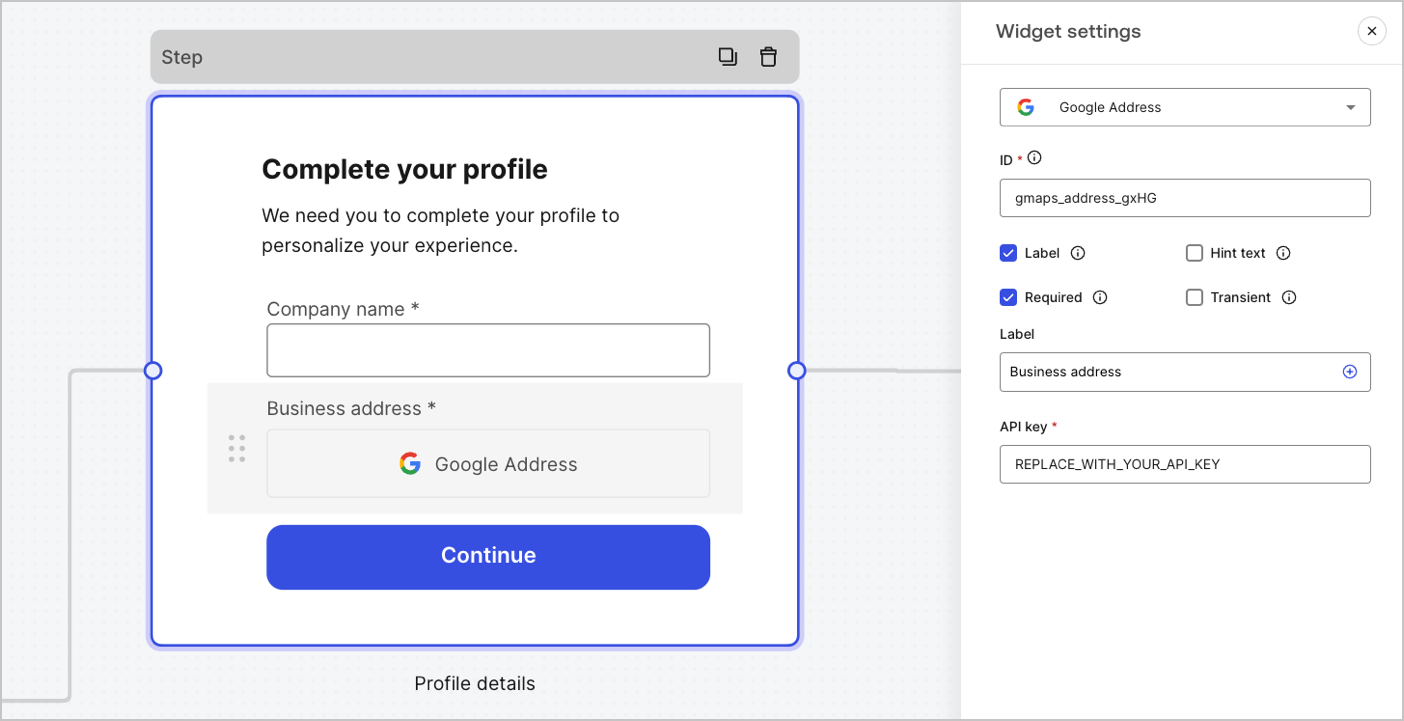
Les gadgets logiciels sont des composants préconçus, avec des intégrations tierces, qui ajoutent de la logique côté client et côté serveur à vos formulaires.
<Frame>
  <img src="https://mintcdn.com/generaltranslationinc/RnTJ5sT0kNq-58cb/docs/images/fr-ca/cdy7uua7fh8z/3J0IuWLP7utOPKSHc82IE9/a523afe0c240c63f714ef5fb102f8dab/forms-widget.png?fit=max&auto=format&n=RnTJ5sT0kNq-58cb&q=85&s=56e807e50f13cbc38182ba3b580ac188" alt="Dashboard > Forms > Components > Widget" data-og-width="1404" width="1404" data-og-height="721" height="721" data-path="docs/images/fr-ca/cdy7uua7fh8z/3J0IuWLP7utOPKSHc82IE9/a523afe0c240c63f714ef5fb102f8dab/forms-widget.png" data-optimize="true" data-opv="3" srcset="https://mintcdn.com/generaltranslationinc/RnTJ5sT0kNq-58cb/docs/images/fr-ca/cdy7uua7fh8z/3J0IuWLP7utOPKSHc82IE9/a523afe0c240c63f714ef5fb102f8dab/forms-widget.png?w=280&fit=max&auto=format&n=RnTJ5sT0kNq-58cb&q=85&s=86dcc4bc90b3d816bb3434cd4836114e 280w, https://mintcdn.com/generaltranslationinc/RnTJ5sT0kNq-58cb/docs/images/fr-ca/cdy7uua7fh8z/3J0IuWLP7utOPKSHc82IE9/a523afe0c240c63f714ef5fb102f8dab/forms-widget.png?w=560&fit=max&auto=format&n=RnTJ5sT0kNq-58cb&q=85&s=a8fba6f223de24f9125f64ad9e604e67 560w, https://mintcdn.com/generaltranslationinc/RnTJ5sT0kNq-58cb/docs/images/fr-ca/cdy7uua7fh8z/3J0IuWLP7utOPKSHc82IE9/a523afe0c240c63f714ef5fb102f8dab/forms-widget.png?w=840&fit=max&auto=format&n=RnTJ5sT0kNq-58cb&q=85&s=5252fbe2fe2e3ce939908b0992f7d166 840w, https://mintcdn.com/generaltranslationinc/RnTJ5sT0kNq-58cb/docs/images/fr-ca/cdy7uua7fh8z/3J0IuWLP7utOPKSHc82IE9/a523afe0c240c63f714ef5fb102f8dab/forms-widget.png?w=1100&fit=max&auto=format&n=RnTJ5sT0kNq-58cb&q=85&s=03f327f025e9dc1d18f61013d2d0d2ea 1100w, https://mintcdn.com/generaltranslationinc/RnTJ5sT0kNq-58cb/docs/images/fr-ca/cdy7uua7fh8z/3J0IuWLP7utOPKSHc82IE9/a523afe0c240c63f714ef5fb102f8dab/forms-widget.png?w=1650&fit=max&auto=format&n=RnTJ5sT0kNq-58cb&q=85&s=d7d0b8c4e3d062f69bc8e822e747b473 1650w, https://mintcdn.com/generaltranslationinc/RnTJ5sT0kNq-58cb/docs/images/fr-ca/cdy7uua7fh8z/3J0IuWLP7utOPKSHc82IE9/a523afe0c240c63f714ef5fb102f8dab/forms-widget.png?w=2500&fit=max&auto=format&n=RnTJ5sT0kNq-58cb&q=85&s=b5947aa65afa4b37d3304b38888c6a01 2500w" />
</Frame>

<div id="available-widgets-in-forms">
  #### Gadgets logiciels proposés dans les formulaires
</div>

Le gadget logiciel proposé est le suivant :

<Accordion title="Widget Google Address">
  Un widget qui permet à un utilisateur de saisir et de valider son adresse.

  ##### Paramètres du widget Google Address

  Les paramètres du widget Google Address sont :

  <table class="table">
    <thead>
      <tr>
        <th><strong>Settings (Paramètres)</strong></th>
        <th><strong>Description</strong></th>
      </tr>
    </thead>

    <tbody>
      <tr>
        <td>Clé API</td>
        <td>Nécessite une clé API Google Maps pour authentifier les demandes.</td>
      </tr>
    </tbody>
  </table>

  ##### Valeur de sortie du widget Google Address.

  Le type de données de la valeur de sortie du widget Google Address est un `object`.

  ```json lines theme={null}
  {
    "google_address_widget_id": {
      "type": "Feature",
      "geometry": {
        "type": "Point",
        "coordinates": [
          -73.9654415,
          40.8054491
        ]
      },
      "properties": {
        "geocoding": {
          "type": "house",
          "housenumber": "2880",
          "street": "Broadway",
          "city": "New York",
          "county": "New York County",
          "state": "New York",
          "country": "United States",
          "postcode": "10025"
        }
      }
    }
  }
  ```
</Accordion>

<Accordion title="Google reCAPTCHA">
  A widget that helps protect your website from spam and abuse by verifying that a user is a human and not a bot.

  The widget supports:

  * Score-based (v3)
  * Challenge (v2)

    * Invisible reCAPTCHA badge

  Differences between `v2` and `v3`:

  * `v2` requires user interaction with visible challenges, such as clicking a checkbox or solving puzzles.
  * `v3` runs in the background and provides a score based on user behavior, without requiring user interaction. When using this version, make sure to implement additional business logic to handle the score and determine if further action is needed.

  ##### Google reCAPTCHA widget settings

  The Google reCAPTCHA widget settings include:

  <table class="table">
    <thead>
      <tr>
        <th><strong>Settings</strong></th>
        <th><strong>Description</strong></th>
      </tr>
    </thead>

    <tbody>
      <tr>
        <td>Site key</td>
        <td>The public site key used to initialize the reCAPTCHA on your website. You can create it in <a href="https://www.google.com/recaptcha/admin/create">Google reCAPTCHA console</a> or your Google Cloud Platform project.</td>
      </tr>

      <tr>
        <td>Secret key</td>
        <td>The secret key used to communicate securely with the reCAPTCHA service server-side. You can create it in <a href="https://www.google.com/recaptcha/admin/create">Google reCAPTCHA console</a> or your Google Cloud Platform project.</td>
      </tr>
    </tbody>
  </table>

  ##### Google reCAPTCHA output value

  The Google reCAPTCHA widget output value data type is an `object`.

  Example of `v2` response:

  ```json lines theme={null}
  {
    "recaptcha_widget_id": {
      "success": true,
      "challenge_ts": "2025-03-26T11:22:18Z",
      "hostname": "auth.example.com"
    }
  }
  ```

  Example of `v3` response:

  ```json lines theme={null}
  {
    "recaptcha_widget_id": {
      "success": true,
      "challenge_ts": "2025-03-26T11:22:18Z",
      "hostname": "auth.example.com",
      "score": 0.9
    }
  }
  ```
</Accordion>

<Accordion title="Verifiable Credentials">
  A widget that lets a user verify their identity using verifiable credentials stored in their digital wallet.

  ##### Verifiable Credentials widget settings

  The Verifiable Credentials widget settings include:

  <table class="table">
    <thead>
      <tr>
        <th><strong>Settings</strong></th>
        <th><strong>Description</strong></th>
      </tr>
    </thead>

    <tbody>
      <tr>
        <td>URL</td>
        <td>The URL value used to generate the QR code. This value is returned in the `engagement` property of the verification request.</td>
      </tr>

      <tr>
        <td>Link text</td>
        <td>Alternative text that will be displayed for users who cannot scan the QR code and prefer to open the link directly on their device.</td>
      </tr>

      <tr>
        <td>Size</td>
        <td>The size of the QR code.</td>
      </tr>

      <tr>
        <td>Public token</td>
        <td>The access token required to consume the polling endpoint. Please ensure the token is generated with only the `read:verification_request` scope to avoid exposing access to other resources.</td>
      </tr>

      <tr>
        <td>Verification ID</td>
        <td>The verification ID generated when you start the verification request.</td>
      </tr>

      <tr>
        <td>Maximum waiting time</td>
        <td>The maximum amount of time to wait for the verification process to complete. Once the set time is reached, polling will stop and an error will be thrown, regardless of the verification status.</td>
      </tr>
    </tbody>
  </table>

  ##### Verifiable Credentials output value

  The Verifiable Credentials widget output value data type is an `object`.

  ```json lines theme={null}
  {
    "verifiable_credentials_widget_id": {
      "state": "honored",
      "reason": "...", // The reason field contains additional information (if available) regarding the state of the verification request. 
      "presentation": {} // The presentation contains the claims provided by the wallet in response to the presentation definition.
    }
  }
  ```
</Accordion>

<div id="router-node">
  ## Nœud de routage.
</div>

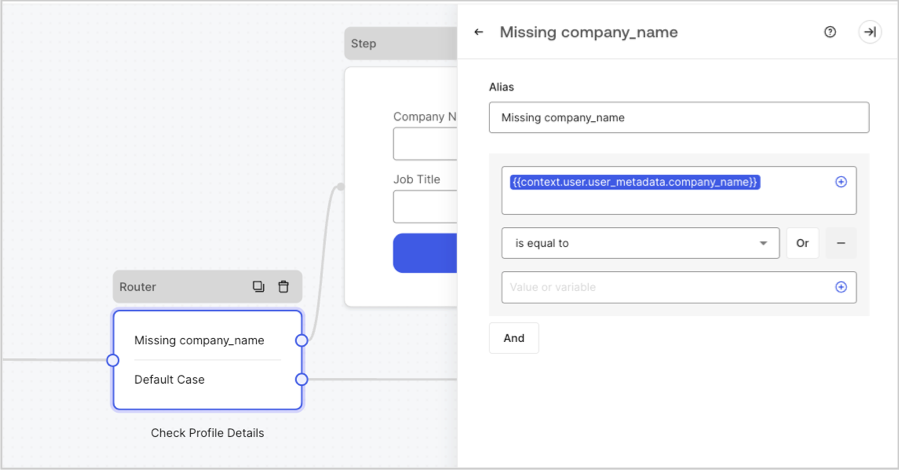
Les nœuds de routeur vous permettent d’ajouter des règles pour créer des sauts logiques conditionnels entre les nœuds.

Par défaut, un nœud de routeur dispose d’une seule règle de passage nommée **Default case (Cas par défaut)** qui se connecte à d’autres nœuds. Vous pouvez ajouter des règles supplémentaires basées sur un ensemble de conditions qu’une variable doit remplir pour se connecter ensuite à d’autres nœuds. Pour en savoir plus, consultez [Routeur](/docs/fr-CA/fr-ca/customize/forms/routers).
<Frame>
  <img src="https://mintcdn.com/generaltranslationinc/I3Fs4t2ino3YdzfZ/docs/images/fr-ca/cdy7uua7fh8z/2IKI9sU9UPCVkMkHQ3G8lX/07df765647a69a4cf1ab8c5c7aae3c22/2025-07-15_10-31-08.png?fit=max&auto=format&n=I3Fs4t2ino3YdzfZ&q=85&s=f54863515f53bf3de8e465c49e5c26b0" alt="Dashboard > Forms > Routers " data-og-width="899" width="899" data-og-height="470" height="470" data-path="docs/images/fr-ca/cdy7uua7fh8z/2IKI9sU9UPCVkMkHQ3G8lX/07df765647a69a4cf1ab8c5c7aae3c22/2025-07-15_10-31-08.png" data-optimize="true" data-opv="3" srcset="https://mintcdn.com/generaltranslationinc/I3Fs4t2ino3YdzfZ/docs/images/fr-ca/cdy7uua7fh8z/2IKI9sU9UPCVkMkHQ3G8lX/07df765647a69a4cf1ab8c5c7aae3c22/2025-07-15_10-31-08.png?w=280&fit=max&auto=format&n=I3Fs4t2ino3YdzfZ&q=85&s=23dc21d868aeb33b9274e237a82701e5 280w, https://mintcdn.com/generaltranslationinc/I3Fs4t2ino3YdzfZ/docs/images/fr-ca/cdy7uua7fh8z/2IKI9sU9UPCVkMkHQ3G8lX/07df765647a69a4cf1ab8c5c7aae3c22/2025-07-15_10-31-08.png?w=560&fit=max&auto=format&n=I3Fs4t2ino3YdzfZ&q=85&s=6eba00969bf804a107d394c755c63d42 560w, https://mintcdn.com/generaltranslationinc/I3Fs4t2ino3YdzfZ/docs/images/fr-ca/cdy7uua7fh8z/2IKI9sU9UPCVkMkHQ3G8lX/07df765647a69a4cf1ab8c5c7aae3c22/2025-07-15_10-31-08.png?w=840&fit=max&auto=format&n=I3Fs4t2ino3YdzfZ&q=85&s=75cc428126e521940162813baf3f0124 840w, https://mintcdn.com/generaltranslationinc/I3Fs4t2ino3YdzfZ/docs/images/fr-ca/cdy7uua7fh8z/2IKI9sU9UPCVkMkHQ3G8lX/07df765647a69a4cf1ab8c5c7aae3c22/2025-07-15_10-31-08.png?w=1100&fit=max&auto=format&n=I3Fs4t2ino3YdzfZ&q=85&s=019c557ff3a72e58e03942ca862f46a2 1100w, https://mintcdn.com/generaltranslationinc/I3Fs4t2ino3YdzfZ/docs/images/fr-ca/cdy7uua7fh8z/2IKI9sU9UPCVkMkHQ3G8lX/07df765647a69a4cf1ab8c5c7aae3c22/2025-07-15_10-31-08.png?w=1650&fit=max&auto=format&n=I3Fs4t2ino3YdzfZ&q=85&s=64a2dc05bf064d515073ed6affaa06ab 1650w, https://mintcdn.com/generaltranslationinc/I3Fs4t2ino3YdzfZ/docs/images/fr-ca/cdy7uua7fh8z/2IKI9sU9UPCVkMkHQ3G8lX/07df765647a69a4cf1ab8c5c7aae3c22/2025-07-15_10-31-08.png?w=2500&fit=max&auto=format&n=I3Fs4t2ino3YdzfZ&q=85&s=6c680b3f0eb0729e69f0a2e5c3fc848f 2500w" />
</Frame>

<div id="flow-node">
  ## Nœud de flux
</div>

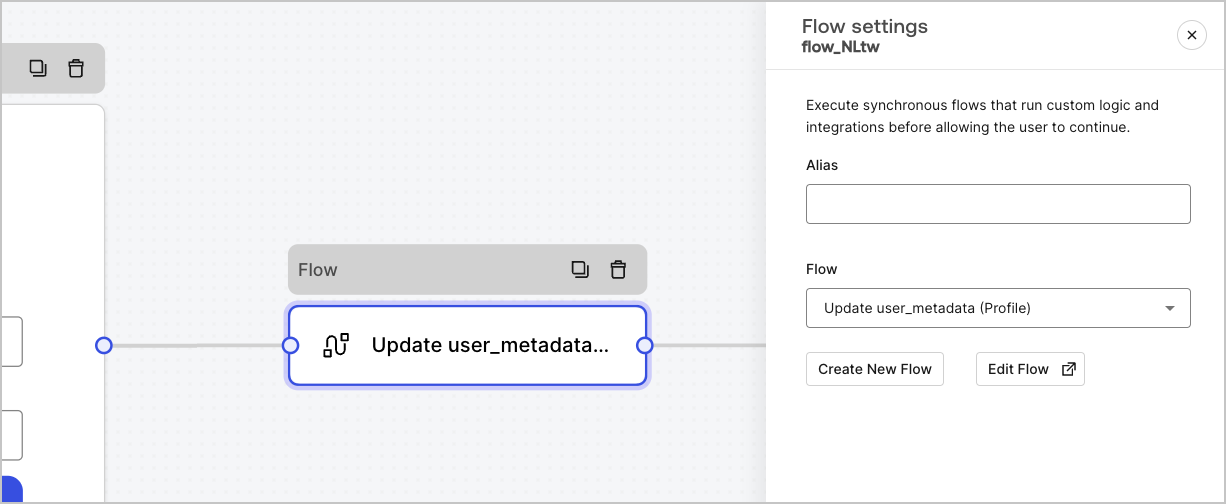
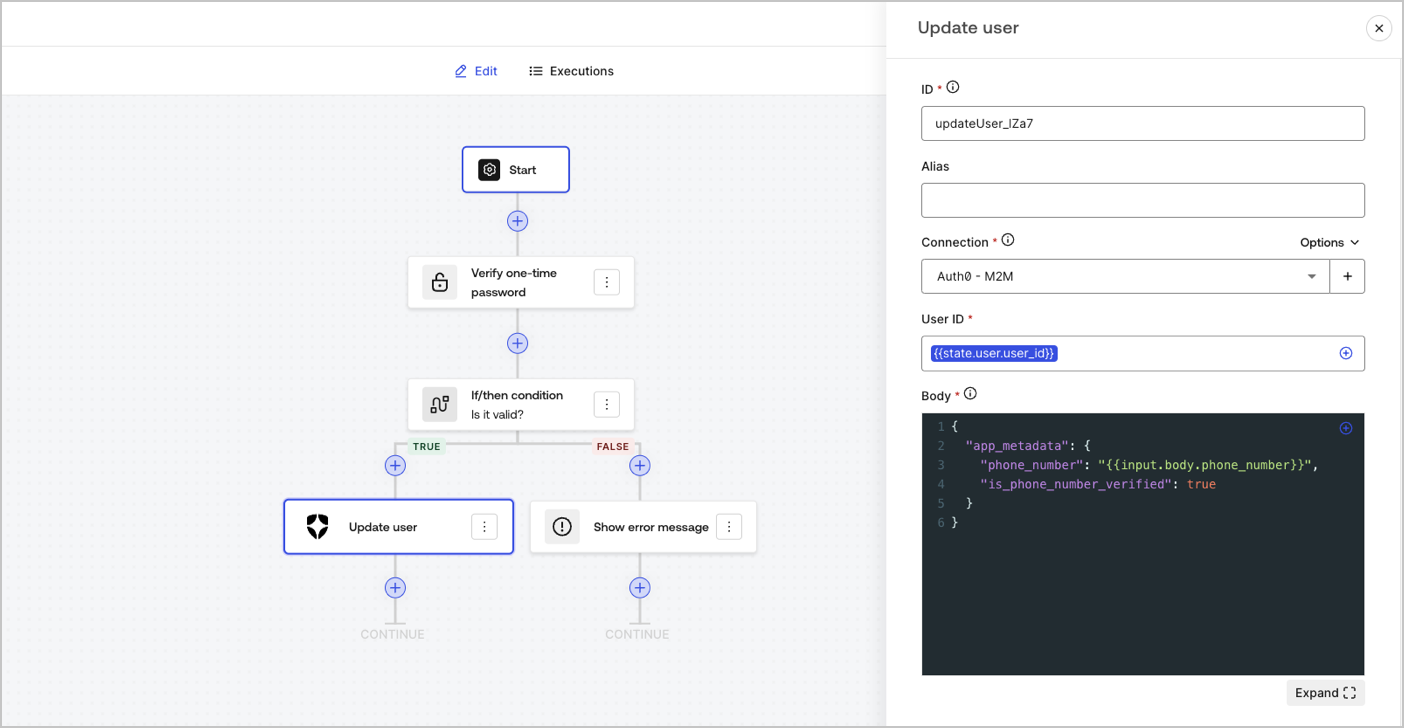
Les nœuds de flux vous permettent d’ajouter et de créer des logiques personnalisées et des flux d’intégration à vos formulaires. Pour en savoir plus, consultez [Flux](/docs/fr-CA/fr-ca/customize/forms/flows).
<Frame>
  <img src="https://mintcdn.com/generaltranslationinc/2RKJkv7bJ8pSb5rN/docs/images/fr-ca/cdy7uua7fh8z/4UGCrqzgyHTPryLoEuBwNt/e4a67be08a33b565ece89973028fa6ac/forms-flow-node.png?fit=max&auto=format&n=2RKJkv7bJ8pSb5rN&q=85&s=f96d718e3bfbbff6502bf984c5a792b7" alt="Dashboard > Forms > Flow" data-og-width="1226" width="1226" data-og-height="504" height="504" data-path="docs/images/fr-ca/cdy7uua7fh8z/4UGCrqzgyHTPryLoEuBwNt/e4a67be08a33b565ece89973028fa6ac/forms-flow-node.png" data-optimize="true" data-opv="3" srcset="https://mintcdn.com/generaltranslationinc/2RKJkv7bJ8pSb5rN/docs/images/fr-ca/cdy7uua7fh8z/4UGCrqzgyHTPryLoEuBwNt/e4a67be08a33b565ece89973028fa6ac/forms-flow-node.png?w=280&fit=max&auto=format&n=2RKJkv7bJ8pSb5rN&q=85&s=f41e47fb769efbff07b694fbda098d70 280w, https://mintcdn.com/generaltranslationinc/2RKJkv7bJ8pSb5rN/docs/images/fr-ca/cdy7uua7fh8z/4UGCrqzgyHTPryLoEuBwNt/e4a67be08a33b565ece89973028fa6ac/forms-flow-node.png?w=560&fit=max&auto=format&n=2RKJkv7bJ8pSb5rN&q=85&s=5b17617bb7e9402ae79df1672165eaf4 560w, https://mintcdn.com/generaltranslationinc/2RKJkv7bJ8pSb5rN/docs/images/fr-ca/cdy7uua7fh8z/4UGCrqzgyHTPryLoEuBwNt/e4a67be08a33b565ece89973028fa6ac/forms-flow-node.png?w=840&fit=max&auto=format&n=2RKJkv7bJ8pSb5rN&q=85&s=5a4e61f2ba41ba7ca63886cb36121cbb 840w, https://mintcdn.com/generaltranslationinc/2RKJkv7bJ8pSb5rN/docs/images/fr-ca/cdy7uua7fh8z/4UGCrqzgyHTPryLoEuBwNt/e4a67be08a33b565ece89973028fa6ac/forms-flow-node.png?w=1100&fit=max&auto=format&n=2RKJkv7bJ8pSb5rN&q=85&s=b74596e8db5e5afcb0194da3a39550d0 1100w, https://mintcdn.com/generaltranslationinc/2RKJkv7bJ8pSb5rN/docs/images/fr-ca/cdy7uua7fh8z/4UGCrqzgyHTPryLoEuBwNt/e4a67be08a33b565ece89973028fa6ac/forms-flow-node.png?w=1650&fit=max&auto=format&n=2RKJkv7bJ8pSb5rN&q=85&s=90b332b0d333b7d736570f983043ed1f 1650w, https://mintcdn.com/generaltranslationinc/2RKJkv7bJ8pSb5rN/docs/images/fr-ca/cdy7uua7fh8z/4UGCrqzgyHTPryLoEuBwNt/e4a67be08a33b565ece89973028fa6ac/forms-flow-node.png?w=2500&fit=max&auto=format&n=2RKJkv7bJ8pSb5rN&q=85&s=3f2ab8814da0a07e88cc62cc3c9df2cf 2500w" />
</Frame>

<Frame>
  <img src="https://mintcdn.com/generaltranslationinc/2RKJkv7bJ8pSb5rN/docs/images/fr-ca/cdy7uua7fh8z/4L1ixTcIVCmslts6M4wn7u/dc07046cfd41494f40285de5c102ff52/flow-editor-example.png?fit=max&auto=format&n=2RKJkv7bJ8pSb5rN&q=85&s=7009b730254e0d3fcfb2bdd41676e41c" alt="Dashboard > Forms > Flow > Editor" data-og-width="1404" width="1404" data-og-height="728" height="728" data-path="docs/images/fr-ca/cdy7uua7fh8z/4L1ixTcIVCmslts6M4wn7u/dc07046cfd41494f40285de5c102ff52/flow-editor-example.png" data-optimize="true" data-opv="3" srcset="https://mintcdn.com/generaltranslationinc/2RKJkv7bJ8pSb5rN/docs/images/fr-ca/cdy7uua7fh8z/4L1ixTcIVCmslts6M4wn7u/dc07046cfd41494f40285de5c102ff52/flow-editor-example.png?w=280&fit=max&auto=format&n=2RKJkv7bJ8pSb5rN&q=85&s=1303a863e84da18701d217fb6245291d 280w, https://mintcdn.com/generaltranslationinc/2RKJkv7bJ8pSb5rN/docs/images/fr-ca/cdy7uua7fh8z/4L1ixTcIVCmslts6M4wn7u/dc07046cfd41494f40285de5c102ff52/flow-editor-example.png?w=560&fit=max&auto=format&n=2RKJkv7bJ8pSb5rN&q=85&s=89577ccf6941e7e480545cae851235e9 560w, https://mintcdn.com/generaltranslationinc/2RKJkv7bJ8pSb5rN/docs/images/fr-ca/cdy7uua7fh8z/4L1ixTcIVCmslts6M4wn7u/dc07046cfd41494f40285de5c102ff52/flow-editor-example.png?w=840&fit=max&auto=format&n=2RKJkv7bJ8pSb5rN&q=85&s=14fdc9010db0e350312929eca2ff749b 840w, https://mintcdn.com/generaltranslationinc/2RKJkv7bJ8pSb5rN/docs/images/fr-ca/cdy7uua7fh8z/4L1ixTcIVCmslts6M4wn7u/dc07046cfd41494f40285de5c102ff52/flow-editor-example.png?w=1100&fit=max&auto=format&n=2RKJkv7bJ8pSb5rN&q=85&s=4761d4fb1cf36b0992eff338a04e85bc 1100w, https://mintcdn.com/generaltranslationinc/2RKJkv7bJ8pSb5rN/docs/images/fr-ca/cdy7uua7fh8z/4L1ixTcIVCmslts6M4wn7u/dc07046cfd41494f40285de5c102ff52/flow-editor-example.png?w=1650&fit=max&auto=format&n=2RKJkv7bJ8pSb5rN&q=85&s=9f9ea15a78e9c4165cf1bb6760f703b2 1650w, https://mintcdn.com/generaltranslationinc/2RKJkv7bJ8pSb5rN/docs/images/fr-ca/cdy7uua7fh8z/4L1ixTcIVCmslts6M4wn7u/dc07046cfd41494f40285de5c102ff52/flow-editor-example.png?w=2500&fit=max&auto=format&n=2RKJkv7bJ8pSb5rN&q=85&s=7bcd8af17df13a35f67919bc9b22aa29 2500w" />
</Frame>

<div id="start-node">
  ## Nœud de départ
</div>

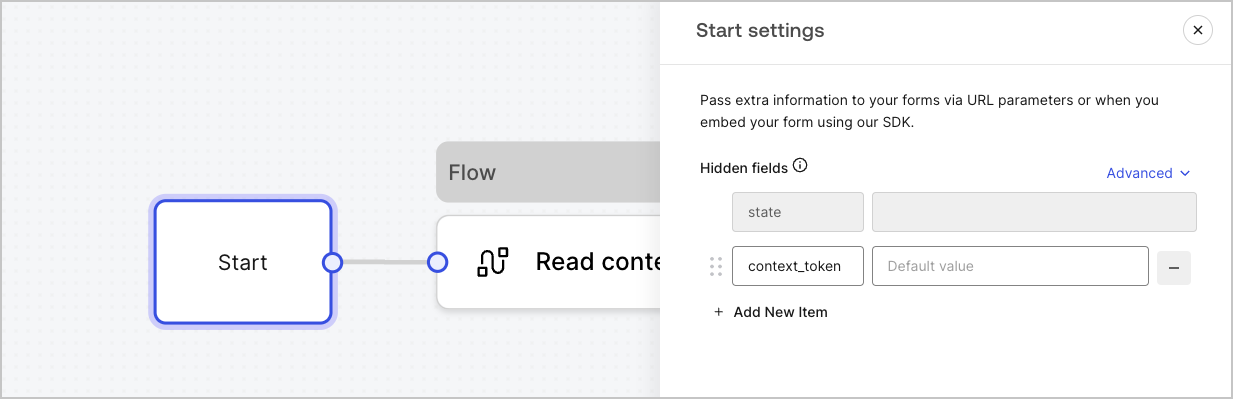
Les nœuds de départ ne sont pas visibles par l’utilisateur. C’est là que vous pouvez configurer des variables de champ cachées, telles que les attributs utilisateur lors du [rendu d’un formulaire avec une Action](/docs/fr-CA/fr-ca/customize/forms/render).
<Frame>
  <img src="https://mintcdn.com/generaltranslationinc/I3Fs4t2ino3YdzfZ/docs/images/fr-ca/cdy7uua7fh8z/2GqFDPep4akUxucmMJyb5/2b50f07f50ee29501341dc54f686de07/form-start-node.png?fit=max&auto=format&n=I3Fs4t2ino3YdzfZ&q=85&s=9412b91e4cbc78bee08a3a52334fd6ad" alt="Dashboard > Forms > Start node" data-og-width="1233" width="1233" data-og-height="399" height="399" data-path="docs/images/fr-ca/cdy7uua7fh8z/2GqFDPep4akUxucmMJyb5/2b50f07f50ee29501341dc54f686de07/form-start-node.png" data-optimize="true" data-opv="3" srcset="https://mintcdn.com/generaltranslationinc/I3Fs4t2ino3YdzfZ/docs/images/fr-ca/cdy7uua7fh8z/2GqFDPep4akUxucmMJyb5/2b50f07f50ee29501341dc54f686de07/form-start-node.png?w=280&fit=max&auto=format&n=I3Fs4t2ino3YdzfZ&q=85&s=d40f999029dac4e61260d24bd56ff788 280w, https://mintcdn.com/generaltranslationinc/I3Fs4t2ino3YdzfZ/docs/images/fr-ca/cdy7uua7fh8z/2GqFDPep4akUxucmMJyb5/2b50f07f50ee29501341dc54f686de07/form-start-node.png?w=560&fit=max&auto=format&n=I3Fs4t2ino3YdzfZ&q=85&s=7a12c43df4d50e794adbf835794def37 560w, https://mintcdn.com/generaltranslationinc/I3Fs4t2ino3YdzfZ/docs/images/fr-ca/cdy7uua7fh8z/2GqFDPep4akUxucmMJyb5/2b50f07f50ee29501341dc54f686de07/form-start-node.png?w=840&fit=max&auto=format&n=I3Fs4t2ino3YdzfZ&q=85&s=57347cb21f02bd7f1866bd4de04bddb1 840w, https://mintcdn.com/generaltranslationinc/I3Fs4t2ino3YdzfZ/docs/images/fr-ca/cdy7uua7fh8z/2GqFDPep4akUxucmMJyb5/2b50f07f50ee29501341dc54f686de07/form-start-node.png?w=1100&fit=max&auto=format&n=I3Fs4t2ino3YdzfZ&q=85&s=6096c4cff56c8157676417b54c80d986 1100w, https://mintcdn.com/generaltranslationinc/I3Fs4t2ino3YdzfZ/docs/images/fr-ca/cdy7uua7fh8z/2GqFDPep4akUxucmMJyb5/2b50f07f50ee29501341dc54f686de07/form-start-node.png?w=1650&fit=max&auto=format&n=I3Fs4t2ino3YdzfZ&q=85&s=92f973542887c80fb03d6f483ba2f65a 1650w, https://mintcdn.com/generaltranslationinc/I3Fs4t2ino3YdzfZ/docs/images/fr-ca/cdy7uua7fh8z/2GqFDPep4akUxucmMJyb5/2b50f07f50ee29501341dc54f686de07/form-start-node.png?w=2500&fit=max&auto=format&n=I3Fs4t2ino3YdzfZ&q=85&s=90fdba06873b4b6f73351a471fd29b34 2500w" />
</Frame>

<div id="ending-screen-node">
  ## Nœud d’écran de fin
</div>

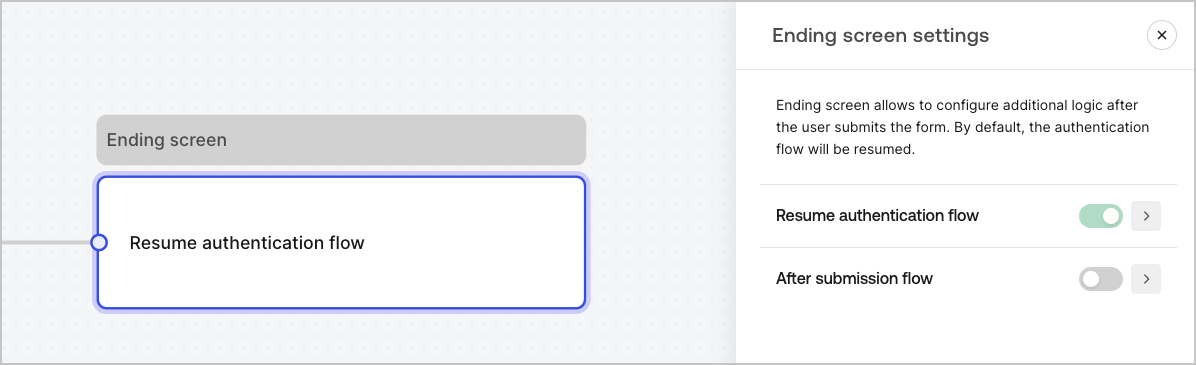
Chaque formulaire dispose d’un nœud d’écran de fin. Par défaut, ce nœud reprend le flux d’authentification et c’est ici que vous pouvez configurer un flux post-soumission.
<Frame>
  <img src="https://mintcdn.com/generaltranslationinc/md6b8ua1hdYa2pM7/docs/images/fr-ca/cdy7uua7fh8z/0icbjPpDKsnmtInimJ548/ead65b5e89de57a3079127324acd314d/ending-screen-node.png?fit=max&auto=format&n=md6b8ua1hdYa2pM7&q=85&s=019b109e867714591897e96c1681040f" alt="Dashboard > Forms > Ending screen node" data-og-width="1196" width="1196" data-og-height="365" height="365" data-path="docs/images/fr-ca/cdy7uua7fh8z/0icbjPpDKsnmtInimJ548/ead65b5e89de57a3079127324acd314d/ending-screen-node.png" data-optimize="true" data-opv="3" srcset="https://mintcdn.com/generaltranslationinc/md6b8ua1hdYa2pM7/docs/images/fr-ca/cdy7uua7fh8z/0icbjPpDKsnmtInimJ548/ead65b5e89de57a3079127324acd314d/ending-screen-node.png?w=280&fit=max&auto=format&n=md6b8ua1hdYa2pM7&q=85&s=486a42e906d2ddfbdc84f9d6f858423e 280w, https://mintcdn.com/generaltranslationinc/md6b8ua1hdYa2pM7/docs/images/fr-ca/cdy7uua7fh8z/0icbjPpDKsnmtInimJ548/ead65b5e89de57a3079127324acd314d/ending-screen-node.png?w=560&fit=max&auto=format&n=md6b8ua1hdYa2pM7&q=85&s=70bac25cfe39771bc1dda8e26a1ad7d2 560w, https://mintcdn.com/generaltranslationinc/md6b8ua1hdYa2pM7/docs/images/fr-ca/cdy7uua7fh8z/0icbjPpDKsnmtInimJ548/ead65b5e89de57a3079127324acd314d/ending-screen-node.png?w=840&fit=max&auto=format&n=md6b8ua1hdYa2pM7&q=85&s=ef83afa434989962b4939d8c26b7274d 840w, https://mintcdn.com/generaltranslationinc/md6b8ua1hdYa2pM7/docs/images/fr-ca/cdy7uua7fh8z/0icbjPpDKsnmtInimJ548/ead65b5e89de57a3079127324acd314d/ending-screen-node.png?w=1100&fit=max&auto=format&n=md6b8ua1hdYa2pM7&q=85&s=959c723b8a11722611c209c05a526e99 1100w, https://mintcdn.com/generaltranslationinc/md6b8ua1hdYa2pM7/docs/images/fr-ca/cdy7uua7fh8z/0icbjPpDKsnmtInimJ548/ead65b5e89de57a3079127324acd314d/ending-screen-node.png?w=1650&fit=max&auto=format&n=md6b8ua1hdYa2pM7&q=85&s=8764fab0c31f26d9df02acfd857b66bc 1650w, https://mintcdn.com/generaltranslationinc/md6b8ua1hdYa2pM7/docs/images/fr-ca/cdy7uua7fh8z/0icbjPpDKsnmtInimJ548/ead65b5e89de57a3079127324acd314d/ending-screen-node.png?w=2500&fit=max&auto=format&n=md6b8ua1hdYa2pM7&q=85&s=199256229827ef94891b8022341d2e6f 2500w" />
</Frame>
