> ## Documentation Index
> Fetch the complete documentation index at: https://auth0.generaltranslation.app/llms.txt
> Use this file to discover all available pages before exploring further.

# Configurer les notifications OTP pour l’authentification multifacteur (MFA)

> Décrit comment configurer les notifications de mots de passe à usage unique (OTP) basées sur le temps pour la MFA.

Pour utiliser des mots de passe à usage unique (OTP) comme facteur d’authentification, les utilisateurs ont besoin d’une application d’authentification telle que :

* Authy ([Google Play](https://play.google.com/store/apps/details?id=com.authy.authy) / [App Store](https://itunes.apple.com/us/app/authy/id494168017)).
* Google Authenticator ([Google Play](https://play.google.com/store/apps/details?id=com.google.android.apps.authenticator2) / [App Store](https://itunes.apple.com/us/app/google-authenticator/id388497605)).
* Gardien Auth0 ([Google Play](https://play.google.com/store/apps/details?id=com.auth0.guardian) / [App Store](https://itunes.apple.com/us/app/auth0-guardian/id1093447833)).
* Microsoft Authenticator ([Google Play](https://play.google.com/store/apps/details?id=com.azure.authenticator) / [App Store](https://itunes.apple.com/us/app/microsoft-authenticator/id983156458))

<Frame>
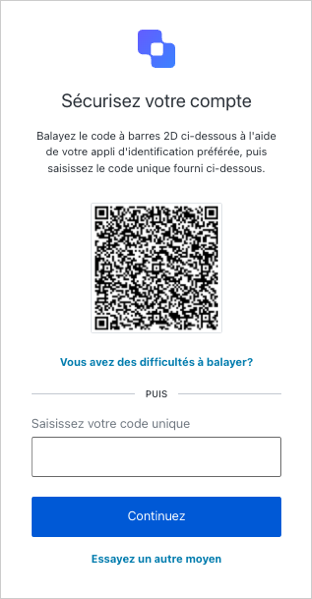
  <img src="https://mintcdn.com/generaltranslationinc/I3Fs4t2ino3YdzfZ/docs/images/fr-ca/cdy7uua7fh8z/2J6vWaonPbCvpuBUu9b8q1/40ed3b8eb49b16e0622ba86e89e439ba/QR_Code_-_FR_-_Small.png?fit=max&auto=format&n=I3Fs4t2ino3YdzfZ&q=85&s=d0a0a1845e443182afa4585da40f071c" alt="Exemple de configuration d’un code QR OTP Auth0 Guardian" width="312" height="599" data-path="docs/images/fr-ca/cdy7uua7fh8z/2J6vWaonPbCvpuBUu9b8q1/40ed3b8eb49b16e0622ba86e89e439ba/QR_Code_-_FR_-_Small.png" />
</Frame>

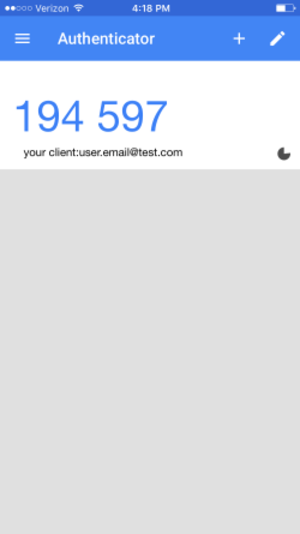
Dès l’inscription, ils peuvent numériser un code et configurer l’application, qui commencera alors à générer des codes à usage unique. Par la suite, en se connectant à l’application, l’utilisateur peut simplement vérifier l’application d’authentification pour obtenir le code à usage unique actuel :
<Frame>
  <img src="https://mintcdn.com/generaltranslationinc/YjN60X_U-1aBZwRP/docs/images/fr-ca/cdy7uua7fh8z/1vVY2NLQwsOwdHIPU4Qj3B/026255e1549c3ec5bdc790280590d210/google-auth-screenshot.png?fit=max&auto=format&n=YjN60X_U-1aBZwRP&q=85&s=1da1d8bbc5dd38cd71e8de9a92979cec" alt="exemple de code OTP Google Auth0 Guardian" width="300" height="534" data-path="docs/images/fr-ca/cdy7uua7fh8z/1vVY2NLQwsOwdHIPU4Qj3B/026255e1549c3ec5bdc790280590d210/google-auth-screenshot.png" />
</Frame>

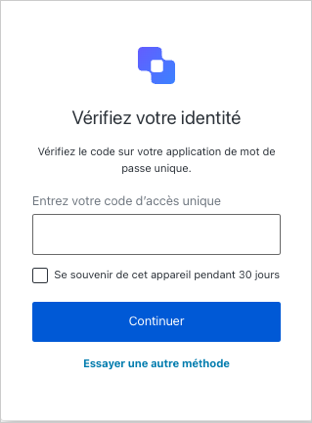
Votre utilisateur saisit le code à l’invite :
<Frame>
  <img src="https://mintcdn.com/generaltranslationinc/4zAuExUltEzBlp_a/docs/images/fr-ca/cdy7uua7fh8z/4dntQCYqgx5QyLZKW7quxR/3df76b9b767f428f4cdbe492d7ca258b/OTP_challenge_-_FR_-_Small.png?fit=max&auto=format&n=4zAuExUltEzBlp_a&q=85&s=ffa2bf7feb9d243953f9ff5edcc9d8fe" alt="Exemple d’invite de connexion OTP Auth0 Guardian" width="312" height="423" data-path="docs/images/fr-ca/cdy7uua7fh8z/4dntQCYqgx5QyLZKW7quxR/3df76b9b767f428f4cdbe492d7ca258b/OTP_challenge_-_FR_-_Small.png" />
</Frame>

vos utilisateurs doivent avoir une application d’authentification OTP installée sur leurs appareils mobiles.

<div id="user-otp-workflow">
  ## En savoir plus
</div>

* [Inscription et défi des authentificateurs OTP](/docs/fr-CA/fr-ca/secure/multi-factor-authentication/authenticate-using-ropg-flow-with-mfa/enroll-and-challenge-otp-authenticators)
