> ## Documentation Index
> Fetch the complete documentation index at: https://auth0.generaltranslation.app/llms.txt
> Use this file to discover all available pages before exploring further.
# アプリをSAML IDプロバイダーに接続する
> エンタープライズ接続を用いてSAML IDプロバイダーに接続する方法を説明します。
export const AuthCodeGroup = ({children, dropdown}) => {
const [processedChildren, setProcessedChildren] = useState(children);
useEffect(() => {
let unsubscribe = null;
function init() {
unsubscribe = window.autorun(() => {
const processChildren = node => {
if (typeof node === "string") {
let processedNode = node;
for (const [key, value] of window.rootStore.variableStore.values.entries()) {
processedNode = processedNode.replace(new RegExp(key, "g"), value);
}
return processedNode;
} else if (Array.isArray(node)) {
return node.map(processChildren);
} else if (node && node.props && node.props.children) {
return {
...node,
props: {
...node.props,
children: processChildren(node.props.children)
}
};
}
return node;
};
setProcessedChildren(processChildren(children));
});
}
if (window.rootStore) {
init();
} else {
window.addEventListener("adu:storeReady", init);
}
return () => {
window.removeEventListener("adu:storeReady", init);
unsubscribe?.();
};
}, [children]);
return {processedChildren};
};
export const AuthCodeBlock = ({filename, icon, language, highlight, children}) => {
const [processedChildren, setProcessedChildren] = useState(children);
useEffect(() => {
let unsubscribe = null;
function init() {
unsubscribe = window.autorun(() => {
let processedChildren = children;
for (const [key, value] of window.rootStore.variableStore.values.entries()) {
processedChildren = processedChildren.replace(new RegExp(key, "g"), value);
}
setProcessedChildren(processedChildren);
});
}
if (window.rootStore) {
init();
} else {
window.addEventListener("adu:storeReady", init);
}
return () => {
window.removeEventListener("adu:storeReady", init);
unsubscribe?.();
};
}, [children]);
return
{processedChildren}
;
};
Auth0を使用すると、SAML IDプロバイダー(IdP)の接続を作成することができます。
## 前提条件
始める前に以下を行います。
* [Auth0にアプリケーションを登録します](/docs/ja-JP/ja-jp/get-started/auth0-overview/create-applications)。
* 適切な **[Application Type(アプリケーションタイプ)]** を選択します。
* **`{https://yourApp/callback}`** の **[Allowed Callback URL(許可されているコールバックURL)]** を追加します。
* アプリケーションの[付与タイプ](/docs/ja-JP/ja-jp/get-started/applications/update-grant-types)に適切なフローが必ず含まれていることを確認してください。
* このエンタープライズ接続の名前を決める
* ポストバックURL(別称、Assertion Consumer Service URL)は次のようになります:`https://{yourDomain}/login/callback?connection={yourConnectionName}`
* エンティティIDは次のようになります:`urn:auth0:{yourTenant}:{yourConnectionName}`
## 手順
アプリケーションをSAML IDプロバイダーに接続するには、以下を行います。
1. IdPにポストバックURLとエンティティIDを入力します(方法については、「[SAML IDプロバイダー構成の設定](/docs/ja-JP/ja-jp/authenticate/protocols/saml/saml-identity-provider-configuration-settings)」をお読みください)。
2. [IdPから署名証明書を入手](#get-the-signing-certificate-from-the-idp)して、[Base64に変換](#convert-signing-certificate-to-base64)します。
3. [Auth0でエンタープライズ接続を作成](#create-an-enterprise-connection-in-auth0)します。
4. [Auth0アプリケーションでエンタープライズ接続を有効](#enable-the-enterprise-connection-for-your-auth0-application)にします。
5. [マッピングをセットアップ](#set-up-mappings)します(ほとんどの場合には必要ありません)。
6. [接続をテスト](#test-the-connection)します。
## IdPから署名証明書を入手する
SAMLログインでは、Auth0はサービスプロバイダーとして機能するため、SAML IdPから署名されたX.509証明書(PEMまたはCER形式)を取得する必要があります。これは後でAuth0にアップロードします。この証明書の取得にはさまざまな方法があるため、詳しい情報が必要な場合には、使用しているIdPのドキュメントを参照してください。
### 署名証明書をBase64に変換する
署名されたX.509証明書のアップロードには、Management APIまたはAuth0 Dashboardを使用することができます。Management APIを使用する場合には、ファイルをBase64に変換しなければなりません。これを行うには、[シンプルなオンラインツール](https://www.base64decode.org/)を使用するか、Bashで以下のコマンドを実行します:`cat signing-cert.crt | base64`。
## Auth0でエンタープライズ接続を作成する
次に、Auth0でSAMLのエンタープライズ接続を作成・構成してから、署名されたX.509証明書をアップロードする必要があります。この作業には、Auth0 DashboardまたはManagement APIを使用することができます。
### Dashboardを使用してエンタープライズ接続を作成する
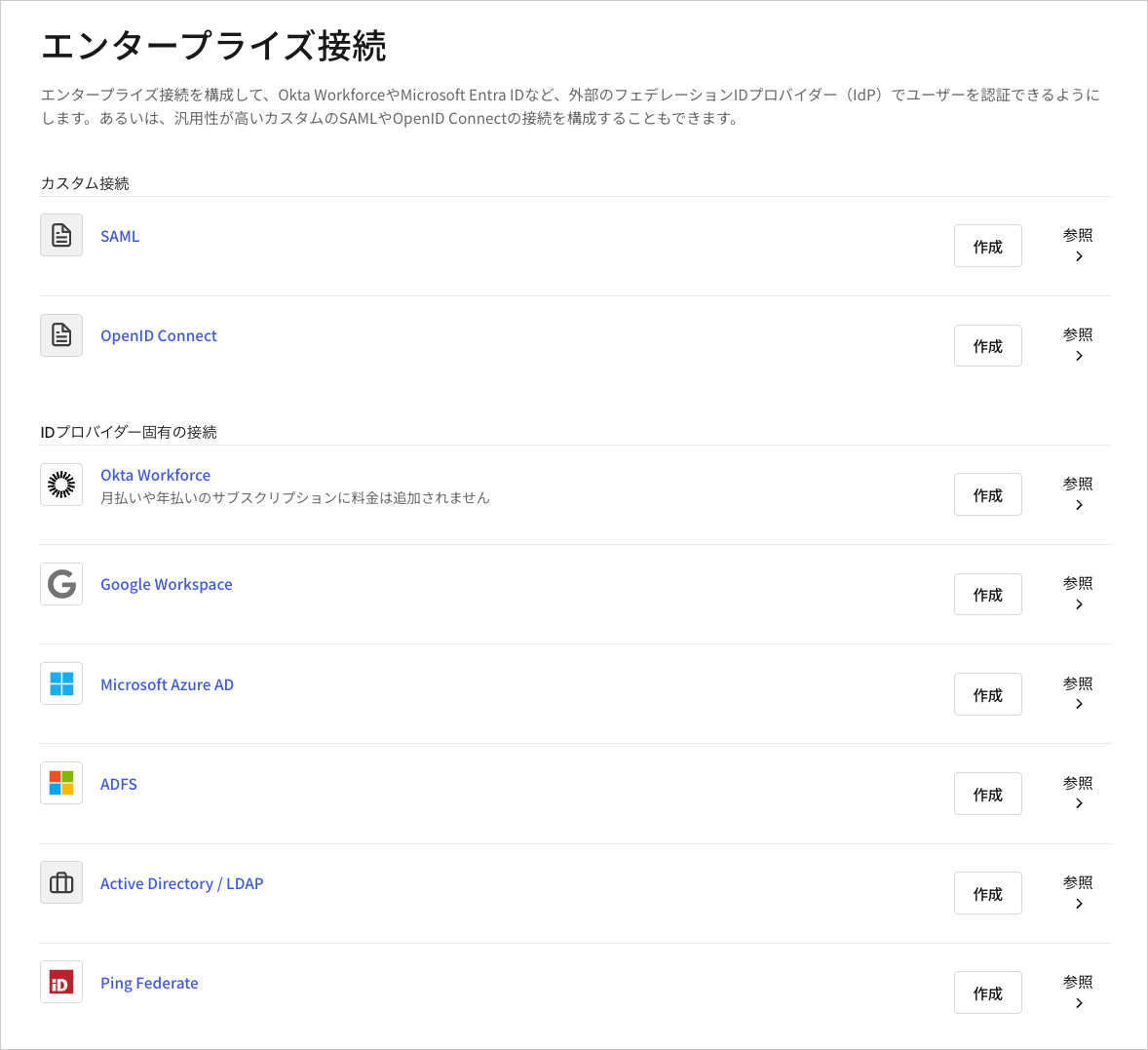
1. [[Auth0 Dashboard]>[Authentication(認証)]>[Enterprise(エンタープライズ)]](https://manage.auth0.com/#/connections/enterprise)に移動し、 **[SAML]** の[`+`]を選択します。
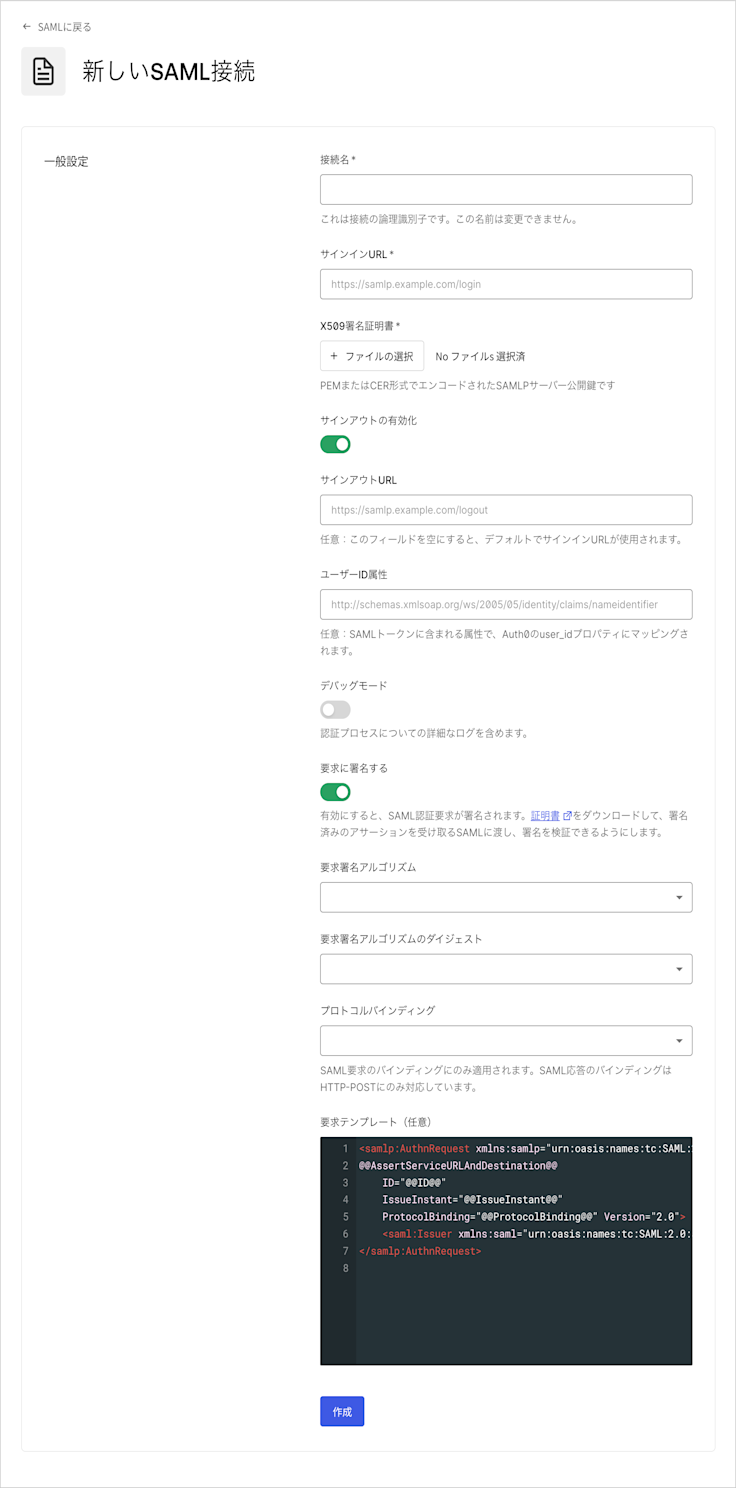
 2. 接続の詳細を入力し、 **[Create(作成)]** をクリックします。
| フィールド |
説明 |
| Connection name(接続名) |
接続の論理識別子です。テナント内で一意でなければなりません。また、IdPでポストバックURLとエンティティIDを設定する際には、この同じ名前を使用しなければなりません。一度設定すると、この名前は変更できません。 |
| Sign In URL(サインインURL) |
SAMLシングルログインURLです。 |
| X.509 Signing Certificate(X.509署名証明書) |
このプロセスで前にIdPから取得した(PEMまたはCERでエンコードされた)署名証明書です。 |
| Enable Sign Out(サインアウトを有効にする) |
有効にすると、特定のサインアウトURLを設定することができます。設定しない場合は、サインインURLがデフォルトで使用されます。 |
| Sign Out URL(サインアウトURL)(任意) |
SAMLシングルログアウトURLです。 |
| User ID Attribute(ユーザーID属性)(任意) |
SAMLトークンに含まれる属性で、Auth0の`user_id`プロパティにマッピングされます。 |
| Debug Mode(デバッグモード) |
有効にすると、認証の処理について、より詳細なログが出力されます。 |
| Sign Request(署名要求) |
有効にすると、SAML認証要求が署名されます(付随した証明書をダウンロードして提供し、SAML IdPがアサーションの署名を検証できるようにしてください)。 |
| Sign Request Algorithm(署名要求アルゴリズム) |
Auth0がSAMLアサーションを署名するのに使用するアルゴリズムです。 |
| Sign Request Digest Algorithm(署名要求ダイジェストアルゴリズム) |
Auth0が署名要求のダイジェストに使用するアルゴリズムです。 |
| Protocol Binding(プロトコルバインディング) |
IdPがサポートするHTTPバインディングです。 |
| Request Template(要求テンプレート)(任意) |
SAML要求を形式化するテンプレートです。 |
 3. **[Provisioning(プロビジョニング)]** ビューでユーザープロファイルがAuth0で作成および更新される方法を構成することができます。
| フィールド |
説明 |
| Sync user profile attributes at each login(ログインごとにユーザープロファイル属性を同期する) |
有効な場合、ユーザーがログインするたびにユーザープロファイルデータを自動的に同期するため、接続ソースで加えられた変更はAuth0で自動的に更新されます。 |
| Sync user profiles using SCIM(SCIMを使ってユーザープロファイルを同期する) |
有効な場合、SCIMを使ってユーザープロファイルデータを同期することができます。詳細については、「インバウンドSCIMを構成する」を参照してください。 |
4. **[Login Experience(ログインエクスペリエンス)]** ビューでこの接続でのユーザーログインの方法を構成することができます。
| フィールド |
説明 |
| ホームレルムディスカバリー |
ユーザーのメールドメインを、指定されたIDプロバイダードメインと比較します。詳細については、\[識別子優先認証の構成]を参照してください。([https://auth0.com/docs/ja-jp/authenticate/login/auth0-universal-login/identifier-first)](https://auth0.com/docs/ja-jp/authenticate/login/auth0-universal-login/identifier-first)) |
| 接続ボタンを表示 |
このオプションでは、アプリケーションの接続ボタンをカスタマイズするため次の選択肢が表示されます。 |
| Button display name(ボタン表示名) (オプション) |
ユニバーサルログインのログインボタンをカスタマイズするために使用されるテキスト。設定されるとボタンは以下を読み取ります:"Continue with `{Button display name}`" |
| Button logo(ボタンロゴ)URL (任意) |
ユニバーサルログインのログインボタンをカスタマイズするために使用される画像のURL。設定されると、ユニバーサルログインのログインボタンは、20px×20pxの四角で画像を表示します。 |
任意のフィールドは、New Universal Loginでのみ使用することができます。Classic Loginを使用している場合、[Add(追加)]ボタン、ボタンの表示名、ボタンロゴのURLは表示されません。
5. 統合を完了するのに必要な管理者権限を持っている場合には、 **[Continue(続行)]** をクリックして、IdPの構成に必要なカスタムパラメーターについて調べます。管理者権限を持っていない場合には、提示されたURLを管理者に提供して必要な設定を調整してもらってください。
### Management APIを使用してエンタープライズ接続を作成する
[Management API](/docs/ja-JP/ja-jp/api/management/v2)を使用して、SAML接続を作成することもできます。その際には、SAMLの構成フィールドをそれぞれ手動で指定するか、構成値のあるSAMLメタデータドキュメントを指定することができます。
#### 指定した値を使って接続を作成する
[接続作成エンドポイント](/docs/ja-JP/ja-jp/api/management/v2#!/Connections/patch_connections_by_id)に`POST`呼び出しを行います。`MGMT_API_ACCESS_TOKEN`、`CONNECTION_NAME`、`SIGN_IN_ENDPOINT_URL`、`SIGN_OUT_ENDPOINT_URL`と`BASE64_SIGNING_CERT`のプレースホルダーをそれぞれManagement APIのアクセストークン、接続名、サインインURL、サインアウトURLとBase64エンコードされた署名証明書(PEMまたはCERの形式)に置き換えます。
```bash cURL theme={null}
curl --request POST \
--url 'https://{yourDomain}/api/v2/connections' \
--header 'authorization: Bearer MGMT_API_ACCESS_TOKEN' \
--header 'cache-control: no-cache' \
--header 'content-type: application/json' \
--data '{ "strategy": "samlp", "name": "CONNECTION_NAME", "options": { "signInEndpoint": "SIGN_IN_ENDPOINT_URL", "signOutEndpoint": "SIGN_OUT_ENDPOINT_URL", "signatureAlgorithm": "rsa-sha256", "digestAlgorithm": "sha256", "fieldsMap": {}, "signingCert": "BASE64_SIGNING_CERT" } }'
```
```csharp C# theme={null}
var client = new RestClient("https://{yourDomain}/api/v2/connections");
var request = new RestRequest(Method.POST);
request.AddHeader("content-type", "application/json");
request.AddHeader("authorization", "Bearer MGMT_API_ACCESS_TOKEN");
request.AddHeader("cache-control", "no-cache");
request.AddParameter("application/json", "{ "strategy": "samlp", "name": "CONNECTION_NAME", "options": { "signInEndpoint": "SIGN_IN_ENDPOINT_URL", "signOutEndpoint": "SIGN_OUT_ENDPOINT_URL", "signatureAlgorithm": "rsa-sha256", "digestAlgorithm": "sha256", "fieldsMap": {}, "signingCert": "BASE64_SIGNING_CERT" } }", ParameterType.RequestBody);
IRestResponse response = client.Execute(request);
```
```go Go theme={null}
package main
import (
"fmt"
"strings"
"net/http"
"io/ioutil"
)
func main() {
url := "https://{yourDomain}/api/v2/connections"
payload := strings.NewReader("{ "strategy": "samlp", "name": "CONNECTION_NAME", "options": { "signInEndpoint": "SIGN_IN_ENDPOINT_URL", "signOutEndpoint": "SIGN_OUT_ENDPOINT_URL", "signatureAlgorithm": "rsa-sha256", "digestAlgorithm": "sha256", "fieldsMap": {}, "signingCert": "BASE64_SIGNING_CERT" } }")
req, _ := http.NewRequest("POST", url, payload)
req.Header.Add("content-type", "application/json")
req.Header.Add("authorization", "Bearer MGMT_API_ACCESS_TOKEN")
req.Header.Add("cache-control", "no-cache")
res, _ := http.DefaultClient.Do(req)
defer res.Body.Close()
body, _ := ioutil.ReadAll(res.Body)
fmt.Println(res)
fmt.Println(string(body))
}
```
```java Java theme={null}
HttpResponse response = Unirest.post("https://{yourDomain}/api/v2/connections")
.header("content-type", "application/json")
.header("authorization", "Bearer MGMT_API_ACCESS_TOKEN")
.header("cache-control", "no-cache")
.body("{ "strategy": "samlp", "name": "CONNECTION_NAME", "options": { "signInEndpoint": "SIGN_IN_ENDPOINT_URL", "signOutEndpoint": "SIGN_OUT_ENDPOINT_URL", "signatureAlgorithm": "rsa-sha256", "digestAlgorithm": "sha256", "fieldsMap": {}, "signingCert": "BASE64_SIGNING_CERT" } }")
.asString();
```
```javascript Node.JS theme={null}
var axios = require("axios").default;
var options = {
method: 'POST',
url: 'https://{yourDomain}/api/v2/connections',
headers: {
'content-type': 'application/json',
authorization: 'Bearer MGMT_API_ACCESS_TOKEN',
'cache-control': 'no-cache'
},
data: {
strategy: 'samlp',
name: 'CONNECTION_NAME',
options: {
signInEndpoint: 'SIGN_IN_ENDPOINT_URL',
signOutEndpoint: 'SIGN_OUT_ENDPOINT_URL',
signatureAlgorithm: 'rsa-sha256',
digestAlgorithm: 'sha256',
fieldsMap: {},
signingCert: 'BASE64_SIGNING_CERT'
}
}
};
axios.request(options).then(function (response) {
console.log(response.data);
}).catch(function (error) {
console.error(error);
});
```
```objc Obj-C theme={null}
#import
NSDictionary *headers = @{ @"content-type": @"application/json",
@"authorization": @"Bearer MGMT_API_ACCESS_TOKEN",
@"cache-control": @"no-cache" };
NSDictionary *parameters = @{ @"strategy": @"samlp",
@"name": @"CONNECTION_NAME",
@"options": @{ @"signInEndpoint": @"SIGN_IN_ENDPOINT_URL", @"signOutEndpoint": @"SIGN_OUT_ENDPOINT_URL", @"signatureAlgorithm": @"rsa-sha256", @"digestAlgorithm": @"sha256", @"fieldsMap": @{ }, @"signingCert": @"BASE64_SIGNING_CERT" } };
NSData *postData = [NSJSONSerialization dataWithJSONObject:parameters options:0 error:nil];
NSMutableURLRequest *request = [NSMutableURLRequest requestWithURL:[NSURL URLWithString:@"https://{yourDomain}/api/v2/connections"]
cachePolicy:NSURLRequestUseProtocolCachePolicy
timeoutInterval:10.0];
[request setHTTPMethod:@"POST"];
[request setAllHTTPHeaderFields:headers];
[request setHTTPBody:postData];
NSURLSession *session = [NSURLSession sharedSession];
NSURLSessionDataTask *dataTask = [session dataTaskWithRequest:request
completionHandler:^(NSData *data, NSURLResponse *response, NSError *error) {
if (error) {
NSLog(@"%@", error);
} else {
NSHTTPURLResponse *httpResponse = (NSHTTPURLResponse *) response;
NSLog(@"%@", httpResponse);
}
}];
[dataTask resume];
```
```php PHP theme={null}
$curl = curl_init();
curl_setopt_array($curl, [
CURLOPT_URL => "https://{yourDomain}/api/v2/connections",
CURLOPT_RETURNTRANSFER => true,
CURLOPT_ENCODING => "",
CURLOPT_MAXREDIRS => 10,
CURLOPT_TIMEOUT => 30,
CURLOPT_HTTP_VERSION => CURL_HTTP_VERSION_1_1,
CURLOPT_CUSTOMREQUEST => "POST",
CURLOPT_POSTFIELDS => "{ "strategy": "samlp", "name": "CONNECTION_NAME", "options": { "signInEndpoint": "SIGN_IN_ENDPOINT_URL", "signOutEndpoint": "SIGN_OUT_ENDPOINT_URL", "signatureAlgorithm": "rsa-sha256", "digestAlgorithm": "sha256", "fieldsMap": {}, "signingCert": "BASE64_SIGNING_CERT" } }",
CURLOPT_HTTPHEADER => [
"authorization: Bearer MGMT_API_ACCESS_TOKEN",
"cache-control: no-cache",
"content-type: application/json"
],
]);
$response = curl_exec($curl);
$err = curl_error($curl);
curl_close($curl);
if ($err) {
echo "cURL Error #:" . $err;
} else {
echo $response;
}
```
```python Python theme={null}
import http.client
conn = http.client.HTTPSConnection("")
payload = "{ "strategy": "samlp", "name": "CONNECTION_NAME", "options": { "signInEndpoint": "SIGN_IN_ENDPOINT_URL", "signOutEndpoint": "SIGN_OUT_ENDPOINT_URL", "signatureAlgorithm": "rsa-sha256", "digestAlgorithm": "sha256", "fieldsMap": {}, "signingCert": "BASE64_SIGNING_CERT" } }"
headers = {
'content-type': "application/json",
'authorization': "Bearer MGMT_API_ACCESS_TOKEN",
'cache-control': "no-cache"
}
conn.request("POST", "/{yourDomain}/api/v2/connections", payload, headers)
res = conn.getresponse()
data = res.read()
print(data.decode("utf-8"))
```
```ruby Ruby theme={null}
require 'uri'
require 'net/http'
require 'openssl'
url = URI("https://{yourDomain}/api/v2/connections")
http = Net::HTTP.new(url.host, url.port)
http.use_ssl = true
http.verify_mode = OpenSSL::SSL::VERIFY_NONE
request = Net::HTTP::Post.new(url)
request["content-type"] = 'application/json'
request["authorization"] = 'Bearer MGMT_API_ACCESS_TOKEN'
request["cache-control"] = 'no-cache'
request.body = "{ "strategy": "samlp", "name": "CONNECTION_NAME", "options": { "signInEndpoint": "SIGN_IN_ENDPOINT_URL", "signOutEndpoint": "SIGN_OUT_ENDPOINT_URL", "signatureAlgorithm": "rsa-sha256", "digestAlgorithm": "sha256", "fieldsMap": {}, "signingCert": "BASE64_SIGNING_CERT" } }"
response = http.request(request)
puts response.read_body
```
```swift Swift theme={null}
import Foundation
let headers = [
"content-type": "application/json",
"authorization": "Bearer MGMT_API_ACCESS_TOKEN",
"cache-control": "no-cache"
]
let parameters = [
"strategy": "samlp",
"name": "CONNECTION_NAME",
"options": [
"signInEndpoint": "SIGN_IN_ENDPOINT_URL",
"signOutEndpoint": "SIGN_OUT_ENDPOINT_URL",
"signatureAlgorithm": "rsa-sha256",
"digestAlgorithm": "sha256",
"fieldsMap": [],
"signingCert": "BASE64_SIGNING_CERT"
]
] as [String : Any]
let postData = JSONSerialization.data(withJSONObject: parameters, options: [])
let request = NSMutableURLRequest(url: NSURL(string: "https://{yourDomain}/api/v2/connections")! as URL,
cachePolicy: .useProtocolCachePolicy,
timeoutInterval: 10.0)
request.httpMethod = "POST"
request.allHTTPHeaderFields = headers
request.httpBody = postData as Data
let session = URLSession.shared
let dataTask = session.dataTask(with: request as URLRequest, completionHandler: { (data, response, error) -> Void in
if (error != nil) {
print(error)
} else {
let httpResponse = response as? HTTPURLResponse
print(httpResponse)
}
})
dataTask.resume()
```
| 値 |
説明 |
| `MGMT_API_ACCESS_TOKEN` |
`create:connections`のスコープを持つManagement APIのアクセストークン。 |
| `CONNECTION_NAME` |
作成される接続の名前。 |
| `SIGN_IN_ENDPONT_URL` |
作成される接続のSAMLシングルログインURL。 |
| `SIGN_OUT_ENDPOINT_URL` |
作成される接続のSAMLシングルログアウトURL。 |
| `BASE64_SIGNING_CERT` |
IdPから取得したX.509署名証明書(PEMまたはCERでエンコード)。 |
または、以下のJSONを使用します。
```json lines theme={null}
{
"strategy": "samlp",
"name": "CONNECTION_NAME",
"options": {
"signInEndpoint": "SIGN_IN_ENDPOINT_URL",
"signOutEndpoint": "SIGN_OUT_ENDPOINT_URL",
"signatureAlgorithm": "rsa-sha256",
"digestAlgorithm": "sha256",
"fieldsMap": {
...
},
"signingCert": "BASE64_SIGNING_CERT"
}
}
```
#### SAMLメタデータを使って接続を作成する
SAMLの構成フィールドをそれぞれ指定する代わりに、構成値のあるSAMLメタデータドキュメントを指定することができます。SAMLメタデータドキュメントを指定する際には、ドキュメントのXMLコンテンツ(`metadataXml`)またはドキュメントのURL(`metadataUrl`)を提供しても構いません。URLを提供すると、コンテンツが一度だけダウンロードされます。後でURLのコンテンツが変更されても、接続は自動的には再構成されません。
##### メタデータドキュメントのコンテンツを提供する
`metadataXml`オプションを使用して、ドキュメントの内容を提供します。
```bash cURL theme={null}
curl --request POST \
--url 'https://{yourDomain}/api/v2/connections' \
--header 'authorization: Bearer MGMT_API_ACCESS_TOKEN' \
--header 'cache-control: no-cache' \
--header 'content-type: application/json' \
--data '{ "strategy": "samlp", "name": "CONNECTION_NAME", "options": { "metadataXml": "..." } }'
```
```csharp C# theme={null}
var client = new RestClient("https://{yourDomain}/api/v2/connections");
var request = new RestRequest(Method.POST);
request.AddHeader("content-type", "application/json");
request.AddHeader("authorization", "Bearer MGMT_API_ACCESS_TOKEN");
request.AddHeader("cache-control", "no-cache");
request.AddParameter("application/json", "{ "strategy": "samlp", "name": "CONNECTION_NAME", "options": { "metadataXml": "..." } }", ParameterType.RequestBody);
IRestResponse response = client.Execute(request);
```
```go Go theme={null}
package main
import (
"fmt"
"strings"
"net/http"
"io/ioutil"
)
func main() {
url := "https://{yourDomain}/api/v2/connections"
payload := strings.NewReader("{ "strategy": "samlp", "name": "CONNECTION_NAME", "options": { "metadataXml": "..." } }")
req, _ := http.NewRequest("POST", url, payload)
req.Header.Add("content-type", "application/json")
req.Header.Add("authorization", "Bearer MGMT_API_ACCESS_TOKEN")
req.Header.Add("cache-control", "no-cache")
res, _ := http.DefaultClient.Do(req)
defer res.Body.Close()
body, _ := ioutil.ReadAll(res.Body)
fmt.Println(res)
fmt.Println(string(body))
}
```
```java Java theme={null}
HttpResponse response = Unirest.post("https://{yourDomain}/api/v2/connections")
.header("content-type", "application/json")
.header("authorization", "Bearer MGMT_API_ACCESS_TOKEN")
.header("cache-control", "no-cache")
.body("{ "strategy": "samlp", "name": "CONNECTION_NAME", "options": { "metadataXml": "..." } }")
.asString();
```
```javascript Node.JS theme={null}
var axios = require("axios").default;
var options = {
method: 'POST',
url: 'https://{yourDomain}/api/v2/connections',
headers: {
'content-type': 'application/json',
authorization: 'Bearer MGMT_API_ACCESS_TOKEN',
'cache-control': 'no-cache'
},
data: {
strategy: 'samlp',
name: 'CONNECTION_NAME',
options: {
metadataXml: '...'
}
}
};
axios.request(options).then(function (response) {
console.log(response.data);
}).catch(function (error) {
console.error(error);
});
```
```objc Obj-C theme={null}
#import
NSDictionary *headers = @{ @"content-type": @"application/json",
@"authorization": @"Bearer MGMT_API_ACCESS_TOKEN",
@"cache-control": @"no-cache" };
NSDictionary *parameters = @{ @"strategy": @"samlp",
@"name": @"CONNECTION_NAME",
@"options": @{ @"metadataXml": @"..." } };
NSData *postData = [NSJSONSerialization dataWithJSONObject:parameters options:0 error:nil];
NSMutableURLRequest *request = [NSMutableURLRequest requestWithURL:[NSURL URLWithString:@"https://{yourDomain}/api/v2/connections"]
cachePolicy:NSURLRequestUseProtocolCachePolicy
timeoutInterval:10.0];
[request setHTTPMethod:@"POST"];
[request setAllHTTPHeaderFields:headers];
[request setHTTPBody:postData];
NSURLSession *session = [NSURLSession sharedSession];
NSURLSessionDataTask *dataTask = [session dataTaskWithRequest:request
completionHandler:^(NSData *data, NSURLResponse *response, NSError *error) {
if (error) {
NSLog(@"%@", error);
} else {
NSHTTPURLResponse *httpResponse = (NSHTTPURLResponse *) response;
NSLog(@"%@", httpResponse);
}
}];
[dataTask resume];
```
```php PHP theme={null}
$curl = curl_init();
curl_setopt_array($curl, [
CURLOPT_URL => "https://{yourDomain}/api/v2/connections",
CURLOPT_RETURNTRANSFER => true,
CURLOPT_ENCODING => "",
CURLOPT_MAXREDIRS => 10,
CURLOPT_TIMEOUT => 30,
CURLOPT_HTTP_VERSION => CURL_HTTP_VERSION_1_1,
CURLOPT_CUSTOMREQUEST => "POST",
CURLOPT_POSTFIELDS => "{ "strategy": "samlp", "name": "CONNECTION_NAME", "options": { "metadataXml": "..." } }",
CURLOPT_HTTPHEADER => [
"authorization: Bearer MGMT_API_ACCESS_TOKEN",
"cache-control: no-cache",
"content-type: application/json"
],
]);
$response = curl_exec($curl);
$err = curl_error($curl);
curl_close($curl);
if ($err) {
echo "cURL Error #:" . $err;
} else {
echo $response;
}
```
```python Python theme={null}
iimport http.client
conn = http.client.HTTPSConnection("")
payload = "{ "strategy": "samlp", "name": "CONNECTION_NAME", "options": { "metadataXml": "..." } }"
headers = {
'content-type': "application/json",
'authorization': "Bearer MGMT_API_ACCESS_TOKEN",
'cache-control': "no-cache"
}
conn.request("POST", "/{yourDomain}/api/v2/connections", payload, headers)
res = conn.getresponse()
data = res.read()
print(data.decode("utf-8"))
```
```ruby Ruby theme={null}
require 'uri'
require 'net/http'
require 'openssl'
url = URI("https://{yourDomain}/api/v2/connections")
http = Net::HTTP.new(url.host, url.port)
http.use_ssl = true
http.verify_mode = OpenSSL::SSL::VERIFY_NONE
request = Net::HTTP::Post.new(url)
request["content-type"] = 'application/json'
request["authorization"] = 'Bearer MGMT_API_ACCESS_TOKEN'
request["cache-control"] = 'no-cache'
request.body = "{ "strategy": "samlp", "name": "CONNECTION_NAME", "options": { "metadataXml": "..." } }"
response = http.request(request)
puts response.read_body
```
```swift Swift theme={null}
import Foundation
let headers = [
"content-type": "application/json",
"authorization": "Bearer MGMT_API_ACCESS_TOKEN",
"cache-control": "no-cache"
]
let parameters = [
"strategy": "samlp",
"name": "CONNECTION_NAME",
"options": ["metadataXml": "..."]
] as [String : Any]
let postData = JSONSerialization.data(withJSONObject: parameters, options: [])
let request = NSMutableURLRequest(url: NSURL(string: "https://{yourDomain}/api/v2/connections")! as URL,
cachePolicy: .useProtocolCachePolicy,
timeoutInterval: 10.0)
request.httpMethod = "POST"
request.allHTTPHeaderFields = headers
request.httpBody = postData as Data
let session = URLSession.shared
let dataTask = session.dataTask(with: request as URLRequest, completionHandler: { (data, response, error) -> Void in
if (error != nil) {
print(error)
} else {
let httpResponse = response as? HTTPURLResponse
print(httpResponse)
}
})
dataTask.resume()
```
##### メタデータドキュメントのURLを提供する
`metadataUrl`オプションを使用して、ドキュメントのURLを提供します。
```bash cURL theme={null}
curl --request POST \
--url 'https://{yourDomain}/api/v2/connections' \
--header 'authorization: Bearer MGMT_API_ACCESS_TOKEN' \
--header 'cache-control: no-cache' \
--header 'content-type: application/json' \
--data '{ "strategy": "samlp", "name": "CONNECTION_NAME", "options": { "metadataUrl": "https://saml-idp/samlp/metadata/uarlU13n63e0feZNJxOCNZ1To3a9H7jX" } }'
```
```csharp C# theme={null}
var client = new RestClient("https://{yourDomain}/api/v2/connections");
var request = new RestRequest(Method.POST);
request.AddHeader("content-type", "application/json");
request.AddHeader("authorization", "Bearer MGMT_API_ACCESS_TOKEN");
request.AddHeader("cache-control", "no-cache");
request.AddParameter("application/json", "{ "strategy": "samlp", "name": "CONNECTION_NAME", "options": { "metadataUrl": "https://saml-idp/samlp/metadata/uarlU13n63e0feZNJxOCNZ1To3a9H7jX" } }", ParameterType.RequestBody);
IRestResponse response = client.Execute(request);
```
```go Go theme={null}
package main
import (
"fmt"
"strings"
"net/http"
"io/ioutil"
)
func main() {
url := "https://{yourDomain}/api/v2/connections"
payload := strings.NewReader("{ "strategy": "samlp", "name": "CONNECTION_NAME", "options": { "metadataUrl": "https://saml-idp/samlp/metadata/uarlU13n63e0feZNJxOCNZ1To3a9H7jX" } }")
req, _ := http.NewRequest("POST", url, payload)
req.Header.Add("content-type", "application/json")
req.Header.Add("authorization", "Bearer MGMT_API_ACCESS_TOKEN")
req.Header.Add("cache-control", "no-cache")
res, _ := http.DefaultClient.Do(req)
defer res.Body.Close()
body, _ := ioutil.ReadAll(res.Body)
fmt.Println(res)
fmt.Println(string(body))
}
```
```java Java theme={null}
HttpResponse response = Unirest.post("https://{yourDomain}/api/v2/connections")
.header("content-type", "application/json")
.header("authorization", "Bearer MGMT_API_ACCESS_TOKEN")
.header("cache-control", "no-cache")
.body("{ "strategy": "samlp", "name": "CONNECTION_NAME", "options": { "metadataUrl": "https://saml-idp/samlp/metadata/uarlU13n63e0feZNJxOCNZ1To3a9H7jX" } }")
.asString();
```
```javascript Node.JS theme={null}
var axios = require("axios").default;
var options = {
method: 'POST',
url: 'https://{yourDomain}/api/v2/connections',
headers: {
'content-type': 'application/json',
authorization: 'Bearer MGMT_API_ACCESS_TOKEN',
'cache-control': 'no-cache'
},
data: {
strategy: 'samlp',
name: 'CONNECTION_NAME',
options: {
metadataUrl: 'https://saml-idp/samlp/metadata/uarlU13n63e0feZNJxOCNZ1To3a9H7jX'
}
}
};
axios.request(options).then(function (response) {
console.log(response.data);
}).catch(function (error) {
console.error(error);
});
```
```objc Obj-C theme={null}
#import
NSDictionary *headers = @{ @"content-type": @"application/json",
@"authorization": @"Bearer MGMT_API_ACCESS_TOKEN",
@"cache-control": @"no-cache" };
NSDictionary *parameters = @{ @"strategy": @"samlp",
@"name": @"CONNECTION_NAME",
@"options": @{ @"metadataUrl": @"https://saml-idp/samlp/metadata/uarlU13n63e0feZNJxOCNZ1To3a9H7jX" } };
NSData *postData = [NSJSONSerialization dataWithJSONObject:parameters options:0 error:nil];
NSMutableURLRequest *request = [NSMutableURLRequest requestWithURL:[NSURL URLWithString:@"https://{yourDomain}/api/v2/connections"]
cachePolicy:NSURLRequestUseProtocolCachePolicy
timeoutInterval:10.0];
[request setHTTPMethod:@"POST"];
[request setAllHTTPHeaderFields:headers];
[request setHTTPBody:postData];
NSURLSession *session = [NSURLSession sharedSession];
NSURLSessionDataTask *dataTask = [session dataTaskWithRequest:request
completionHandler:^(NSData *data, NSURLResponse *response, NSError *error) {
if (error) {
NSLog(@"%@", error);
} else {
NSHTTPURLResponse *httpResponse = (NSHTTPURLResponse *) response;
NSLog(@"%@", httpResponse);
}
}];
[dataTask resume];
```
```php PHP theme={null}
$curl = curl_init();
curl_setopt_array($curl, [
CURLOPT_URL => "https://{yourDomain}/api/v2/connections",
CURLOPT_RETURNTRANSFER => true,
CURLOPT_ENCODING => "",
CURLOPT_MAXREDIRS => 10,
CURLOPT_TIMEOUT => 30,
CURLOPT_HTTP_VERSION => CURL_HTTP_VERSION_1_1,
CURLOPT_CUSTOMREQUEST => "POST",
CURLOPT_POSTFIELDS => "{ "strategy": "samlp", "name": "CONNECTION_NAME", "options": { "metadataUrl": "https://saml-idp/samlp/metadata/uarlU13n63e0feZNJxOCNZ1To3a9H7jX" } }",
CURLOPT_HTTPHEADER => [
"authorization: Bearer MGMT_API_ACCESS_TOKEN",
"cache-control: no-cache",
"content-type: application/json"
],
]);
$response = curl_exec($curl);
$err = curl_error($curl);
curl_close($curl);
if ($err) {
echo "cURL Error #:" . $err;
} else {
echo $response;
}
```
```python Python theme={null}
import http.client
conn = http.client.HTTPSConnection("")
payload = "{ "strategy": "samlp", "name": "CONNECTION_NAME", "options": { "metadataUrl": "https://saml-idp/samlp/metadata/uarlU13n63e0feZNJxOCNZ1To3a9H7jX" } }"
headers = {
'content-type': "application/json",
'authorization': "Bearer MGMT_API_ACCESS_TOKEN",
'cache-control': "no-cache"
}
conn.request("POST", "/{yourDomain}/api/v2/connections", payload, headers)
res = conn.getresponse()
data = res.read()
print(data.decode("utf-8"))
```
```ruby Ruby theme={null}
require 'uri'
require 'net/http'
require 'openssl'
url = URI("https://{yourDomain}/api/v2/connections")
http = Net::HTTP.new(url.host, url.port)
http.use_ssl = true
http.verify_mode = OpenSSL::SSL::VERIFY_NONE
request = Net::HTTP::Post.new(url)
request["content-type"] = 'application/json'
request["authorization"] = 'Bearer MGMT_API_ACCESS_TOKEN'
request["cache-control"] = 'no-cache'
request.body = "{ "strategy": "samlp", "name": "CONNECTION_NAME", "options": { "metadataUrl": "https://saml-idp/samlp/metadata/uarlU13n63e0feZNJxOCNZ1To3a9H7jX" } }"
response = http.request(request)
puts response.read_body
```
```swift Swift theme={null}
import Foundation
let headers = [
"content-type": "application/json",
"authorization": "Bearer MGMT_API_ACCESS_TOKEN",
"cache-control": "no-cache"
]
let parameters = [
"strategy": "samlp",
"name": "CONNECTION_NAME",
"options": ["metadataUrl": "https://saml-idp/samlp/metadata/uarlU13n63e0feZNJxOCNZ1To3a9H7jX"]
] as [String : Any]
let postData = JSONSerialization.data(withJSONObject: parameters, options: [])
let request = NSMutableURLRequest(url: NSURL(string: "https://{yourDomain}/api/v2/connections")! as URL,
cachePolicy: .useProtocolCachePolicy,
timeoutInterval: 10.0)
request.httpMethod = "POST"
request.allHTTPHeaderFields = headers
request.httpBody = postData as Data
let session = URLSession.shared
let dataTask = session.dataTask(with: request as URLRequest, completionHandler: { (data, response, error) -> Void in
if (error != nil) {
print(error)
} else {
let httpResponse = response as? HTTPURLResponse
print(httpResponse)
}
})
dataTask.resume()
```
URLを提供すると、コンテンツが一度だけダウンロードされます。後でURLのコンテンツが変更されても、接続は自動的には再構成されません。
##### メタデータURLを使って既存の接続情報を更新する
この処理は、`metadataUrl`を使って手動で接続を作成した場合にのみ機能します。
B2Bを統合していて、独自のSAML IDプロバイダーでAuth0にフェデレーションしている場合には、Auth0に保管されている接続情報を更新して、署名証明書の変更、エンドポイントURLの変更や新しいアサーションフィールドなどを反映させる必要があるかもしれません。Auth0はこれをADFS接続に対しては自動的に行いますが、SAML接続に対しては行いません。
定期的に更新するために、バッチプロセス(cronジョブ)を作成することができます。このプロセスは数週間ごとに実行され、`/api/v2/connections/CONNECTION_ID`エンドポイントにPATCH呼び出しを行い、本文に`{options:{metadataUrl:'$URL'}}`を含めて渡します。ここで、`$URL`は接続の作成に使ったのと同じメタデータURLになります。メタデータURLを使って一時的な接続を新たに作成してから、新旧の接続のプロパティを比較します。違いがある場合には、新しい接続を更新してから、一時的な接続を削除します。
1. `options.metadataUrl`を使用してSAML接続を作成します。接続オブジェクトにメタデータからの情報が追加されます。
2. URLのメタデータコンテンツを更新します。
3. `/api/v2/connections/CONNECTION_ID`エンドポイントに対して、`{options:{metadataUrl:'$URL'}}`を含めてPATCH呼び出しを行います。これで、接続オブジェクトが新しいメタデータコンテンツで更新されました。
`options`パラメーターを使用する場合は、`options`オブジェクト全体をオーバーライドすることになります。すべてのパラメーターが存在することを確認してください。
## カスタムエンティティIDを指定する
カスタムエンティティIDを指定するには、Management APIを使用してデフォルトの`urn:auth0:YOUR_TENANT:YOUR_CONNECTION_NAME`をオーバーライドします。接続が新規作成の場合や、既存の接続を更新する場合には、`connection.options.entityID`プロパティを設定します。
以下のJSONの例を使用すると、カスタムエンティティIDを指定し、SAML IdPのメタデータURLを使って新しいSAML接続を作成することができます。エンティティIDは、接続名を使って作成されているため、一意のままになります。
```json lines theme={null}
{
"strategy": "samlp",
"name": "{yourConnectionName}",
"options": {
"metadataUrl": "https://saml-idp/samlp/metadata/uarlU13n63e0feZNJxOCNZ1To3a9H7jX",
"entityId": "urn:your-custom-sp-name:{yourConnectionName}"
}
}
```
## Auth0アプリケーションでエンタープライズ接続を有効化する
新しいSAMLエンタープライズ接続を使用するには、まずAuth0アプリケーションの[接続を有効化する](/docs/ja-JP/ja-jp/authenticate/identity-providers/enterprise-identity-providers/enable-enterprise-connections)必要があります。
## マッピングをセットアップする
標準以外のPingFederateサーバーに対してSAMLエンタープライズ接続を構成する場合は、属性マッピングを **更新しなければなりません** 。
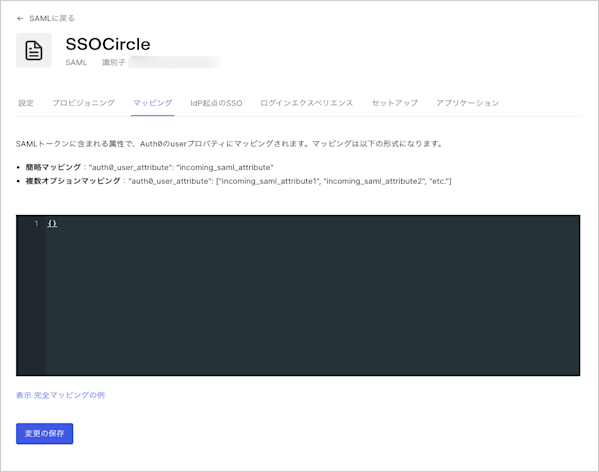
**[Mappings(マッピング)]** ビューを選択し、`{}`間のマッピングを入力してから **[Save(保存)]** を選択します。
 **非標準のPingFederateサーバーのマッピング**
```json lines theme={null}
{
"user_id": "http://schemas.xmlsoap.org/ws/2005/05/identity/claims/nameidentifier",
"email": "http://schemas.xmlsoap.org/ws/2005/05/identity/claims/nameidentifier"
}
```
**SSO Circleのマッピング**
```json lines theme={null}
{
"email": "EmailAddress",
"given_name": "FirstName",
"family_name": "LastName"
}
```
**1つのユーザー属性に2つのクレームのうち1つをマッピング**
```json lines theme={null}
{
"given_name": [
"http://schemas.xmlsoap.org/ws/2005/05/identity/claims/givenname",
"http://schemas.xmlsoap.org/ws/2005/05/identity/claims/name"
]
}
```
**名前識別子をユーザー属性にマッピングする方法**
```json lines theme={null}
{
"user_id": [
"http://schemas.xmlsoap.org/ws/2005/05/identity/claims/nameidentifier",
"http://schemas.xmlsoap.org/ws/2005/05/identity/claims/upn",
"http://schemas.xmlsoap.org/ws/2005/05/identity/claims/name"
]
}
```
**非標準のPingFederateサーバーのマッピング**
```json lines theme={null}
{
"user_id": "http://schemas.xmlsoap.org/ws/2005/05/identity/claims/nameidentifier",
"email": "http://schemas.xmlsoap.org/ws/2005/05/identity/claims/nameidentifier"
}
```
**SSO Circleのマッピング**
```json lines theme={null}
{
"email": "EmailAddress",
"given_name": "FirstName",
"family_name": "LastName"
}
```
**1つのユーザー属性に2つのクレームのうち1つをマッピング**
```json lines theme={null}
{
"given_name": [
"http://schemas.xmlsoap.org/ws/2005/05/identity/claims/givenname",
"http://schemas.xmlsoap.org/ws/2005/05/identity/claims/name"
]
}
```
**名前識別子をユーザー属性にマッピングする方法**
```json lines theme={null}
{
"user_id": [
"http://schemas.xmlsoap.org/ws/2005/05/identity/claims/nameidentifier",
"http://schemas.xmlsoap.org/ws/2005/05/identity/claims/upn",
"http://schemas.xmlsoap.org/ws/2005/05/identity/claims/name"
]
}
```
## 接続をテストする
これで[接続をテストする](/docs/ja-JP/ja-jp/authenticate/identity-providers/enterprise-identity-providers/test-enterprise-connections)準備が整いました。
## グローバルトークン取り消しを構成する
この接続タイプはグローバルトークン取り消しエンドポイントに対応しており、準拠しているIDプロバイダーがAuth0ユーザーセッションとリフレッシュトークンを取り消し、安全なバックチャネルを使用してアプリケーションのバックチャネルログアウトをトリガーできます。
この機能はOkta Workforce Identity Cloudでユニバーサルログアウトと併用できます。
詳しい情報と構成手順については、「[ユニバーサルログアウト](/docs/ja-JP/ja-jp/authenticate/login/logout/universal-logout)」を参照してください。
## もっと詳しく
* [ユニバーサルログアウト](/docs/ja-JP/ja-jp/authenticate/login/logout/universal-logout)