> ## Documentation Index
> Fetch the complete documentation index at: https://auth0.generaltranslation.app/llms.txt
> Use this file to discover all available pages before exploring further.

# OIDCバックチャネルログアウトイニシエータ

> OIDCバックチャネルログアウトイニシエータの機能と、使用しているアプリケーションについて設定する方法を説明します。

export const AuthCodeBlock = ({filename, icon, language, highlight, children}) => {
  const [processedChildren, setProcessedChildren] = useState(children);
  useEffect(() => {
    let unsubscribe = null;
    function init() {
      unsubscribe = window.autorun(() => {
        let processedChildren = children;
        for (const [key, value] of window.rootStore.variableStore.values.entries()) {
          processedChildren = processedChildren.replace(new RegExp(key, "g"), value);
        }
        setProcessedChildren(processedChildren);
      });
    }
    if (window.rootStore) {
      init();
    } else {
      window.addEventListener("adu:storeReady", init);
    }
    return () => {
      window.removeEventListener("adu:storeReady", init);
      unsubscribe?.();
    };
  }, [children]);
  return <CodeBlock filename={filename} icon={icon} language={language} lines highlight={highlight}>
      {processedChildren}
    </CodeBlock>;
};

OIDCバックチャネルログアウトイニシエータを使用すると、セッション終了イベントに基づいて、ユーザーをリモートでアプリケーションからログアウトさせることができます。OIDCバックチャネルログアウトイニシエータは、IDプロバイダー（<Tooltip data-tooltip-id="react-containers-DefinitionTooltip-2" href="/docs/ja-JP/ja-jp/glossary?term=idp" tip="IDプロバイダー（IdP）: デジタルIDを保存および管理するサービス。" cta="用語集の表示">IdP</Tooltip>）起点の<Tooltip data-tooltip-id="react-containers-DefinitionTooltip-1" href="/docs/ja-JP/ja-jp/glossary?term=security-assertion-markup-language" tip="Security Assertion Markup Language（SAML）: パスワードなしに二者間で認証情報を交換できる標準化プロトコル。" cta="用語集の表示">SAML</Tooltip>ログアウト要求など、プロトコルを超えて動作し、サードパーティーのクッキー制限には影響されません。

この機能はOIDCバックチャネルの標準仕様を拡張したものです。この機能を構成すると、パスワードの変更やセッションの期限切れなどの特定のセッション終了イベント、またはすべてのセッション終了イベントに対して、OIDCバックチャネルログアウト要求を開始できるようになります。

管理者はAuth0 <Tooltip data-tooltip-id="react-containers-DefinitionTooltip-0" href="/docs/ja-JP/ja-jp/glossary?term=management-api" tip="Management API: 顧客が管理タスクを実行できるようにするための製品。" cta="用語集の表示">Management API</Tooltip>を使って、特定のアプリケーションに対してこの機能を有効にすることができます。

<div id="how-oidc-back-channel-logout-initiators-work">
  ## OIDCバックチャネルログアウトイニシエータの仕組み
</div>

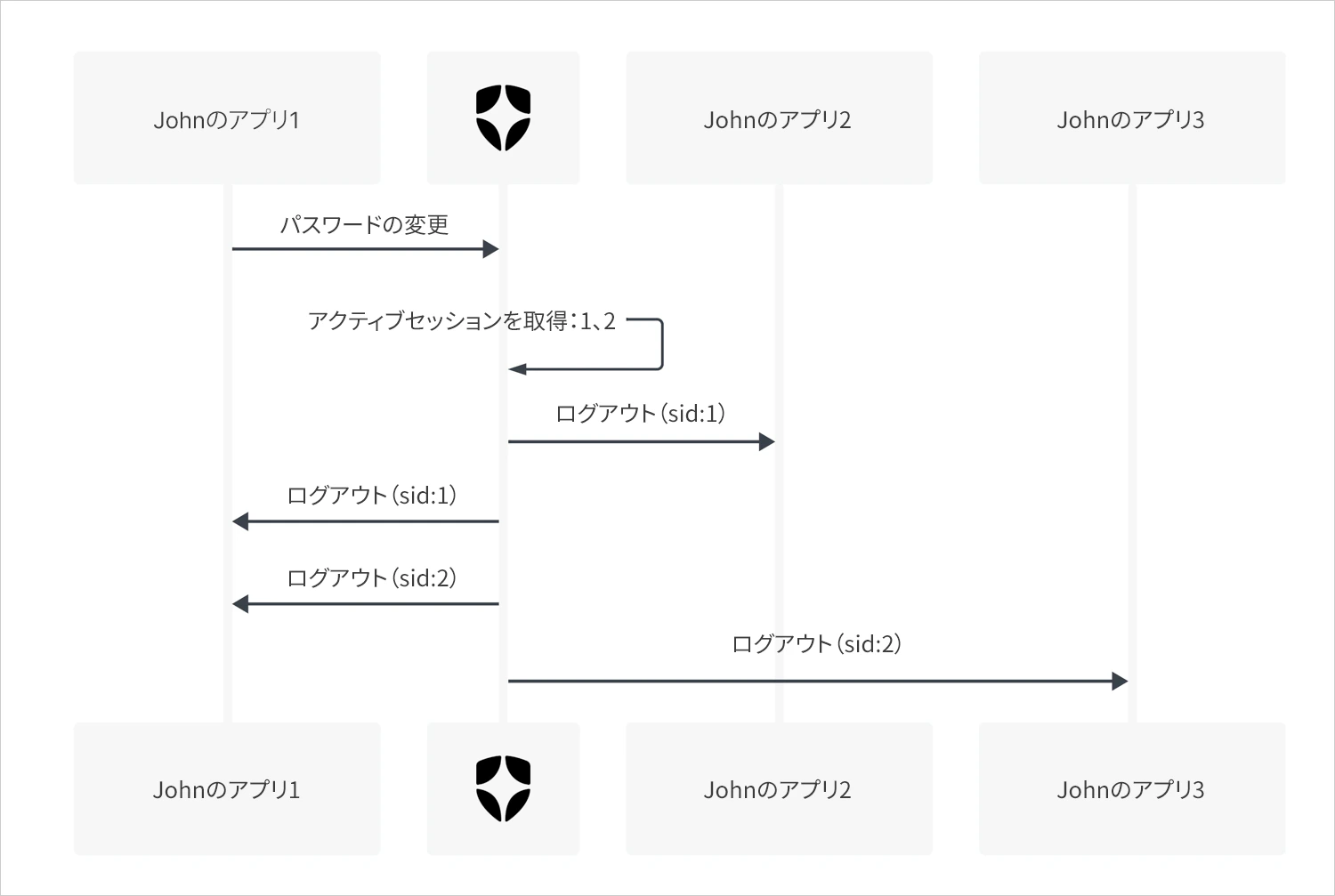
イニシエータは、OIDCバックチャネルログアウト応答をセッション終了イベントにバインドします。イベントをキャプチャして、対象のセッションに関連付けられているすべてのアプリケーションでOIDCログアウトトークンをトリガーするのに使用します。

<Callout icon="file-lines" color="#0EA5E9" iconType="regular">
  イニシエータは、テナントにおけるセッション管理（セッション終了イベントを含む）を制御しません。
</Callout>

下の図は、パスワード変更イベントについて、OIDCバックチャネルログアウトイニシエータの動作をまとめたものです。
<Frame>
  <img src="https://mintcdn.com/generaltranslationinc/PUgbyUqJRl3iBJzI/docs/images/ja-jp/cdy7uua7fh8z/2GwtCTwecxYONxL1DbewxO/a096a417507a96be8b13acf0970567a3/OIDC_Back-Channel_Logout_Initiators_Diagram.png?fit=max&auto=format&n=PUgbyUqJRl3iBJzI&q=85&s=e064a5dce1e5edfb3692d06928148da7" alt="" width="1500" height="1007" data-path="docs/images/ja-jp/cdy7uua7fh8z/2GwtCTwecxYONxL1DbewxO/a096a417507a96be8b13acf0970567a3/OIDC_Back-Channel_Logout_Initiators_Diagram.png" />
</Frame>

<div id="configure-oidc-back-channel-logout-initiators">
  ## OIDCバックチャネルログアウトイニシエータを構成する
</div>

OIDCバックチャネルログアウトイニシエータはAuth0 Management APIを使って構成することができます。

<div id="management-api">
  ### Management API
</div>

Auth0 Management APIでOIDCバックチャネルログアウトイニシエータを構成するには、[クライアント更新](https://auth0.com/docs/api/management/v2/clients/patch-clients-by-id)エンドポイントを使用します。

1. `update:clients`スコープを持つ[Management APIアクセストークン](https://auth0.com/docs/secure/tokens/access-tokens/management-api-access-tokens)を取得します。
2. ペイロードに適切な構成データを含めて、[クライアント更新](https://auth0.com/docs/api/management/v2/clients/patch-clients-by-id)エンドポイントを呼び出します。たとえば、パスワード変更イベントの後でアプリケーションからログアウトさせるには、以下を提供します。

export const codeExample1 = `   PATCH /api/v2/clients/{yourClientId}
{
  ...
  "oidc_logout": {
    "backchannel_logout_urls": ["https://example.com/cb"]
    "backchannel_logout_initiators": {
      "mode":"custom",
      "selected_initiators": ["rp-logout", "idp-logout", "password-changed"]
    }
  }
  ...
}
`;

<AuthCodeBlock children={codeExample1} language="json" filename="JSON" />

<div id="properties">
  #### プロパティ
</div>

`backchannel_logout_initiators`オブジェクトは以下のプロパティをサポートしています。

<table class="table">
  <thead>
    <tr>
      <th><b>プロパティ</b></th>
      <th><b>タイプ</b></th>
      <th><b>必須?</b></th>
      <th><b>説明</b></th>
      <th><b>サポートされている値</b></th>
    </tr>
  </thead>

  <tbody>
    <tr>
      <td>`mode`</td>
      <td>文字列</td>
      <td>必須</td>
      <td>イニシエーターを有効にするための構成方法。</td>
      <td>`custom`、`all`</td>
    </tr>

    <tr>
      <td>`selected_initiators`</td>
      <td>配列</td>
      <td>`mode`が`custom`の場合は必須</td>
      <td>有効にするイニシエーターのリスト。</td>
      <td>`rp-logout`、`idp-logout`、`password-changed`、`session-expired`、`session-revoked`、`account-deleted`、`email-identifier-changed`</td>
    </tr>
  </tbody>
</table>

<div id="mode-property">
  ##### modeプロパティ
</div>

`mode`プロパティはイニシエータを有効化するための構成メソッドを定義します。

デフォルトでは`custom`に設定され、有効化したいイニシエータを指定できるようになっています。IdPセッションの終了後に必ずアプリケーションをログアウトさせたい場合には、`all`に設定します。

`mode`プロパティは以下の値をサポートしています。

<table class="table">
  <thead>
    <tr>
      <th><b>値</b></th>
      <th><b>説明</b></th>
    </tr>
  </thead>

  <tbody>
    <tr>
      <td>`custom`</td>
      <td>`selected_initiators`配列にリストされたイニシエーターのみを有効にします。</td>
    </tr>

    <tr>
      <td>`all`</td>
      <td>現在および将来のすべてのイニシエーターを自動的に有効にします。</td>
    </tr>
  </tbody>
</table>

<div id="selected_initiators-property">
  ##### selected\_initiatorsプロパティ
</div>

`selected_initiators`プロパティには、指定されたアプリケーションに対して有効化するイニシエータのリストが含まれます。

`selected_initiators`プロパティは以下の値をサポートしています。

<table class="table">
  <thead>
    <tr>
      <th><b>値</b></th>
      <th><b>説明</b></th>
    </tr>
  </thead>

  <tbody>
    <tr>
      <td>`rp-logout`</td>
      <td>要求がリライングパーティー（RP）によって開始されました。</td>
    </tr>

    <tr>
      <td>`idp-logout`</td>
      <td>要求が外部IDプロバイダー（IdP）によって開始されました。</td>
    </tr>

    <tr>
      <td>`password-changed`</td>
      <td>要求がパスワードの変更によって開始されました。</td>
    </tr>

    <tr>
      <td>`session-expired`</td>
      <td>要求がセッションの期限切れによって開始されました。</td>
    </tr>

    <tr>
      <td>`session-revoked`</td>
      <td>要求がセッションの削除によって開始されました。</td>
    </tr>

    <tr>
      <td>`account-deleted`</td>
      <td>要求がアカウントの削除によって開始されました。</td>
    </tr>

    <tr>
      <td>`email-identifier-changed`</td>
      <td>要求がメール識別子の変更によって開始されました。</td>
    </tr>
  </tbody>
</table>

<div id="examples">
  #### 例
</div>

<div id="subscribe-an-application-to-all-current-and-future-initiators">
  ##### アプリケーションを現在と未来のイニシエータすべてに登録する
</div>

export const codeExample2 = `PATCH /api/v2/clients/{yourClientId}

{
  ...
  "oidc_logout": {
    "backchannel_logout_urls": ["https://example.com/cb"]
    "backchannel_logout_initiators": {
      "mode":"all"
    }
  }
  ...
}`;

<AuthCodeBlock children={codeExample2} language="json" filename="JSON" />

<div id="subscribe-an-application-to-password-changed-initiator-only-rp-logout-and-idp-logout-are-required">
  ##### アプリケーションをパスワード変更のイニシエータにのみ登録する（rp-logoutとidp-logoutが必要）
</div>

export const codeExample3 = `PATCH /api/v2/clients/{yourClientId}

{
  ...
  "oidc_logout": {
    "backchannel_logout_urls": ["https://example.com/cb"]
    "backchannel_logout_initiators": {
      "mode":"custom",
      "selected_initiators": ["rp-logout", "idp-logout", "password-changed"]
    }
  }
  ...
}`;

<AuthCodeBlock children={codeExample3} language="json" filename="JSON" />

<div id="unsubscribe-all-initiators-rp-logout-remains-the-default">
  ##### すべてのイニシエータを登録解除する（rp-logoutはデフォルトで登録されたままになる）
</div>

export const codeExample4 = `PATCH /api/v2/clients/{yourClientId}

{
  ...
  "oidc_logout": {
	  "backchannel_logout_urls": ["https://example.com/cb"]
  }
  ...
}`;

<AuthCodeBlock children={codeExample4} language="json" filename="JSON" />

<div id="dashboard">
  ### ダッシュボード
</div>

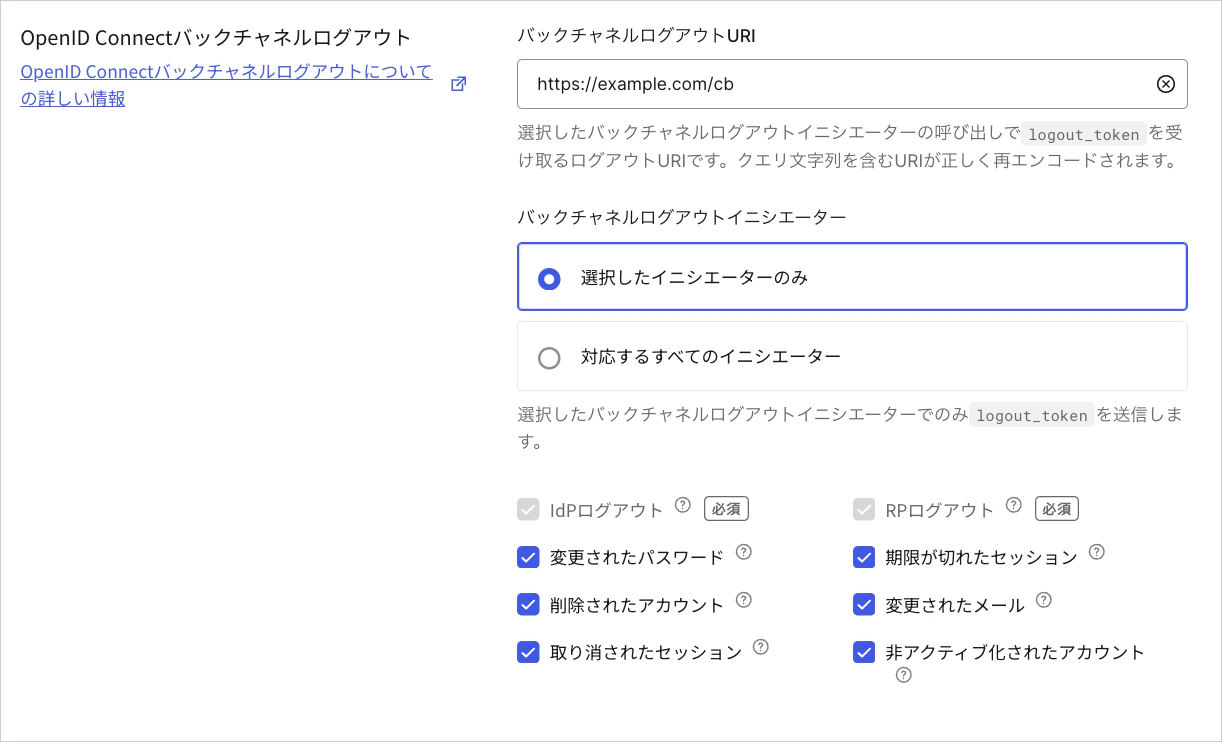
<Tooltip data-tooltip-id="react-containers-DefinitionTooltip-0" href="/docs/ja-JP/ja-jp/glossary?term=openid" tip="OpenID: アプリケーションがログイン情報を収集および保存することなくにユーザーのIDを検証できるようにする認証用のオープン標準。" cta="用語集の表示">OpenID</Tooltip> Connectバックチャネルログアウトは他のアプリケーション設定と並行して構成できます。この機能は、バックチャネルログアウトURIが提供されると、自動的にアクティブ化されます。
<Frame>
  <img src="https://mintcdn.com/generaltranslationinc/Vfs3K4sBEwnXQ0uD/docs/images/ja-jp/cdy7uua7fh8z/vgN0wudP38zgRZNL59Mhy/305351ceb61852621759023a3269e9cf/Backchannel_Logout_settings.png?fit=max&auto=format&n=Vfs3K4sBEwnXQ0uD&q=85&s=3c1c584cad374584328b7d8159033956" alt="Dashboard > Applications > Application Settings" data-og-width="1222" width="1222" data-og-height="742" height="742" data-path="docs/images/ja-jp/cdy7uua7fh8z/vgN0wudP38zgRZNL59Mhy/305351ceb61852621759023a3269e9cf/Backchannel_Logout_settings.png" data-optimize="true" data-opv="3" srcset="https://mintcdn.com/generaltranslationinc/Vfs3K4sBEwnXQ0uD/docs/images/ja-jp/cdy7uua7fh8z/vgN0wudP38zgRZNL59Mhy/305351ceb61852621759023a3269e9cf/Backchannel_Logout_settings.png?w=280&fit=max&auto=format&n=Vfs3K4sBEwnXQ0uD&q=85&s=2d73ddc6a71aaff2a3063f1f40c61147 280w, https://mintcdn.com/generaltranslationinc/Vfs3K4sBEwnXQ0uD/docs/images/ja-jp/cdy7uua7fh8z/vgN0wudP38zgRZNL59Mhy/305351ceb61852621759023a3269e9cf/Backchannel_Logout_settings.png?w=560&fit=max&auto=format&n=Vfs3K4sBEwnXQ0uD&q=85&s=f92beef4b0c51b9c9d1bee7fa9fcd43c 560w, https://mintcdn.com/generaltranslationinc/Vfs3K4sBEwnXQ0uD/docs/images/ja-jp/cdy7uua7fh8z/vgN0wudP38zgRZNL59Mhy/305351ceb61852621759023a3269e9cf/Backchannel_Logout_settings.png?w=840&fit=max&auto=format&n=Vfs3K4sBEwnXQ0uD&q=85&s=008ad108759d6e131fade4a85eb06fd1 840w, https://mintcdn.com/generaltranslationinc/Vfs3K4sBEwnXQ0uD/docs/images/ja-jp/cdy7uua7fh8z/vgN0wudP38zgRZNL59Mhy/305351ceb61852621759023a3269e9cf/Backchannel_Logout_settings.png?w=1100&fit=max&auto=format&n=Vfs3K4sBEwnXQ0uD&q=85&s=4eccd93574c9cde47b956c6591e34467 1100w, https://mintcdn.com/generaltranslationinc/Vfs3K4sBEwnXQ0uD/docs/images/ja-jp/cdy7uua7fh8z/vgN0wudP38zgRZNL59Mhy/305351ceb61852621759023a3269e9cf/Backchannel_Logout_settings.png?w=1650&fit=max&auto=format&n=Vfs3K4sBEwnXQ0uD&q=85&s=8c8a7f3cece4bd57633b756961c430be 1650w, https://mintcdn.com/generaltranslationinc/Vfs3K4sBEwnXQ0uD/docs/images/ja-jp/cdy7uua7fh8z/vgN0wudP38zgRZNL59Mhy/305351ceb61852621759023a3269e9cf/Backchannel_Logout_settings.png?w=2500&fit=max&auto=format&n=Vfs3K4sBEwnXQ0uD&q=85&s=6c1b219088efcbcaafc0659e6de47f4e 2500w" />
</Frame>

<div id="selected-initiators-only">
  #### Selected initiators only（選択されたイニシエータのみ）
</div>

必要なイニシエータ（`rp-logout`と`idp-logout`）のみがデフォルトで登録されます。他の追加のイニシエータは、未来に追加されるものも含めて、前もって選択しておかないと、アプリケーションからログアウトを開始できません。

選択したイニシエータについてのみアプリケーションをログアウトさせたい場合には、このオプションを選択します。

<div id="all-supported-initiators">
  #### All supported initiators（すべてのサポートされているイニシエータ）
</div>

すべてのサポートされているイニシエータが、未来に追加されるものも含めて、デフォルトで登録されます。

IdPセッションの終了時に必ずアプリケーションをログアウトさせたい場合には、このオプションを選択します。
