> ## Documentation Index
> Fetch the complete documentation index at: https://auth0.generaltranslation.app/llms.txt
> Use this file to discover all available pages before exploring further.
# M2Mトリガー
> アクションのM2Mフローと、M2Mフローの一部として実行されるcredentials-exchangeアクショントリガーについて説明します。
M2Mトリガーは、アクセストークンが[クライアントの資格情報フロー](/docs/ja-JP/ja-jp/get-started/authentication-and-authorization-flow/client-credentials-flow)で発行された場合に実行されます。
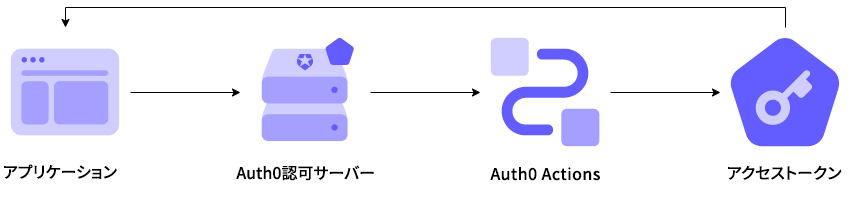 このフロー内のアクションはブロッキング(同期的)であり、トリガーのプロセスの一部として実行されます。そのため、アクションが完了するまでAuth0パイプラインの他の部分の実行が停止されます。
## トリガー
### M2M / クライアント資格情報
`credentials-exchange`トリガーは、アクセストークンが返される前に実行される関数です。
#### リファレンス
* [イベントオブジェクト](/docs/ja-JP/ja-jp/customize/actions/explore-triggers/machine-to-machine-trigger/credentials-exchange-event-object):クライアント資格情報交換の要求についてコンテキスト情報を提供します。
* [APIオブジェクト](/docs/ja-JP/ja-jp/customize/actions/explore-triggers/machine-to-machine-trigger/credentials-exchange-api-object):フローの動作を変更するためのメソッドが提供されます。
## 一般的なユースケース
### アクセス制御
credentials-exchangeアクションは、カスタムロジックに基づいてアクセストークンを拒否するのに使用できます。
```javascript lines theme={null}
/**
* @param {Event} event - Details about client credentials grant request.
* @param {CredentialsExchangeAPI} api - Interface whose methods can be used to change the behavior of client credentials grant.
*/
exports.onExecuteCredentialsExchange = async (event, api) => {
if (event.request.geoip.continentCode === "NA") {
api.access.deny('invalid_request', "Access from North America is not allowed.");
}
};
```
### アクセストークンにカスタムクレームを追加する
credentials-exchangeアクションは、アクセストークンにカスタムクレームを追加するのに使用できます。
```javascript lines theme={null}
/**
* @param {Event} event - Details about client credentials grant request.
* @param {CredentialsExchangeAPI} api - Interface whose methods can be used to change the behavior of client credentials grant.
*/
exports.onExecuteCredentialsExchange = async (event, api) => {
api.accessToken.setCustomClaim("https://my-api.exampleco.com/request-ip", event.request.ip);
};
```
名前空間のある、URI形式のカスタムクレームを使用することを強くお勧めします。名前空間のあるカスタムクレームと名前空間のないカスタムクレームについては、「 [カスタムクレームを作成する](/docs/ja-JP/ja-jp/secure/tokens/json-web-tokens/create-custom-claims)」をお読みください。