> ## Documentation Index
> Fetch the complete documentation index at: https://auth0.generaltranslation.app/llms.txt
> Use this file to discover all available pages before exploring further.

# Auth0

> Auth0フローのアクションを構成して、ユーザープロファイル情報の取得や更新と、新しいユーザーの作成を行う方法について説明します。

このリストにあるAuth0アクションは、ユーザーの取得、作成、更新を行えるようにします。

<div id="management-api">
  ## Vault接続を構成する
</div>

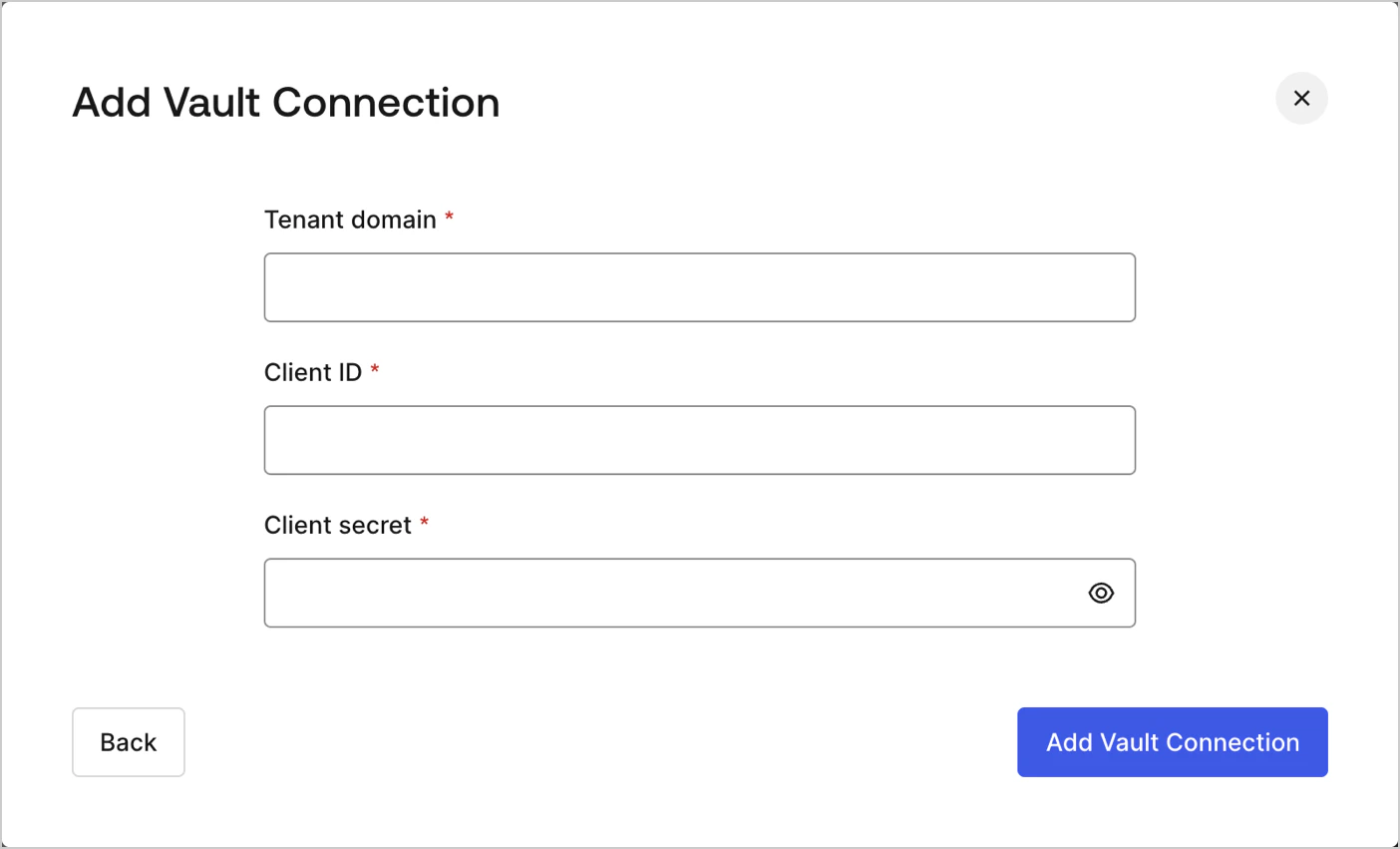
Auth0のアクションにVault接続を構成するには、[マシンツーマシン](/docs/ja-JP/ja-jp/get-started/auth0-overview/create-applications/machine-to-machine-apps)アプリケーションを作成して、 **テナントドメイン、クライアントIDおよびクライアントシークレット** を使用する必要があります：

<Frame>
  <img src="https://mintcdn.com/generaltranslationinc/8DIt0xu_-cUu1jhk/docs/images/ja-jp/cdy7uua7fh8z/1IPtH5hD6QTRXsySyo2Ovr/3562828624e2fd4f308b6eb3b5042f34/auth0-vault-connection.png?fit=max&auto=format&n=8DIt0xu_-cUu1jhk&q=85&s=77091fec80b16017d8c3e004e042b2eb" alt="" width="1404" height="851" data-path="docs/images/ja-jp/cdy7uua7fh8z/1IPtH5hD6QTRXsySyo2Ovr/3562828624e2fd4f308b6eb3b5042f34/auth0-vault-connection.png" />
</Frame>

<Warning>
  マシンツーマシンアプリケーションには必ずManagement APIへのアクセスを認可して、正しいスコープ（`update:users_app_metadata`など）を選択してください。
</Warning>

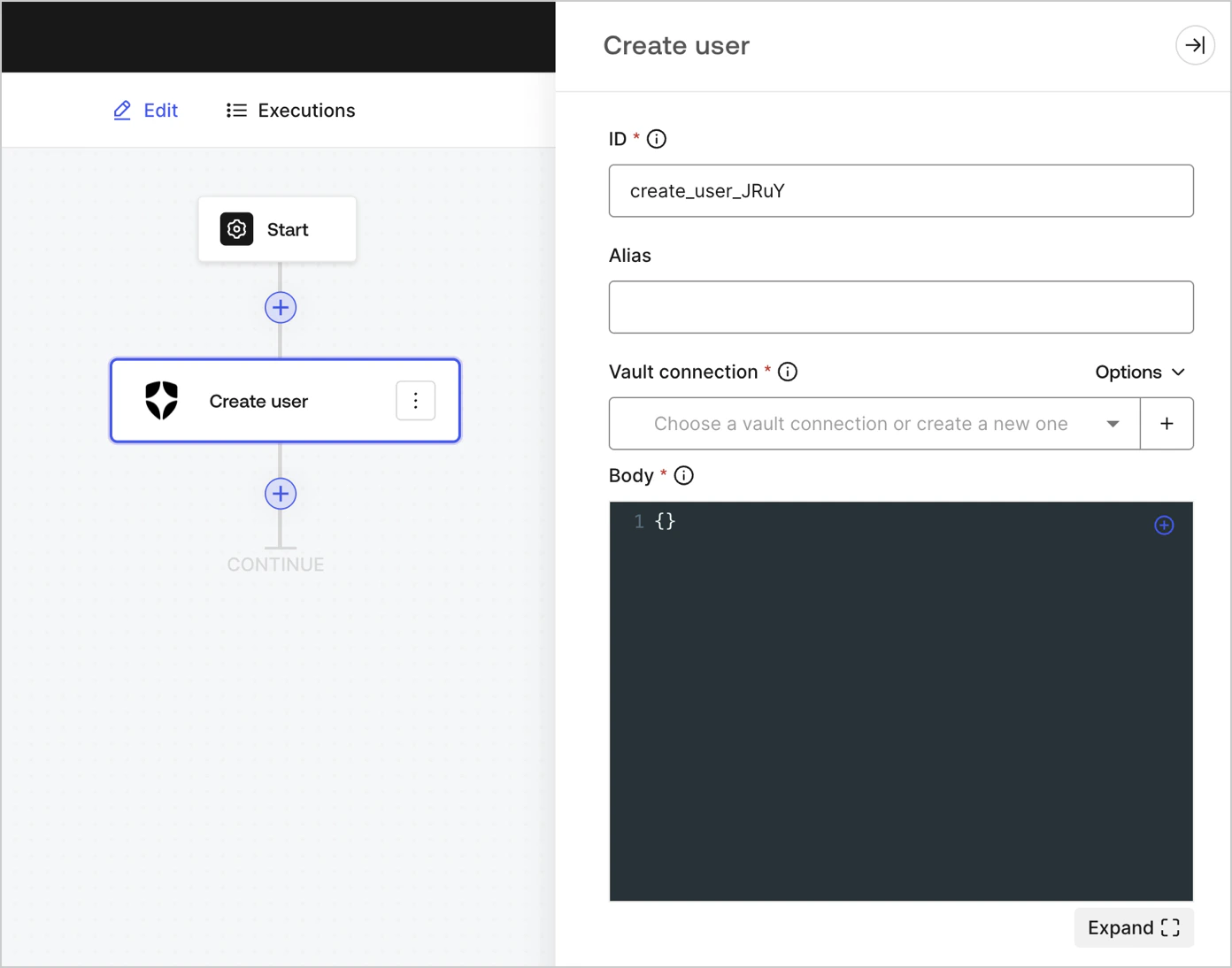
## ユーザーの作成

ユーザーを作成します。

<Frame>
  <img src="https://mintcdn.com/generaltranslationinc/UCtxRPLKKGiAgiWv/docs/images/ja-jp/cdy7uua7fh8z/6MQIKf2IpTtI2g7d5Pwn7u/222ec746cf9c0c1003d18ba4c0aa451e/create_user.png?fit=max&auto=format&n=UCtxRPLKKGiAgiWv&q=85&s=d75d16b29f53ea1e7bde4e8e1a174bcd" alt="" width="1392" height="1094" data-path="docs/images/ja-jp/cdy7uua7fh8z/6MQIKf2IpTtI2g7d5Pwn7u/222ec746cf9c0c1003d18ba4c0aa451e/create_user.png" />
</Frame>

<div id="create-user">
  ### 入力設定
</div>

<table class="table">
  <thead>
    <tr>
      <th><b>パラメーター</b></th>
      <th><b>説明</b></th>
    </tr>
  </thead>

  <tbody>
    <tr>
      <td>ボディー</td>
      <td>追加するAuth0ユーザープロパティのペイロードです。詳細については、<a href="https://auth0.com/docs/ja-jp/api/management/v2/users/post-users">ユーザー作成</a>APIのドキュメントをお読みください。 </td>
    </tr>
  </tbody>
</table>

### 出力設定

期待される応答とステータスコードは、APIドキュメントの「[ユーザーの作成](https://auth0.com/docs/api/management/v2/users/post-users#response-messages)」に記載されています。

## ユーザーの取得

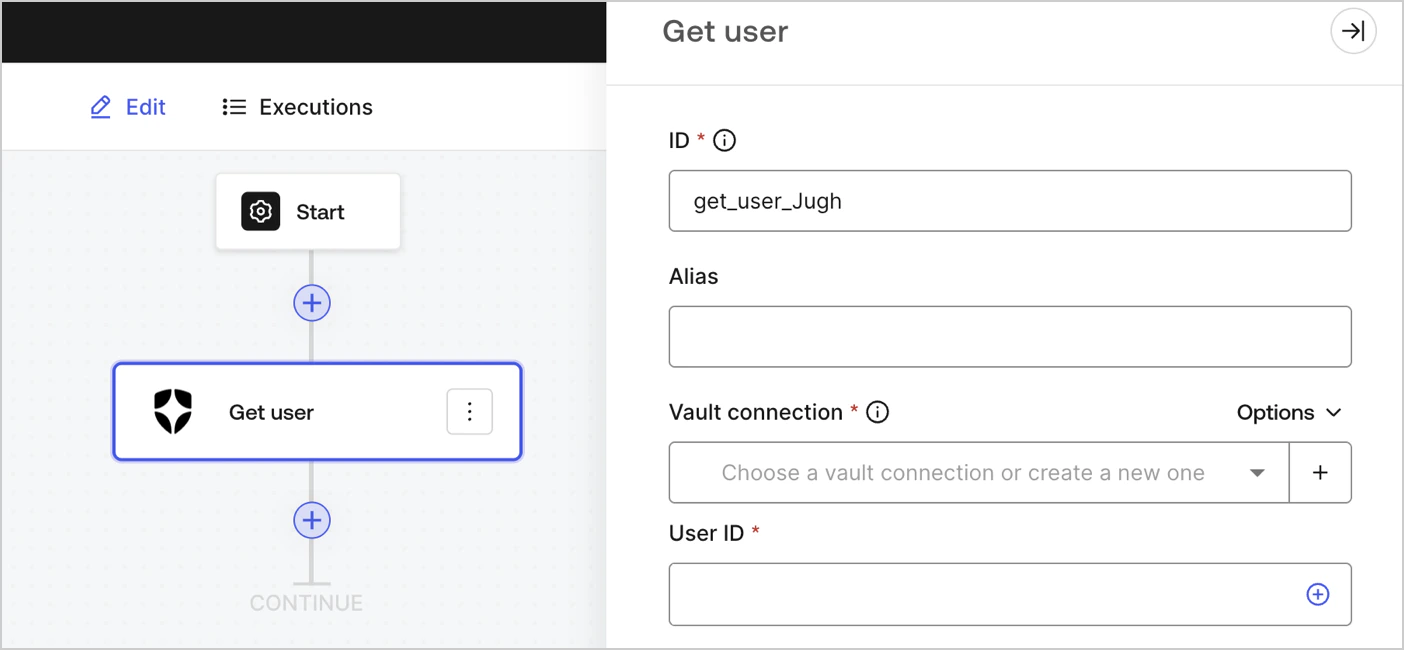
ユーザーの詳細情報を取得します。

<Frame>
  <img src="https://mintcdn.com/generaltranslationinc/fJ7FJkQ9-WdlT49P/docs/images/ja-jp/cdy7uua7fh8z/3GoNZsXOvMTYRtMQNj00mm/6e92d94cee7b165479c688358a5df242/Screenshot_2024-11-18_at_16.31.49.png?fit=max&auto=format&n=fJ7FJkQ9-WdlT49P&q=85&s=ac54f8ebea2cbe4b263f29164cecbf3a" alt="" width="1404" height="650" data-path="docs/images/ja-jp/cdy7uua7fh8z/3GoNZsXOvMTYRtMQNj00mm/6e92d94cee7b165479c688358a5df242/Screenshot_2024-11-18_at_16.31.49.png" />
</Frame>

<div id="create-user">
  ### 入力設定
</div>

<table class="table">
  <thead>
    <tr>
      <th><b>パラメーター</b></th>
      <th><b>説明</b></th>
    </tr>
  </thead>

  <tbody>
    <tr>
      <td>ユーザーID</td>
      <td>取得するユーザーのIDです。詳細については、<a api=" auth0.com" docs="" get-users-by-id="https:=" ja-jp="" management="" users="" v2="">ユーザー取得</a>APIのドキュメントをお読みください。 </td>
    </tr>
  </tbody>
</table>

### 出力設定

期待される応答とステータスコードは、APIドキュメントの「[ユーザーの取得](https://auth0.com/docs/api/management/v2/users/get-users-by-id#response-messages)」に記載されています。

## ユーザーの更新

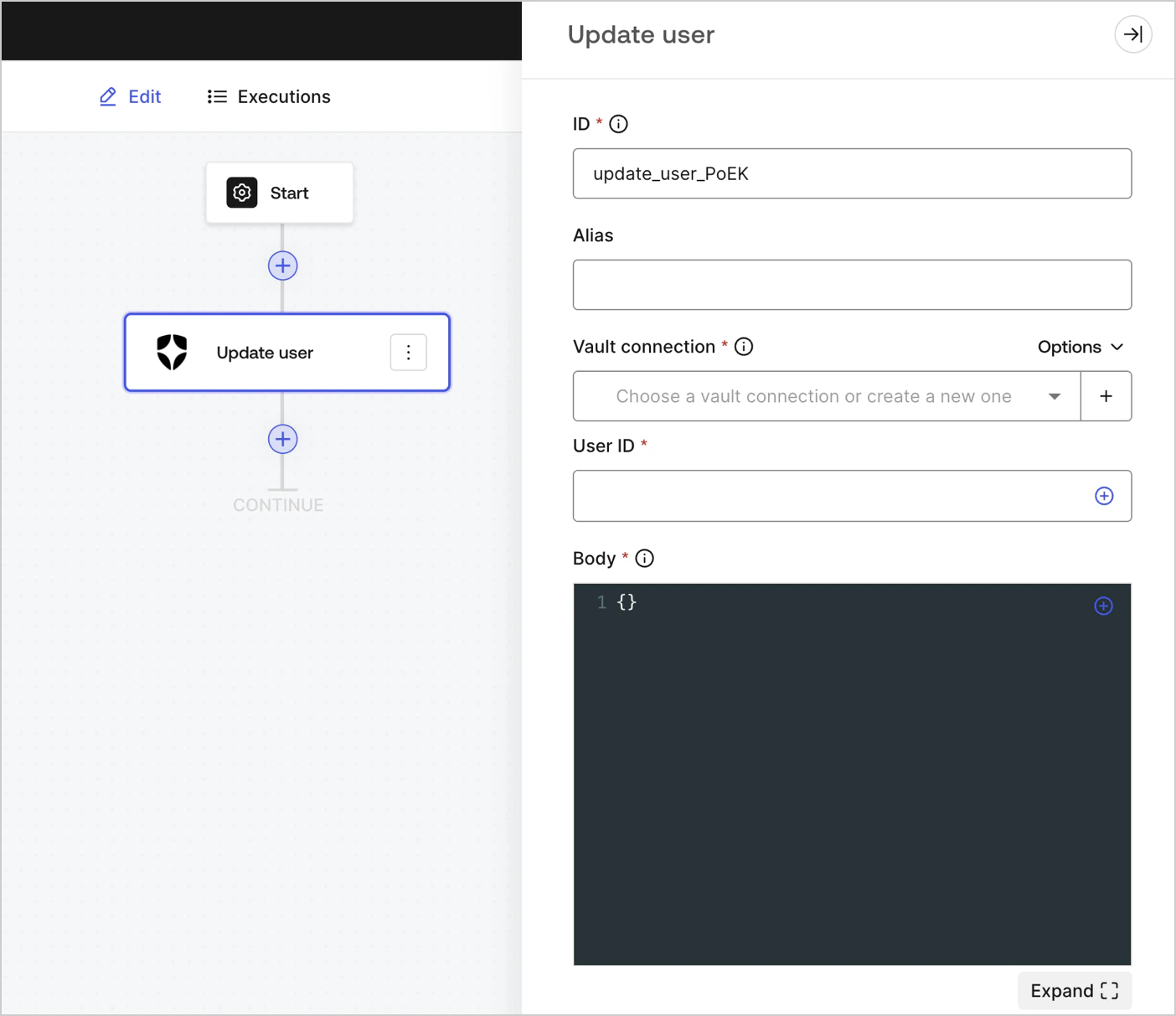
ユーザーを更新します。

<Frame>
  <img src="https://mintcdn.com/generaltranslationinc/xBEuvOEiZgMgyXPQ/docs/images/ja-jp/cdy7uua7fh8z/3tymSpaeod6EksWRJp1sge/1122b244d756d754fe41baac209a132b/Screenshot_2024-11-18_at_16.49.56.png?fit=max&auto=format&n=xBEuvOEiZgMgyXPQ&q=85&s=fd942d9624f14cba32b183e8b175fb83" alt="" width="1404" height="1213" data-path="docs/images/ja-jp/cdy7uua7fh8z/3tymSpaeod6EksWRJp1sge/1122b244d756d754fe41baac209a132b/Screenshot_2024-11-18_at_16.49.56.png" />
</Frame>

<div id="create-user">
  ### 入力設定
</div>

<table class="table">
  <thead>
    <tr>
      <th><b>パラメーター</b></th>
      <th><b>説明</b></th>
    </tr>
  </thead>

  <tbody>
    <tr>
      <td>ユーザーID</td>
      <td>更新するユーザーのIDです。</td>
    </tr>

    <tr>
      <td>ボディー</td>
      <td>更新するAuth0ユーザープロパティのペイロードです。詳細については、<a href="https://auth0.com/docs/ja-jp/api/management/v2/users/patch-users-by-id">ユーザー更新</a>APIのドキュメントをお読みください。 </td>
    </tr>
  </tbody>
</table>

### 出力設定

期待される応答とステータスコードは、APIドキュメントの「[ユーザーの更新](https://auth0.com/docs/api/management/v2/users/patch-users-by-id#response-messages)」に記載されています。

## カスタムAPI要求

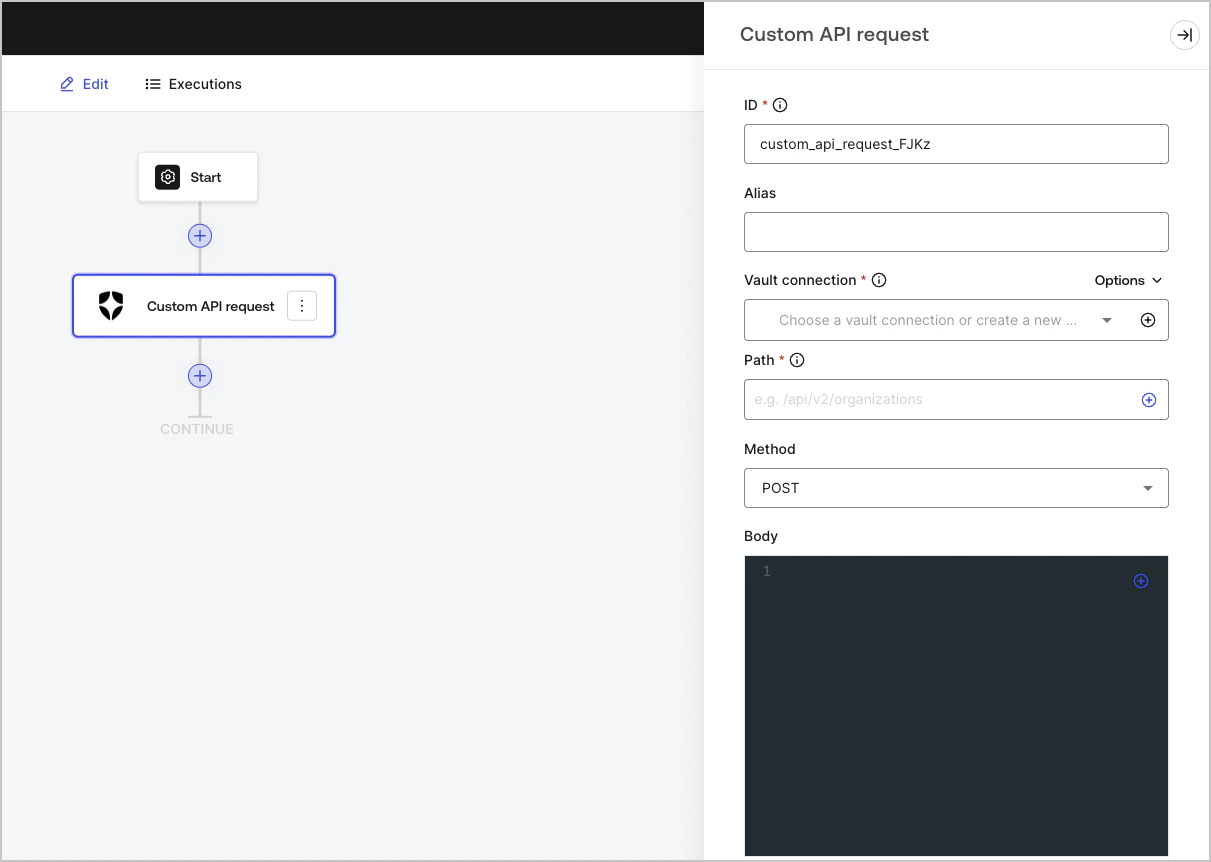
Auth0 APIのエンドポイントにカスタムAPI要求を送信します。

<Frame>
  <img src="https://mintcdn.com/generaltranslationinc/UCtxRPLKKGiAgiWv/docs/images/ja-jp/cdy7uua7fh8z/66uV9iuhwfnXUdE1quLOyx/2ae3ff26335acbcd172cbb40618a5a90/Screenshot_2025-01-24_at_18.50.26.png?fit=max&auto=format&n=UCtxRPLKKGiAgiWv&q=85&s=a06d316906a01d18c2658fe4d9ef7cec" alt="Dashboard > Customize > Flows > Integrations > Auth0" data-og-width="1211" width="1211" data-og-height="862" height="862" data-path="docs/images/ja-jp/cdy7uua7fh8z/66uV9iuhwfnXUdE1quLOyx/2ae3ff26335acbcd172cbb40618a5a90/Screenshot_2025-01-24_at_18.50.26.png" data-optimize="true" data-opv="3" srcset="https://mintcdn.com/generaltranslationinc/UCtxRPLKKGiAgiWv/docs/images/ja-jp/cdy7uua7fh8z/66uV9iuhwfnXUdE1quLOyx/2ae3ff26335acbcd172cbb40618a5a90/Screenshot_2025-01-24_at_18.50.26.png?w=280&fit=max&auto=format&n=UCtxRPLKKGiAgiWv&q=85&s=a8df3d89329c7b3689f602ce4e6c513a 280w, https://mintcdn.com/generaltranslationinc/UCtxRPLKKGiAgiWv/docs/images/ja-jp/cdy7uua7fh8z/66uV9iuhwfnXUdE1quLOyx/2ae3ff26335acbcd172cbb40618a5a90/Screenshot_2025-01-24_at_18.50.26.png?w=560&fit=max&auto=format&n=UCtxRPLKKGiAgiWv&q=85&s=20cd33a5baec5dab8265ac4249903ec5 560w, https://mintcdn.com/generaltranslationinc/UCtxRPLKKGiAgiWv/docs/images/ja-jp/cdy7uua7fh8z/66uV9iuhwfnXUdE1quLOyx/2ae3ff26335acbcd172cbb40618a5a90/Screenshot_2025-01-24_at_18.50.26.png?w=840&fit=max&auto=format&n=UCtxRPLKKGiAgiWv&q=85&s=61d3ed5187d1c58a4271ef84a37cd164 840w, https://mintcdn.com/generaltranslationinc/UCtxRPLKKGiAgiWv/docs/images/ja-jp/cdy7uua7fh8z/66uV9iuhwfnXUdE1quLOyx/2ae3ff26335acbcd172cbb40618a5a90/Screenshot_2025-01-24_at_18.50.26.png?w=1100&fit=max&auto=format&n=UCtxRPLKKGiAgiWv&q=85&s=b3d58e3a913d21614bb67dc70bcd706f 1100w, https://mintcdn.com/generaltranslationinc/UCtxRPLKKGiAgiWv/docs/images/ja-jp/cdy7uua7fh8z/66uV9iuhwfnXUdE1quLOyx/2ae3ff26335acbcd172cbb40618a5a90/Screenshot_2025-01-24_at_18.50.26.png?w=1650&fit=max&auto=format&n=UCtxRPLKKGiAgiWv&q=85&s=b6858a46def173858b227354a67099e5 1650w, https://mintcdn.com/generaltranslationinc/UCtxRPLKKGiAgiWv/docs/images/ja-jp/cdy7uua7fh8z/66uV9iuhwfnXUdE1quLOyx/2ae3ff26335acbcd172cbb40618a5a90/Screenshot_2025-01-24_at_18.50.26.png?w=2500&fit=max&auto=format&n=UCtxRPLKKGiAgiWv&q=85&s=9d57435dfc0761447163f2228c2b09c1 2500w" />
</Frame>

<div id="create-user">
  ### 入力設定
</div>

<table class="table">
  <thead>
    <tr>
      <th><b>Parameter</b></th>
      <th><b>Description</b></th>
    </tr>
  </thead>

  <tbody>
    <tr>
      <td>Path</td>

      <td>
        The API endpoint absolute pathname.
        <br />( Example: `/api/v2/organizations` )
        <br /> <b>Note:</b> Some endpoints, for example: <a href="https://auth0.com/docs/api/management/v2/users/get-users-by-id"> Get a user </a>, require URI encoded parameters when not using alphanumeric characters, such as: `-`, `.`, `_`, or `~`, <a href="https://datatracker.ietf.org/doc/html/rfc3986#section-2.3"> characters </a>).
        <br />To do this, you can use the encodeURIComponent function:  <br />`{{ functions.encodeURIComponent(context.user.user_id) }} `
      </td>
    </tr>

    <tr>
      <td>Method</td>

      <td>
        Available HTTP methods include:

        <ul>
          <li>`GET`</li>
          <li>`POST`</li>
          <li>`PUT`</li>
          <li>`PATCH`</li>
          <li>`DELETE`</li>
        </ul>
      </td>
    </tr>

    <tr>
      <td>Body</td>
      <td>The body of the request. </td>
    </tr>

    <tr>
      <td>Headers</td>
      <td>The headers of the request. </td>
    </tr>

    <tr>
      <td>URL Params</td>
      <td>The URL parameters. These parameters are automatically URL-encoded. </td>
    </tr>
  </tbody>
</table>

### 出力設定

期待される応答とステータスコードは、Auth0 <Tooltip data-tooltip-id="react-containers-DefinitionTooltip-0" href="/docs/ja-JP/ja-jp/glossary?term=management-api" tip="Management API: 顧客が管理タスクを実行できるようにするための製品。" cta="用語集の表示">Management API</Tooltip>のドキュメントに記載されています。