> ## Documentation Index
> Fetch the complete documentation index at: https://auth0.generaltranslation.app/llms.txt
> Use this file to discover all available pages before exploring further.

# JSON

> JSONフローアクションを構成して、JSONオブジェクトの作成、JSONの解析、JSONの文字列変換を行う方法について説明します。

以下に記載のJSONアクションは、JSONの作成、解析、文字列変換を行えるようにします。

<div id="create-json-object">
  ## JSONオブジェクトを作成する
</div>

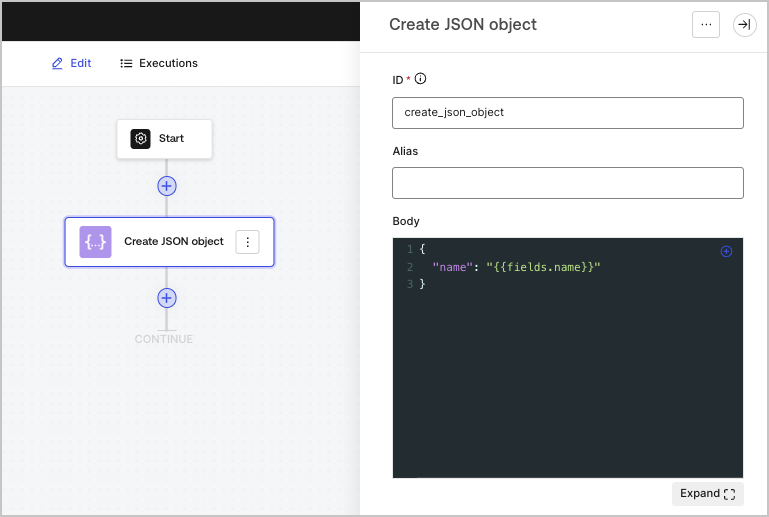
JSONオブジェクトを作成します。これは、フローにある他のアクションでコンテンツを再利用するのに便利です。
<Frame>
  <img src="https://mintcdn.com/generaltranslationinc/PUgbyUqJRl3iBJzI/docs/images/ja-jp/cdy7uua7fh8z/1zJEENRPI2uONuCApPY98p/f1fce88a42fb13fb9856c95c562bd506/createjsonobject.png?fit=max&auto=format&n=PUgbyUqJRl3iBJzI&q=85&s=922d8794653a6ac2cc79841720ef5b41" alt="" width="769" height="517" data-path="docs/images/ja-jp/cdy7uua7fh8z/1zJEENRPI2uONuCApPY98p/f1fce88a42fb13fb9856c95c562bd506/createjsonobject.png" />
</Frame>

<div id="input-settings">
  ### 入力設定
</div>

<table class="table">
  <thead>
    <tr>
      <th><b>パラメーター</b></th>
      <th><b>説明</b></th>
    </tr>
  </thead>

  <tbody>
    <tr>
      <td>ボディー</td>
      <td>JSONオブジェクト。</td>
    </tr>
  </tbody>
</table>

<div id="output-object">
  ### 出力オブジェクト
</div>

<table class="table">
  <thead>
    <tr>
      <th><b>プロパティ</b></th>
      <th><b>種類</b></th>
      <th><b>説明</b></th>
    </tr>
  </thead>

  <tbody>
    <tr>
      <td>`result`</td>
      <td>オブジェクト</td>
      <td>JSONオブジェクトです。</td>
    </tr>
  </tbody>
</table>

<div id="output-object-example">
  ### 出力オブジェクトの例
</div>

```json lines theme={null}
{
	"result": {
		"name": "John Doe"
	}
}
```

<div id="parse-json">
  ## JSONを解析する
</div>

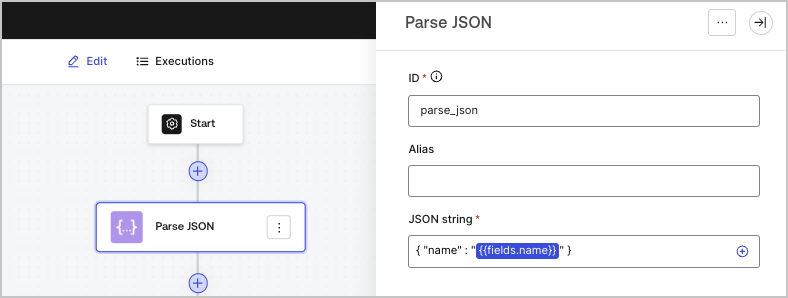
JSON形式の文字列の中身を解析して、JSONオブジェクトに変換します。

<Frame>
  <img src="https://mintcdn.com/generaltranslationinc/xVHOwZwVA1KVCQay/docs/images/ja-jp/cdy7uua7fh8z/5HjIGbBiWik1XozAZczxg5/fe2b0c6f7c657c4209921f1a0978e54b/parsejson.png?fit=max&auto=format&n=xVHOwZwVA1KVCQay&q=85&s=77a82458a8cb4f9e3b3709d8e2fea96d" alt="" width="788" height="298" data-path="docs/images/ja-jp/cdy7uua7fh8z/5HjIGbBiWik1XozAZczxg5/fe2b0c6f7c657c4209921f1a0978e54b/parsejson.png" />
</Frame>

<div id="input-settings">
  ### 入力設定
</div>

<table class="table">
  <thead>
    <tr>
      <th><b>パラメーター</b></th>
      <th><b>説明</b></th>
    </tr>
  </thead>

  <tbody>
    <tr>
      <td>JSON文字列（必須）</td>
      <td>JSON文字列です。</td>
    </tr>
  </tbody>
</table>

<div id="output-object">
  ### 出力オブジェクト
</div>

<table class="table">
  <thead>
    <tr>
      <th><b>プロパティ</b></th>
      <th><b>種類</b></th>
      <th><b>説明</b></th>
    </tr>
  </thead>

  <tbody>
    <tr>
      <td>`object`</td>
      <td>オブジェクト</td>
      <td>解析されたJSONオブジェクトです。</td>
    </tr>
  </tbody>
</table>

<div id="output-object-example">
  ### 出力オブジェクトの例
</div>

```json lines theme={null}
{
  "object": {
    "name": "John Doe"
  }
}
```

<div id="convert-json-to-string">
  ## JSONを文字列に変換する
</div>

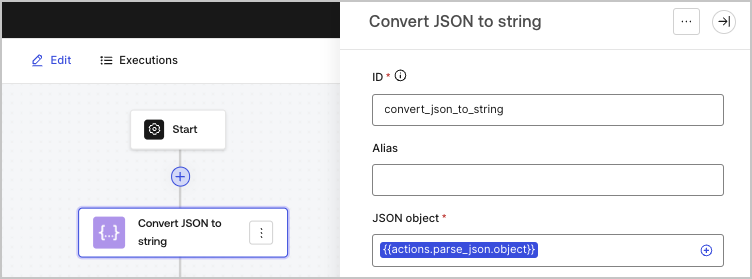
JSONオブジェクトを文字列に変換します。

<Frame>
  <img src="https://mintcdn.com/generaltranslationinc/xBEuvOEiZgMgyXPQ/docs/images/ja-jp/cdy7uua7fh8z/45acWYMlTGc5ZWMzK5Cqqr/6974ea640a76d2d9cc5814225e52734a/convertjsontostring.png?fit=max&auto=format&n=xBEuvOEiZgMgyXPQ&q=85&s=6f563376b298c6e3743ff26398f138c4" alt="" width="752" height="279" data-path="docs/images/ja-jp/cdy7uua7fh8z/45acWYMlTGc5ZWMzK5Cqqr/6974ea640a76d2d9cc5814225e52734a/convertjsontostring.png" />
</Frame>

<div id="input-settings">
  ### 入力設定
</div>

<table class="table">
  <thead>
    <tr>
      <th><b>パラメーター</b></th>
      <th><b>説明</b></th>
    </tr>
  </thead>

  <tbody>
    <tr>
      <td>JSONオブジェクト（必須）</td>

      <td>
        文字列に直列化されるJSONオブジェクトです。
      </td>
    </tr>
  </tbody>
</table>

<div id="output-object">
  ### 出力オブジェクト
</div>

<table class="table">
  <thead>
    <tr>
      <th><b>プロパティ</b></th>
      <th><b>種類</b></th>
      <th><b>説明</b></th>
    </tr>
  </thead>

  <tbody>
    <tr>
      <td>`json`</td>
      <td>文字列</td>
      <td>直列化されたJSONオブジェクトです。</td>
    </tr>
  </tbody>
</table>

<div id="output-object-example">
  ### 出力オブジェクトの例
</div>

```json lines theme={null}
{
  "json": "{\"name\":\"John Doe\"}"
}
```