> ## Documentation Index
> Fetch the complete documentation index at: https://auth0.generaltranslation.app/llms.txt
> Use this file to discover all available pages before exploring further.

# APIにロールベースのアクセス制御（RBAC）を有効にする

> Auth0 DashboardまたはManagement APIを使用して、APIにロールベースのアクセス制御（RBAC）を有効化する方法を学びます。

export const AuthCodeGroup = ({children, dropdown}) => {
  const [processedChildren, setProcessedChildren] = useState(children);
  useEffect(() => {
    let unsubscribe = null;
    function init() {
      unsubscribe = window.autorun(() => {
        const processChildren = node => {
          if (typeof node === "string") {
            let processedNode = node;
            for (const [key, value] of window.rootStore.variableStore.values.entries()) {
              processedNode = processedNode.replace(new RegExp(key, "g"), value);
            }
            return processedNode;
          } else if (Array.isArray(node)) {
            return node.map(processChildren);
          } else if (node && node.props && node.props.children) {
            return {
              ...node,
              props: {
                ...node.props,
                children: processChildren(node.props.children)
              }
            };
          }
          return node;
        };
        setProcessedChildren(processChildren(children));
      });
    }
    if (window.rootStore) {
      init();
    } else {
      window.addEventListener("adu:storeReady", init);
    }
    return () => {
      window.removeEventListener("adu:storeReady", init);
      unsubscribe?.();
    };
  }, [children]);
  return <CodeGroup dropdown={dropdown}>{processedChildren}</CodeGroup>;
};

export const AuthCodeBlock = ({filename, icon, language, highlight, children}) => {
  const [processedChildren, setProcessedChildren] = useState(children);
  useEffect(() => {
    let unsubscribe = null;
    function init() {
      unsubscribe = window.autorun(() => {
        let processedChildren = children;
        for (const [key, value] of window.rootStore.variableStore.values.entries()) {
          processedChildren = processedChildren.replace(new RegExp(key, "g"), value);
        }
        setProcessedChildren(processedChildren);
      });
    }
    if (window.rootStore) {
      init();
    } else {
      window.addEventListener("adu:storeReady", init);
    }
    return () => {
      window.removeEventListener("adu:storeReady", init);
      unsubscribe?.();
    };
  }, [children]);
  return <CodeBlock filename={filename} icon={icon} language={language} lines highlight={highlight}>
      {processedChildren}
    </CodeBlock>;
};

<Tooltip data-tooltip-id="react-containers-DefinitionTooltip-0" href="/docs/ja-JP/ja-jp/glossary?term=auth0-dashboard" tip="Auth0 Dashboard: サービスを構成するためのAuth0の主製品。" cta="用語集の表示">Auth0 Dashboard</Tooltip>またはManagement使用して、APIに[ロールベースのアクセス制御（RBAC）](/docs/ja-JP/ja-jp/manage-users/access-control/rbac)を有効化することができます。これにより、APIの認可コア機能セットが有効になります。

RBACを有効にすると、アクセストークンに権限が含まれているかにかかわらず、要求された権限とユーザーに割り当てられた権限の共通部分がアクセストークンの`scope`クレームに含まれます。RBACを無効にすると、アプリケーションがAPIに定義された任意の権限を要求できるようになり、`scope`クレームには要求されたすべての権限が含まれます。

<Callout icon="file-lines" color="#0EA5E9" iconType="regular">
  アクセストークンのスコープを変更する[Actions](/docs/ja-JP/ja-jp/customize/actions)
</Callout>

<div id="dashboard">
  ## Dashboard
</div>

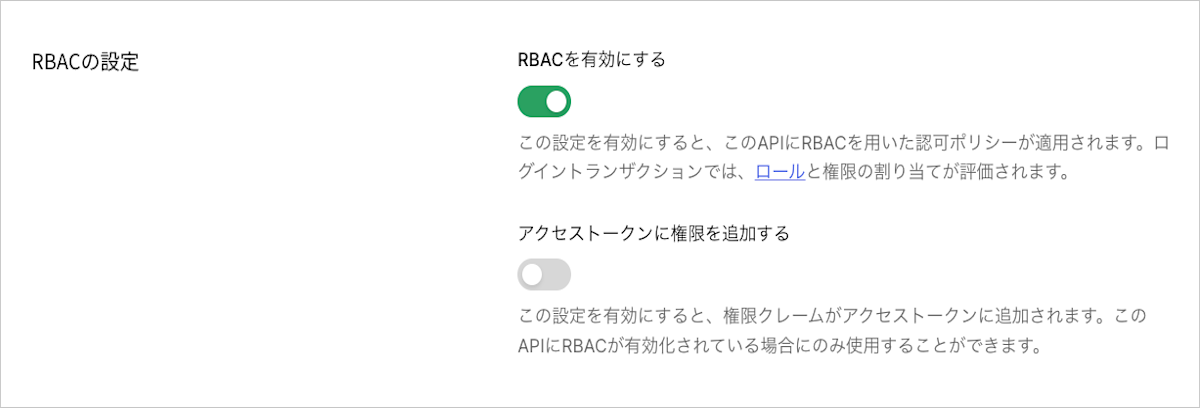
1. [［Dashboard］>［Applications （アプリケーション）］>［API］](https://manage.auth0.com/#/apis)に移動し、表示するAPI名をクリックします。

   <Frame>
     <img src="https://mintcdn.com/generaltranslationinc/xBEuvOEiZgMgyXPQ/docs/images/ja-jp/cdy7uua7fh8z/3rhmhghYZDSi6YWHRA5yMQ/2bafc57d32df6eb415b9e59b62f41531/API_List.png?fit=max&auto=format&n=xBEuvOEiZgMgyXPQ&q=85&s=e2694f8e258643e08e24c4169fe01e16" alt="Dashboard - アプリケーション - APIリスト" width="1402" height="511" data-path="docs/images/ja-jp/cdy7uua7fh8z/3rhmhghYZDSi6YWHRA5yMQ/2bafc57d32df6eb415b9e59b62f41531/API_List.png" />
   </Frame>

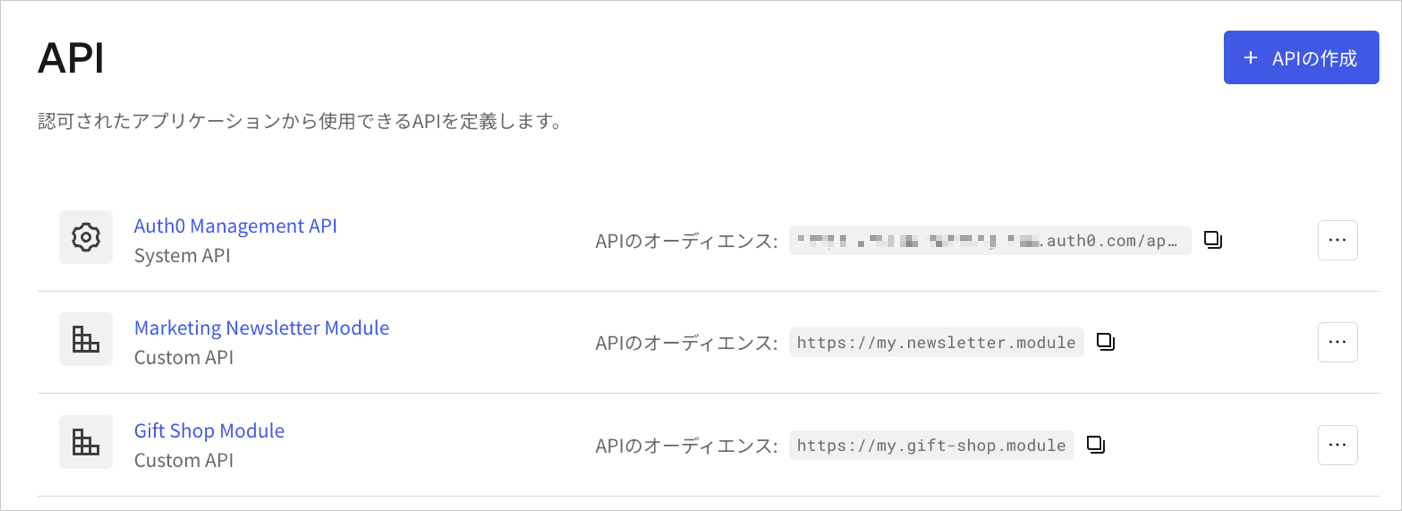
2. **［RBAC Settings（RBACの設定）］** までスクロールして、**［Enable RBAC（RBACを有効にする）］** トグルを有効にします。

   <Frame>
     <img src="https://mintcdn.com/generaltranslationinc/RaaDNrCsuR3m7a0Z/docs/images/ja-jp/cdy7uua7fh8z/65tKb6aj0ktc2qXLUVlV3e/ee1e226b004fb56f88143ead67750fbf/API_-_RBAC_Settings.png?fit=max&auto=format&n=RaaDNrCsuR3m7a0Z&q=85&s=0a4cd1695250b5f8b3e4934316977943" alt="Auth0 Dashboard - APIの設定 - RBACトグル" width="1200" height="408" data-path="docs/images/ja-jp/cdy7uua7fh8z/65tKb6aj0ktc2qXLUVlV3e/ee1e226b004fb56f88143ead67750fbf/API_-_RBAC_Settings.png" />
   </Frame>

3. ユーザーに割り当てられたすべての権限をアクセストークンの`permissions`クレームに含めるには、**［Add Permissions in the Access Token（アクセストークンに権限を追加する）］** トグルを有効にして、**［Save（保存）］** をクリックします。アクセストークンに権限を含めると、最小限の呼び出しで権限を取得できますが、トークンのサイズは大きくなります。**［Add Permissions in the Access Token（アクセストークンに権限を追加する）］** sトグルを有効にすると、Auth0はAPIに設定された[アクセストークンプロファイル](/docs/ja-JP/ja-jp/secure/tokens/access-tokens/access-token-profiles)を基に、トークンのダイアレクトも更新します。

   * トークンのダイアレクトが`access_token`の場合、Auth0はこれを`access_token_authz`に更新します。これは、`permissions`クレームを含む`access_token`プロファイルと同等です。
   * トークンのダイアレクトが`rfc9068_profile`の場合、Auth0はこれを`rfc9068_profile_authz`に更新します。これは、`permissions`クレームを含む`rfc9068_profile`と同等です。

   使用可能なトークンのダイアレクトについては、「[トークンのダイアレクトオプション](#token-dialect-options)」をお読みください。

<div id="management-api">
  ## Mangement API
</div>

<Tooltip data-tooltip-id="react-containers-DefinitionTooltip-0" href="/docs/ja-JP/ja-jp/glossary?term=management-api" tip="Management API: 顧客が管理タスクを実行できるようにするための製品。" cta="用語集の表示">Management API</Tooltip>を使用してRBACを有効にするには、[リソースサーバー更新エンドポイント](https://auth0.com/docs/api/management/v2/resource-servers/patch-resource-servers-by-id)にPATCH要求を行います。PATCH要求で、`enforce_policies`を`true`に設定します。

<AuthCodeGroup>
  ```bash cURL theme={null}
  curl --request PATCH \
    --url 'https://{yourDomain}/api/v2/resource-servers/API_ID' \
    --header 'authorization: Bearer MGMT_API_ACCESS_TOKEN' \
    --header 'cache-control: no-cache' \
    --header 'content-type: application/json' \
    --data '{ "enforce_policies": "true", "token_dialect": "TOKEN_DIALECT" }'
  ```

  ```csharp C# theme={null}
  var client = new RestClient("https://{yourDomain}/api/v2/resource-servers/API_ID");
  var request = new RestRequest(Method.PATCH);
  request.AddHeader("content-type", "application/json");
  request.AddHeader("authorization", "Bearer MGMT_API_ACCESS_TOKEN");
  request.AddHeader("cache-control", "no-cache");
  request.AddParameter("application/json", "{ "enforce_policies": "true", "token_dialect": "TOKEN_DIALECT" }", ParameterType.RequestBody);
  IRestResponse response = client.Execute(request);
  ```

  ```go Go theme={null}
  package main

  import (
  	"fmt"
  	"strings"
  	"net/http"
  	"io/ioutil"
  )

  func main() {

  	url := "https://{yourDomain}/api/v2/resource-servers/API_ID"

  	payload := strings.NewReader("{ "enforce_policies": "true", "token_dialect": "TOKEN_DIALECT" }")

  	req, _ := http.NewRequest("PATCH", url, payload)

  	req.Header.Add("content-type", "application/json")
  	req.Header.Add("authorization", "Bearer MGMT_API_ACCESS_TOKEN")
  	req.Header.Add("cache-control", "no-cache")

  	res, _ := http.DefaultClient.Do(req)

  	defer res.Body.Close()
  	body, _ := ioutil.ReadAll(res.Body)

  	fmt.Println(res)
  	fmt.Println(string(body))

  }
  ```

  ```java Java theme={null}
  HttpResponse<String> response = Unirest.patch("https://{yourDomain}/api/v2/resource-servers/API_ID")
    .header("content-type", "application/json")
    .header("authorization", "Bearer MGMT_API_ACCESS_TOKEN")
    .header("cache-control", "no-cache")
    .body("{ "enforce_policies": "true", "token_dialect": "TOKEN_DIALECT" }")
    .asString();
  ```

  ```javascript Node.JS theme={null}
  var axios = require("axios").default;

  var options = {
    method: 'PATCH',
    url: 'https://{yourDomain}/api/v2/resource-servers/API_ID',
    headers: {
      'content-type': 'application/json',
      authorization: 'Bearer MGMT_API_ACCESS_TOKEN',
      'cache-control': 'no-cache'
    },
    data: {enforce_policies: 'true', token_dialect: 'TOKEN_DIALECT'}
  };

  axios.request(options).then(function (response) {
    console.log(response.data);
  }).catch(function (error) {
    console.error(error);
  });
  ```

  ```objc Obj-C theme={null}
  #import <Foundation/Foundation.h>

  NSDictionary *headers = @{ @"content-type": @"application/json",
                             @"authorization": @"Bearer MGMT_API_ACCESS_TOKEN",
                             @"cache-control": @"no-cache" };
  NSDictionary *parameters = @{ @"enforce_policies": @"true",
                                @"token_dialect": @"TOKEN_DIALECT" };

  NSData *postData = [NSJSONSerialization dataWithJSONObject:parameters options:0 error:nil];

  NSMutableURLRequest *request = [NSMutableURLRequest requestWithURL:[NSURL URLWithString:@"https://{yourDomain}/api/v2/resource-servers/API_ID"]
                                                         cachePolicy:NSURLRequestUseProtocolCachePolicy
                                                     timeoutInterval:10.0];
  [request setHTTPMethod:@"PATCH"];
  [request setAllHTTPHeaderFields:headers];
  [request setHTTPBody:postData];

  NSURLSession *session = [NSURLSession sharedSession];
  NSURLSessionDataTask *dataTask = [session dataTaskWithRequest:request
                                              completionHandler:^(NSData *data, NSURLResponse *response, NSError *error) {
                                                  if (error) {
                                                      NSLog(@"%@", error);
                                                  } else {
                                                      NSHTTPURLResponse *httpResponse = (NSHTTPURLResponse *) response;
                                                      NSLog(@"%@", httpResponse);
                                                  }
                                              }];
  [dataTask resume];
  ```

  ```php PHP theme={null}
  $curl = curl_init();

  curl_setopt_array($curl, [
    CURLOPT_URL => "https://{yourDomain}/api/v2/resource-servers/API_ID",
    CURLOPT_RETURNTRANSFER => true,
    CURLOPT_ENCODING => "",
    CURLOPT_MAXREDIRS => 10,
    CURLOPT_TIMEOUT => 30,
    CURLOPT_HTTP_VERSION => CURL_HTTP_VERSION_1_1,
    CURLOPT_CUSTOMREQUEST => "PATCH",
    CURLOPT_POSTFIELDS => "{ "enforce_policies": "true", "token_dialect": "TOKEN_DIALECT" }",
    CURLOPT_HTTPHEADER => [
      "authorization: Bearer MGMT_API_ACCESS_TOKEN",
      "cache-control: no-cache",
      "content-type: application/json"
    ],
  ]);

  $response = curl_exec($curl);
  $err = curl_error($curl);

  curl_close($curl);

  if ($err) {
    echo "cURL Error #:" . $err;
  } else {
    echo $response;
  }
  ```

  ```python Python theme={null}
  import http.client

  conn = http.client.HTTPSConnection("")

  payload = "{ "enforce_policies": "true", "token_dialect": "TOKEN_DIALECT" }"

  headers = {
      'content-type': "application/json",
      'authorization': "Bearer MGMT_API_ACCESS_TOKEN",
      'cache-control': "no-cache"
      }

  conn.request("PATCH", "/{yourDomain}/api/v2/resource-servers/API_ID", payload, headers)

  res = conn.getresponse()
  data = res.read()

  print(data.decode("utf-8"))
  ```

  ```ruby Ruby theme={null}
  require 'uri'
  require 'net/http'
  require 'openssl'

  url = URI("https://{yourDomain}/api/v2/resource-servers/API_ID")

  http = Net::HTTP.new(url.host, url.port)
  http.use_ssl = true
  http.verify_mode = OpenSSL::SSL::VERIFY_NONE

  request = Net::HTTP::Patch.new(url)
  request["content-type"] = 'application/json'
  request["authorization"] = 'Bearer MGMT_API_ACCESS_TOKEN'
  request["cache-control"] = 'no-cache'
  request.body = "{ "enforce_policies": "true", "token_dialect": "TOKEN_DIALECT" }"

  response = http.request(request)
  puts response.read_body
  ```

  ```swift Swift theme={null}
  import Foundation

  let headers = [
    "content-type": "application/json",
    "authorization": "Bearer MGMT_API_ACCESS_TOKEN",
    "cache-control": "no-cache"
  ]
  let parameters = [
    "enforce_policies": "true",
    "token_dialect": "TOKEN_DIALECT"
  ] as [String : Any]

  let postData = JSONSerialization.data(withJSONObject: parameters, options: [])

  let request = NSMutableURLRequest(url: NSURL(string: "https://{yourDomain}/api/v2/resource-servers/API_ID")! as URL,
                                          cachePolicy: .useProtocolCachePolicy,
                                      timeoutInterval: 10.0)
  request.httpMethod = "PATCH"
  request.allHTTPHeaderFields = headers
  request.httpBody = postData as Data

  let session = URLSession.shared
  let dataTask = session.dataTask(with: request as URLRequest, completionHandler: { (data, response, error) -> Void in
    if (error != nil) {
      print(error)
    } else {
      let httpResponse = response as? HTTPURLResponse
      print(httpResponse)
    }
  })

  dataTask.resume()
  ```
</AuthCodeGroup>

以下の表が示すように、`API_ID`、`MGMT_API_ACCESS_TOKEN`、`TOKEN_DIALECT`をそれぞれの値に置き換えます。

<table class="table">
  <thead>
    <tr>
      <th>パラメーター</th>
      <th>説明</th>
    </tr>
  </thead>

  <tbody>
    <tr>
      <td>`API_ID`</td>
      <td>RBACを有効にしたいAPIのID。</td>
    </tr>

    <tr>
      <td>`MGMT_API_ACCESS_TOKEN`</td>
      <td>スコープ`update:resource_servers`を持つ<a href="https://auth0.com/docs/ja-jp/api/management/v2/tokens">Management APIのアクセストークン</a>。</td>
    </tr>

    <tr>
      <td>`TOKEN_DIALECT`</td>
      <td>指定されたAPIのアクセストークンのダイアレクト。詳しくは、「<a href="#token-dialect-options">トークンのダイアレクトオプション</a>」をご覧ください。</td>
    </tr>
  </tbody>
</table>

<div id="token-dialect-options">
  ### トークンのダイアレクトオプション
</div>

Auth0は以下のトークンダイアレクトに対応しています。

<table class="table">
  <thead>
    <tr>
      <th>値</th>
      <th>説明</th>
    </tr>
  </thead>

  <tbody>
    <tr>
      <td>`access_token`</td>
      <td>デフォルトのAuth0トークンプロファイルは<a href="/docs/ja-JP/ja-jp/secure/tokens/json-web-tokens">JSON Web Token（JWT）</a>形式のアクセストークンを生成します。アクセストークンの`scope`クレームには、要求された権限とユーザーに割り当てられた権限の共通部分が含まれます。`permissions`クレームは渡されません。詳細については、「<a href="/docs/ja-JP/ja-jp/secure/tokens/access-tokens/access-token-profiles">アクセストークンのプロファイル</a>」をお読みください。</td>
    </tr>

    <tr>
      <td>`access_token_authz`</td>
      <td>`permissions`クレームのあるデフォルトのAuth0トークンプロファイル（`access_token`）です。アクセストークンの`scope`クレームには、要求された権限とユーザーに割り当てられた権限の共通部分が含まれます。アクセストークンの`permissions`クレームには、ユーザーに割り当てられたすべての許可が含まれます。アクセストークンに許可を含めると、最小限の呼び出しで許可を取得できますが、トークンサイズは大きくなります。</td>
    </tr>

    <tr>
      <td>`rfc9068_profile`</td>
      <td><a href="https://datatracker.ietf.org/doc/html/rfc9068">IETF JWT Profile for OAuth 2.0 Access Tokens（RFC 9068）</a>に準拠したJWT形式のアクセストークンを生成します。アクセストークンの`scope`クレームには、要求された権限とユーザーに割り当てられた権限の共通部分が含まれます。`permissions`クレームは渡されません。詳細については、「<a href="/docs/ja-JP/ja-jp/secure/tokens/access-tokens/access-token-profiles">アクセストークンのプロファイル</a>」をお読みください。</td>
    </tr>

    <tr>
      <td>`rfc9068_profile_authz`</td>
      <td>`permissions`のあるRFC 9068トークンプロファイル（`rfc9068_profile`）。アクセストークンの`scope`クレームには、要求された権限とユーザーに割り当てられた権限の共通部分が含まれます。アクセストークンの`permissions`クレームには、ユーザーに割り当てられたすべての許可が含まれます。アクセストークンに許可を含めると、最小限の呼び出しで許可を取得できますが、トークンサイズは大きくなります。</td>
    </tr>
  </tbody>
</table>

<div id="learn-more">
  ## もっと詳しく
</div>

* [Role-based Access Controlユーザーの管理](/docs/ja-JP/ja-jp/manage-users/access-control/configure-core-rbac/rbac-users)
* [Role-based Access Controlアクセス許可の管理](/docs/ja-JP/ja-jp/manage-users/access-control/configure-core-rbac/manage-permissions)
* [ユースケースの例：ロールベースのアクセス制御（RBAC）](/docs/ja-JP/ja-jp/manage-users/access-control/sample-use-cases-role-based-access-control)
* [Role-Based Access Controlと認可のトラブルシューティング](/docs/ja-JP/ja-jp/troubleshoot/authentication-issues/troubleshoot-rbac-authorization)