Luciano Balmaceda 著
このチュートリアルでは、Flask で構築された Python 製の API に認可機能を追加する方法を説明します。ご利用のアカウント向けに設定されたサンプル付きでこのクイックスタートを進められるよう、事前にログインしておくことをお勧めします。
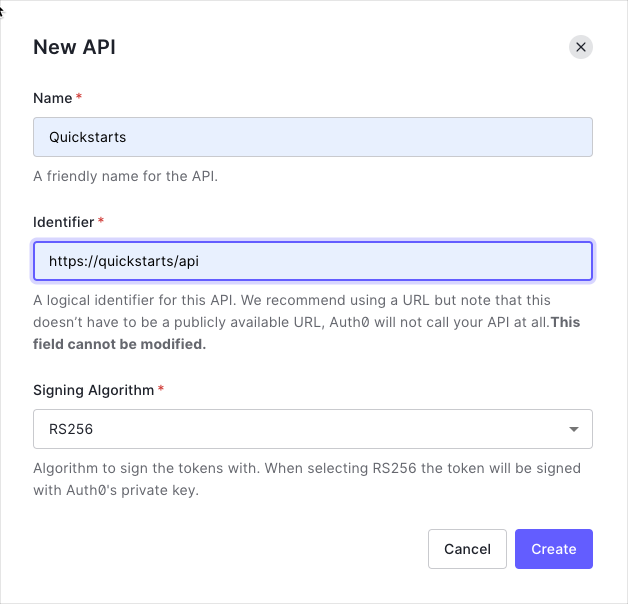
Auth0 Dashboard の APIs セクションで Create API をクリックします。API の名前と識別子を指定します。たとえば、識別子として https://quickstarts/api のような値を使用します。後でアクセストークンの検証を設定するときに、この識別子を audience として使用します。Signing Algorithm は RS256 のままにしておきます。
デフォルトでは、API はトークンに署名するアルゴリズムとして RS256 を使用します。RS256 は秘密鍵/公開鍵ペアを使用するため、Auth0 アカウントの公開鍵に対してトークンを検証します。公開鍵は JSON Web Key Set (JWKS) 形式で提供されており、こちら からアクセスできます。
パーミッションを使用すると、特定のアクセストークンを使ってユーザーに代わってリソースへどのようにアクセスできるかを定義できます。たとえば、ユーザーがマネージャーのアクセスレベルを持つ場合は messages リソースへの読み取りアクセス権を付与し、管理者のアクセスレベルを持つ場合はそのリソースへの書き込みアクセス権を付与するといった構成が可能です。
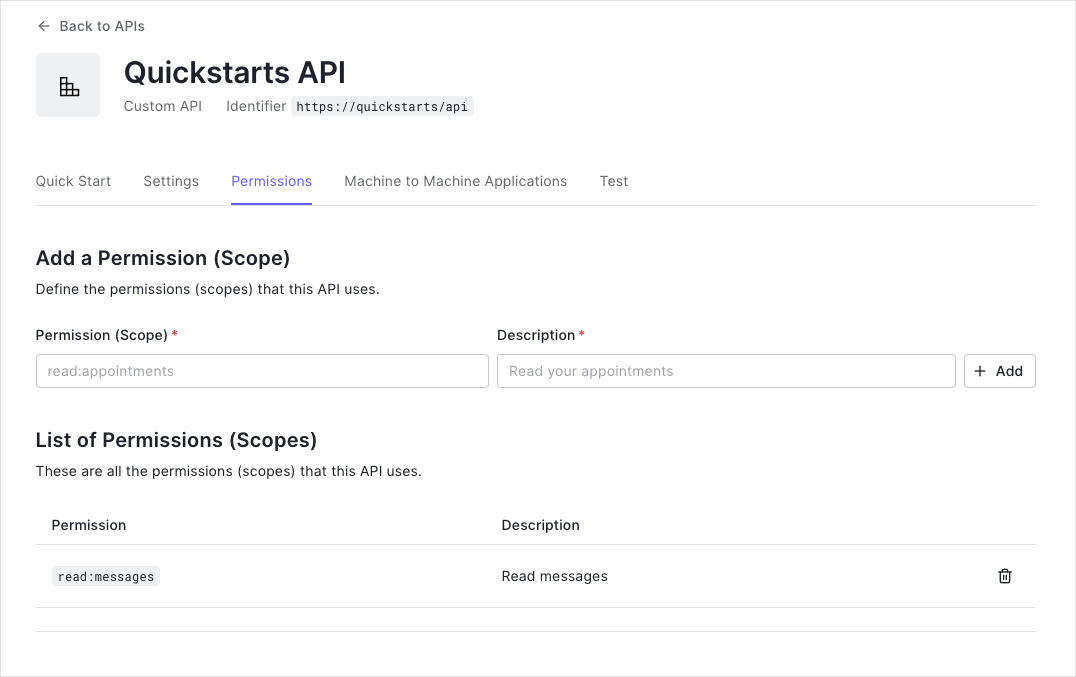
利用可能なパーミッションは、Auth0 Dashboard の APIs セクションにある Permissions ビューで定義できます。
この例では、read:messages というスコープを使用します。
requirements.txt に追加します:
# /requirements.txt
flask==2.3.3
python-dotenv
pyjwt
flask-cors
six
server.py ファイルを作成し、Flask アプリケーションを初期化します。ドメイン、オーディエンス、エラー処理を設定します。
JWKS を使ってアクセストークンを検証するデコレーターを追加します。
# /server.py
# Format error response and append status code
def get_token_auth_header():
"""Authorization ヘッダーからアクセストークンを取得
"""
auth = request.headers.get("Authorization", None)
if not auth:
raise AuthError({"code": "authorization_header_missing",
"description":
"Authorization header is expected"}, 401)
parts = auth.split()
if parts[0].lower() != "bearer":
raise AuthError({"code": "invalid_header",
"description":
"Authorization header must start with"
" Bearer"}, 401)
elif len(parts) == 1:
raise AuthError({"code": "invalid_header",
"description": "Token not found"}, 401)
elif len(parts) > 2:
raise AuthError({"code": "invalid_header",
"description":
"Authorization header must be"
" Bearer token"}, 401)
token = parts[1]
return token
def requires_auth(f):
"""Determines if the Access Token is valid
"""
@wraps(f)
def decorated(*args, **kwargs):
token = get_token_auth_header()
jsonurl = urlopen("https://"+AUTH0_DOMAIN+"/.well-known/jwks.json")
jwks = json.loads(jsonurl.read())
unverified_header = jwt.get_unverified_header(token)
public_key = None
for key in jwks["keys"]:
if key["kid"] == unverified_header["kid"]:
public_key = jwt.algorithms.RSAAlgorithm.from_jwk(json.dumps(jwk))
if public_key:
try:
payload = jwt.decode(
token,
public_key,
algorithms=ALGORITHMS,
audience=API_AUDIENCE,
issuer="https://"+AUTH0_DOMAIN+"/"
)
except jwt.ExpiredSignatureError:
raise AuthError({"code": "token_expired",
"description": "token is expired"}, 401)
except jwt.InvalidAudienceError:
raise AuthError({"code": "invalid_audience",
"description":
"incorrect audience,"
" please check the audience"}, 401)
except jwt.InvalidIssuerError
raise AuthError({"code": "invalid_issuer",
"description":
"incorrect issuer,"
" please check the issuer"}, 401)
except Exception:
raise AuthError({"code": "invalid_header",
"description":
"Unable to parse authentication"
" token."}, 401)
_request_ctx_stack.top.current_user = payload
return f(*args, **kwargs)
raise AuthError({"code": "invalid_header",
"description": "Unable to find appropriate key"}, 401)
return decorated
scope が含まれているかどうかを確認できます。
# /server.py
def requires_scope(required_scope):
"""アクセストークンに必要なスコープが含まれているかどうかを判定します
Args:
required_scope (str): リソースへのアクセスに必要なスコープ
"""
token = get_token_auth_header()
unverified_claims = jwt.decode(token, options={"verify_signature": False})
if unverified_claims.get("scope"):
token_scopes = unverified_claims["scope"].split()
for token_scope in token_scopes:
if token_scope == required_scope:
return True
return False
GET /api/public: 認証されていないリクエストで使用可能GET /api/private: 追加のスコープを含まないアクセストークンを持つ認証済みリクエストで使用可能GET /api/private-scoped: read:messages スコープが付与されたアクセストークンを持つ認証済みリクエストで使用可能
上記で定義したデコレーターと関数を、対応するエンドポイントで使用できます。
# Controllers API
# 認証不要
@APP.route("/api/public")
@cross_origin(headers=["Content-Type", "Authorization"])
def public():
response = "Hello from a public endpoint! You don't need to be authenticated to see this."
return jsonify(message=response)
# 認証が必要
@APP.route("/api/private")
@cross_origin(headers=["Content-Type", "Authorization"])
@requires_auth
def private():
response = "Hello from a private endpoint! You need to be authenticated to see this."
return jsonify(message=response)
# 認可が必要
@APP.route("/api/private-scoped")
@cross_origin(headers=["Content-Type", "Authorization"])
@requires_auth
def private_scoped():
if requires_scope("read:messages"):
response = "Hello from a private endpoint! You need to be authenticated and have a scope of read:messages to see this."
return jsonify(message=response)
raise AuthError({
"code": "Unauthorized",
"description": "You don't have access to this resource"
}, 403)