> ## Documentation Index
> Fetch the complete documentation index at: https://auth0.generaltranslation.app/llms.txt
> Use this file to discover all available pages before exploring further.
> このガイドでは、Auth0 Flutter ソフトウェア開発キット (SDK) を使用して、Flutter アプリケーションに Auth0 を統合する方法を紹介します。
# Flutter アプリケーションにログイン機能を追加する
export const SignUpForm = () => {
const [isAuthenticated, setIsAuthenticated] = useState(false);
const [storeReady, setStoreReady] = useState(false);
useEffect(() => {
let unsubscribe = null;
function init() {
setStoreReady(true);
unsubscribe = window.autorun(() => {
const authenticated = window.rootStore?.sessionStore?.isAuthenticated || false;
setIsAuthenticated(authenticated);
});
}
if (window.rootStore) {
init();
} else {
window.addEventListener("adu:storeReady", init);
}
return () => {
window.removeEventListener("adu:storeReady", init);
unsubscribe?.();
};
}, []);
function LoggedInForm({sampleApp}) {
const LS_APPS_KEY = "auth_demo_apps";
const LS_APP_CFG_KEY = "auth_demo_app_cfg";
const CHANNEL = "auth_flows_sync_v1";
const mkChannel = () => new BroadcastChannel(CHANNEL);
function uid() {
return Math.random().toString(36).slice(2) + Date.now().toString(36);
}
function loadApps() {
const raw = localStorage.getItem(LS_APPS_KEY);
if (raw) return JSON.parse(raw);
const seeded = [{
id: "{yourClientId}",
name: "デフォルトアプリ"
}];
localStorage.setItem(LS_APPS_KEY, JSON.stringify(seeded));
return seeded;
}
function saveApps(apps) {
localStorage.setItem(LS_APPS_KEY, JSON.stringify(apps));
}
function loadCfg() {
const raw = localStorage.getItem(LS_APP_CFG_KEY);
return raw ? JSON.parse(raw) : {};
}
function saveCfg(cfg) {
localStorage.setItem(LS_APP_CFG_KEY, JSON.stringify(cfg));
}
const RightChevron = ({className = "w-5 h-5", ...props}) => ;
const LightningIcon = () => ;
const LayersIcon = () => ;
const GithubIcon = () => ;
function IconTile({children}) {
return
{children}
;
}
function Card({className = "", children}) {
return
{children}
;
}
function Button({variant = "primary", type = "button", onClick, children}) {
const base = "inline-flex items-center justify-center gap-2 h-10 px-4 rounded-xl font-medium transition";
let styles = "";
if (variant === "primary") {
styles = "mint-bg-indigo-600 text-white hover:mint-bg-indigo-700";
} else if (variant === "outline") {
styles = "border border-zinc-300 dark:border-zinc-700 mint-bg-transparent hover:mint-bg-zinc-50 dark:hover:mint-bg-zinc-800";
} else if (variant === "ghost") {
styles = "hover:mint-bg-zinc-100 dark:hover:mint-bg-zinc-800";
}
return ;
}
function Input({id, label, value, onChange, placeholder, name}) {
return ;
}
function Select({label, value, onChange, options}) {
return ;
}
function Toast({open, onClose, children}) {
useEffect(() => {
if (!open) return;
const t = setTimeout(onClose, 2200);
return () => clearTimeout(t);
}, [open, onClose]);
return ;
}
function Flows() {
const [route, setRoute] = useState("menu");
const [apps, setApps] = useState(loadApps());
const [cfg, setCfg] = useState(loadCfg());
const [selected, setSelected] = useState(apps[0]?.id || "");
const [toast, setToast] = useState(false);
const [bc] = useState(() => mkChannel());
useEffect(() => {
if (!apps.find(a => a.id === selected)) {
setSelected(apps[0]?.id || "");
}
}, [apps, selected]);
useEffect(() => {
const onMsg = e => {
const {type, payload} = e.data || ({});
switch (type) {
case "NAV":
setRoute(payload.route);
break;
case "SELECT":
setSelected(payload.appId);
break;
case "APPS_UPDATED":
setApps(loadApps());
break;
case "CFG_UPDATED":
setCfg(loadCfg());
setToast(true);
break;
default:
break;
}
};
bc.addEventListener("message", onMsg);
return () => bc.removeEventListener("message", onMsg);
}, [bc]);
const nav = nextRoute => {
setRoute(nextRoute);
bc.postMessage({
type: "NAV",
payload: {
route: nextRoute
}
});
};
const selectApp = appId => {
setSelected(appId);
bc.postMessage({
type: "SELECT",
payload: {
appId
}
});
};
const onCreate = name => {
const id = uid();
const next = [...apps, {
id,
name: name || "Untitled"
}];
setApps(next);
saveApps(next);
bc.postMessage({
type: "APPS_UPDATED"
});
selectApp(id);
nav("integrate");
};
const onSaveCfg = (appId, data) => {
const next = {
...cfg,
[appId]: data
};
setCfg(next);
saveCfg(next);
setToast(true);
bc.postMessage({
type: "CFG_UPDATED"
});
};
return
{route === "menu" &&
;
}
function Menu({onCreate, onIntegrate}) {
return ;
}
function CreateForm({onSave, onCancel}) {
const [name, setName] = useState("");
return ;
}
function IntegrateForm({apps, selected, onSelect, saved, onSave, onCancel}) {
const [callbacks, setCallbacks] = useState(saved?.callbacks ?? "");
const [logouts, setLogouts] = useState(saved?.logouts ?? "");
const [origins, setOrigins] = useState(saved?.origins ?? "");
useEffect(() => {
setCallbacks(loadCfg()[selected]?.callbacks ?? "");
setLogouts(loadCfg()[selected]?.logouts ?? "");
setOrigins(loadCfg()[selected]?.origins ?? "");
}, [selected]);
return ;
}
return
;
}
function SignUpFormInternal() {
return
 Auth0アカウント
にサインアップするか、既存のアカウントに
console.log("log in")}>
ログイン
して、お客様のテナントと直接統合できます。
Auth0アカウント
にサインアップするか、既存のアカウントに
console.log("log in")}>
ログイン
して、お客様のテナントと直接統合できます。
;
}
return <>;
};
export const SideMenuSectionItem = ({id, children}) => {
return ;
};
export const SideMenu = ({sections, children}) => {
const [visibleSection, setVisibleSection] = useState(sections[0]?.id ?? null);
const checkVisibility = () => {
let currentVisible = null;
const viewportHeight = window.innerHeight;
const scrollY = window.scrollY;
sections.forEach(({id}) => {
const section = document.getElementById(id);
if (section) {
const rect = section.getBoundingClientRect();
const sectionTop = rect.top + scrollY;
const sectionBottom = sectionTop + rect.height;
const multiplier = viewportHeight > 1600 ? 0.34 : 0.22;
if (scrollY + viewportHeight * multiplier >= sectionTop && scrollY <= sectionBottom) {
currentVisible = id;
}
}
});
if (currentVisible && currentVisible !== visibleSection) {
setVisibleSection(currentVisible);
}
};
useEffect(() => {
const throttledCheck = () => {
setTimeout(checkVisibility, 100);
};
checkVisibility();
window.addEventListener("scroll", throttledCheck);
return () => {
window.removeEventListener("scroll", throttledCheck);
};
}, [sections, visibleSection]);
useEffect(() => {
sections.forEach(({id}) => {
const section = document.getElementById(id);
const sideMenuItem = document.getElementById(`side-menu-item-${id}`);
if (section) {
if (id === visibleSection) {
section.classList.add("active-section");
} else {
section.classList.remove("active-section");
}
}
if (sideMenuItem) {
if (id === visibleSection) {
sideMenuItem.classList.add("active-side-menu-item");
} else {
sideMenuItem.classList.remove("active-side-menu-item");
}
}
});
}, [visibleSection, sections]);
return
{children.map(child => {
if (child.props.id === visibleSection) {
return child;
}
return null;
})}
;
};
export const Section = ({id, title, stepNumber, children, isSingleColumn = false}) => {
return
{}
{children}
;
};
export const Content = ({title, children}) => {
return
{title &&
{title}
}
{children}
;
};
export const Recipe = ({children, isSingleColumn = false}) => {
return
{children}
;
};
export const AuthCodeGroup = ({children, dropdown}) => {
const [processedChildren, setProcessedChildren] = useState(children);
useEffect(() => {
let unsubscribe = null;
function init() {
unsubscribe = window.autorun(() => {
const processChildren = node => {
if (typeof node === "string") {
let processedNode = node;
for (const [key, value] of window.rootStore.variableStore.values.entries()) {
processedNode = processedNode.replace(new RegExp(key, "g"), value);
}
return processedNode;
} else if (Array.isArray(node)) {
return node.map(processChildren);
} else if (node && node.props && node.props.children) {
return {
...node,
props: {
...node.props,
children: processChildren(node.props.children)
}
};
}
return node;
};
setProcessedChildren(processChildren(children));
});
}
if (window.rootStore) {
init();
} else {
window.addEventListener("adu:storeReady", init);
}
return () => {
window.removeEventListener("adu:storeReady", init);
unsubscribe?.();
};
}, [children]);
return {processedChildren};
};
export const sections = [{
id: "configure-auth0",
title: "Auth0 を構成する"
}, {
id: "install-the-auth0-flutter-sdk",
title: "Auth0 Flutter SDK をインストールする"
}, {
id: "add-login-to-your-application",
title: "アプリケーションにログイン機能を追加する"
}, {
id: "add-logout-to-your-application",
title: "アプリケーションにログアウト機能を追加する"
}, {
id: "show-user-profile-information",
title: "ユーザー プロファイル情報を表示する"
}];
Auth0を使用すると、アプリケーションに認証を迅速に追加し、ユーザープロファイル情報にアクセスできます。このガイドでは、[Auth0 Flutter SDK](https://github.com/auth0/auth0-flutter)を使用して、Auth0をFlutterアプリケーションに統合する方法を説明します。
Flutter SDK は現在、Android、iOS、または Web 上で動作する Flutter アプリケーションのみをサポートしています。
このクイックスタートは、[Flutter](https://flutter.dev/) アプリケーションがすでに稼働していることを前提としています。まだの場合は、[Flutter の「はじめに」ガイド](https://docs.flutter.dev/get-started/install)を参照して、シンプルなアプリを作成してください。
[Flutterコマンドラインツール](https://docs.flutter.dev/reference/flutter-cli)についても理解しておく必要があります。
Auth0 にサインアップしたときに、新しいアプリケーションが作成されているか、もしくはご自身で新しくアプリケーションを作成しているはずです。
Auth0 と連携するには、そのアプリケーションに関するいくつかの情報が必要になります。これらの情報は Auth0 Dashboard の [Application
Settings](https://manage.auth0.com/#/applications) セクションから取得できます。
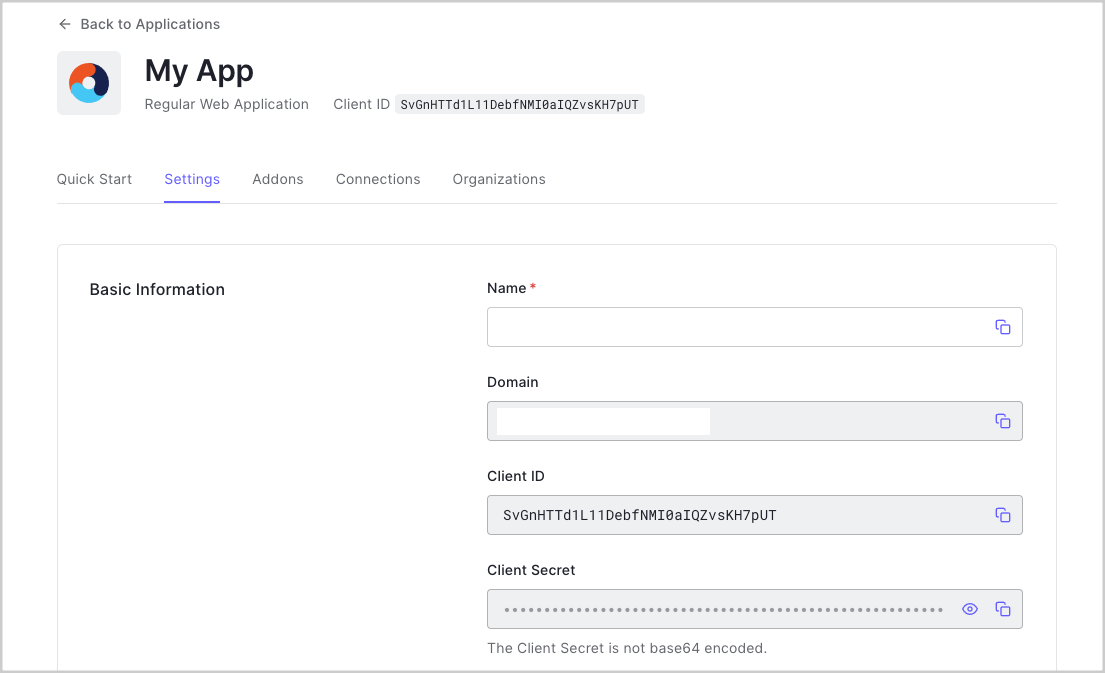 Native または Single Page Application で Default App を使用する場合は、**Token
Endpoint Authentication Method** を `None` に更新し、**Application Type** を
`SPA` または `Native` のいずれかに設定してください。
次の情報が必要です。
* **Domain**
* **Client ID**
このページ上部からサンプルをダウンロードした場合、これらの情報はあらかじめ入力されています。
### コールバックURLの設定
コールバックURLは、ユーザーが認証された後に Auth0 がアプリケーションへリダイレクトする URL です。
アプリのコールバックURLは、[Application
Settings](https://manage.auth0.com/#/applications) の **Allowed Callback URLs** フィールドに追加する必要があります。このフィールドが設定されていない場合、ユーザーはアプリケーションにログインできず、エラーが発生します。
このページ上部からダウンロードしたサンプルプロジェクトに従っている場合、**Allowed Callback URL** を `http://localhost:3000` に設定してください。
### ログアウトURLの設定
ログアウトURLは、ユーザーが認可サーバーからログアウトされた後に、Auth0 がアプリケーションにリダイレクトできる URL です。これは `returnTo` クエリパラメーターで指定されます。アプリのログアウトURLは、[Application Settings](https://manage.auth0.com/#/applications) の **Allowed Logout URLs** フィールドに追加する必要があります。このフィールドが設定されていない場合、ユーザーはアプリケーションからログアウトできず、エラーが発生します。
このページ上部からダウンロードしたサンプルプロジェクトに従っている場合、**Allowed Logout URLs** フィールドに追加する必要があるログアウトURLは `http://localhost:3000` です。
### Allowed Web Origins の設定
アプリの URL を [Application Settings](https://manage.auth0.com/#/applications/\{yourClientId}/settings) の **Allowed Web Origins** フィールドに追加する必要があります。ここにアプリケーションの URL を登録しない場合、アプリケーションは認証トークンをサイレントリフレッシュできず、ユーザーは次回アプリケーションにアクセスしたとき、またはページを更新したときにログアウトされてしまいます。
このページ上部からダウンロードしたサンプルプロジェクトに従っている場合、**Allowed Web Origins** を `http://localhost:3000` に設定してください。
Auth0 Flutter ソフトウェア開発キット (SDK) をプロジェクトに追加します:
```bash theme={null}
flutter pub add auth0_flutter
```
次の `script` タグを `index.html` ページに追加します。
```html theme={null}
```
[Universal Login](/docs/ja-JP/authenticate/login/auth0-universal-login) は、
アプリケーションに認証をセットアップする最も簡単な方法です。最高のエクスペリエンスとセキュリティ、そして最も充実した機能を利用するために、その使用を推奨します。
`Auth0Web` クラスを使用して、Flutter Web アプリに Auth0 Universal Login を統合します。`loginWithRedirect()` を使用して、
ユーザーを Auth0 Universal Login ページにリダイレクトします。
通常は `loginWithRedirect` に対して `redirectUrl` パラメーターを指定する必要があります。これを省略すると、Auth0 は [既定のログインルート](/docs/ja-JP/authenticate/login/auth0-universal-login/configure-default-login-routes) を使用しますが、これはデフォルトでは構成されていません。
ユーザーがログインすると、アプリケーションにリダイレクトされて戻ってきます。その後、起動時に `onLoad` を呼び出し、
渡された認証情報を処理することで、このユーザーの ID トークンとアクセストークンにアクセスできます。
```js theme={null}
auth0.onLoad().then((final credentials) => setState(() {
// ここで認証情報を処理または保存する
_credentials = credentials;
}));
```
##### チェックポイント
アプリに、`loginWithRedirect()` を呼び出してユーザーをアプリにログインさせるボタンを追加します。
認証のために Auth0 にリダイレクトされ、その後アプリケーションに戻ってくることを確認します。
`onLoad` の呼び出し結果として `credentials` にアクセスでき、
ID トークンとアクセストークンにもアクセスできることを確認します。
ユーザーをログアウトさせるには、Auth0 Flutter ソフトウェア開発キット (SDK) の `logout()` を呼び出し、Auth0 のログアウトエンドポイントへリダイレクトしてログインセッションをクリアします。[Auth0 からのログアウトの詳細はこちらをご覧ください](/docs/ja-JP/authenticate/login/logout)。
通常は `logout` を呼び出すときに `returnToUrl` を指定する必要があります。指定しない場合、
Auth0 は[デフォルトで、許可されたログアウトURLのリスト内の最初の URL を使用します](/docs/ja-JP/authenticate/login/logout/redirect-users-after-logout)。
##### チェックポイント
`logout()` を呼び出してアプリケーションからユーザーをログアウトさせるボタンを、アプリに追加します。
そのボタンを選択したときに、Flutter アプリがログアウトエンドポイントにリダイレクトされ、再び戻ってくることを確認してください。
アプリケーションにログインしたままになっていないことを確認してください。
ユーザープロファイルは、ページの読み込み時に自動的にユーザーのプロファイル情報を取得し、アプリケーションの起動時に `onLoad` を呼び出すことでアクセスおよび保存できます。`onLoad` から返されるオブジェクトには、すべてのユーザーのプロファイル情報を格納した `user` プロパティが含まれます。これは内部的に IDトークンをデコードして設定されます。
##### チェックポイント
ログインして、結果の `user` プロパティを確認します。`email` や `name` など、現在のユーザーのプロファイル情報が正しいことを確認してください。
## 次のステップ
素晴らしい!ここまで進めたなら、アプリケーションでログイン、ログアウト、ユーザープロファイル情報が動作しているはずです。
Native または Single Page Application で Default App を使用する場合は、**Token
Endpoint Authentication Method** を `None` に更新し、**Application Type** を
`SPA` または `Native` のいずれかに設定してください。
次の情報が必要です。
* **Domain**
* **Client ID**
このページ上部からサンプルをダウンロードした場合、これらの情報はあらかじめ入力されています。
### コールバックURLの設定
コールバックURLは、ユーザーが認証された後に Auth0 がアプリケーションへリダイレクトする URL です。
アプリのコールバックURLは、[Application
Settings](https://manage.auth0.com/#/applications) の **Allowed Callback URLs** フィールドに追加する必要があります。このフィールドが設定されていない場合、ユーザーはアプリケーションにログインできず、エラーが発生します。
このページ上部からダウンロードしたサンプルプロジェクトに従っている場合、**Allowed Callback URL** を `http://localhost:3000` に設定してください。
### ログアウトURLの設定
ログアウトURLは、ユーザーが認可サーバーからログアウトされた後に、Auth0 がアプリケーションにリダイレクトできる URL です。これは `returnTo` クエリパラメーターで指定されます。アプリのログアウトURLは、[Application Settings](https://manage.auth0.com/#/applications) の **Allowed Logout URLs** フィールドに追加する必要があります。このフィールドが設定されていない場合、ユーザーはアプリケーションからログアウトできず、エラーが発生します。
このページ上部からダウンロードしたサンプルプロジェクトに従っている場合、**Allowed Logout URLs** フィールドに追加する必要があるログアウトURLは `http://localhost:3000` です。
### Allowed Web Origins の設定
アプリの URL を [Application Settings](https://manage.auth0.com/#/applications/\{yourClientId}/settings) の **Allowed Web Origins** フィールドに追加する必要があります。ここにアプリケーションの URL を登録しない場合、アプリケーションは認証トークンをサイレントリフレッシュできず、ユーザーは次回アプリケーションにアクセスしたとき、またはページを更新したときにログアウトされてしまいます。
このページ上部からダウンロードしたサンプルプロジェクトに従っている場合、**Allowed Web Origins** を `http://localhost:3000` に設定してください。
Auth0 Flutter ソフトウェア開発キット (SDK) をプロジェクトに追加します:
```bash theme={null}
flutter pub add auth0_flutter
```
次の `script` タグを `index.html` ページに追加します。
```html theme={null}
```
[Universal Login](/docs/ja-JP/authenticate/login/auth0-universal-login) は、
アプリケーションに認証をセットアップする最も簡単な方法です。最高のエクスペリエンスとセキュリティ、そして最も充実した機能を利用するために、その使用を推奨します。
`Auth0Web` クラスを使用して、Flutter Web アプリに Auth0 Universal Login を統合します。`loginWithRedirect()` を使用して、
ユーザーを Auth0 Universal Login ページにリダイレクトします。
通常は `loginWithRedirect` に対して `redirectUrl` パラメーターを指定する必要があります。これを省略すると、Auth0 は [既定のログインルート](/docs/ja-JP/authenticate/login/auth0-universal-login/configure-default-login-routes) を使用しますが、これはデフォルトでは構成されていません。
ユーザーがログインすると、アプリケーションにリダイレクトされて戻ってきます。その後、起動時に `onLoad` を呼び出し、
渡された認証情報を処理することで、このユーザーの ID トークンとアクセストークンにアクセスできます。
```js theme={null}
auth0.onLoad().then((final credentials) => setState(() {
// ここで認証情報を処理または保存する
_credentials = credentials;
}));
```
##### チェックポイント
アプリに、`loginWithRedirect()` を呼び出してユーザーをアプリにログインさせるボタンを追加します。
認証のために Auth0 にリダイレクトされ、その後アプリケーションに戻ってくることを確認します。
`onLoad` の呼び出し結果として `credentials` にアクセスでき、
ID トークンとアクセストークンにもアクセスできることを確認します。
ユーザーをログアウトさせるには、Auth0 Flutter ソフトウェア開発キット (SDK) の `logout()` を呼び出し、Auth0 のログアウトエンドポイントへリダイレクトしてログインセッションをクリアします。[Auth0 からのログアウトの詳細はこちらをご覧ください](/docs/ja-JP/authenticate/login/logout)。
通常は `logout` を呼び出すときに `returnToUrl` を指定する必要があります。指定しない場合、
Auth0 は[デフォルトで、許可されたログアウトURLのリスト内の最初の URL を使用します](/docs/ja-JP/authenticate/login/logout/redirect-users-after-logout)。
##### チェックポイント
`logout()` を呼び出してアプリケーションからユーザーをログアウトさせるボタンを、アプリに追加します。
そのボタンを選択したときに、Flutter アプリがログアウトエンドポイントにリダイレクトされ、再び戻ってくることを確認してください。
アプリケーションにログインしたままになっていないことを確認してください。
ユーザープロファイルは、ページの読み込み時に自動的にユーザーのプロファイル情報を取得し、アプリケーションの起動時に `onLoad` を呼び出すことでアクセスおよび保存できます。`onLoad` から返されるオブジェクトには、すべてのユーザーのプロファイル情報を格納した `user` プロパティが含まれます。これは内部的に IDトークンをデコードして設定されます。
##### チェックポイント
ログインして、結果の `user` プロパティを確認します。`email` や `name` など、現在のユーザーのプロファイル情報が正しいことを確認してください。
## 次のステップ
素晴らしい!ここまで進めたなら、アプリケーションでログイン、ログアウト、ユーザープロファイル情報が動作しているはずです。
これでクイックスタートチュートリアルは終了ですが、他にも多くの機能があります。Auth0でできることの詳細については、以下をご確認ください:
* [Auth0 Dashboard](https://manage.auth0.com/dashboard/us/dev-s3674bdouue0bd73) - Auth0 テナントとアプリケーションの設定と管理について学びます
* [auth0-flutter SDK](https://www.github.com/auth0/auth0-flutter/) - このチュートリアルで使用するソフトウェア開発キット (SDK) についてさらに詳しく確認してください
* [Auth0 Marketplace](https://marketplace.auth0.com/) - 有効化して Auth0 の機能を拡張できるインテグレーションを見つける
```dart main_view.dart lines theme={null}
import 'package:auth0_flutter/auth0_flutter.dart';
import 'package:auth0_flutter/auth0_flutter_web.dart';
import 'package:flutter/material.dart';
import 'profile_view.dart';
class MainView extends StatefulWidget {
const MainView({Key? key}) : super(key: key);
@override
State createState() => _MainViewState();
}
class _MainViewState extends State {
Credentials? _credentials;
late Auth0Web auth0;
@override
void initState() {
super.initState();
auth0 = Auth0Web('dev-s3674bdouue0bd73.us.auth0.com', 'QqpqsvIQHjLodaUIPpabJcIHoG41tbAv');
auth0.onLoad().then((final credentials) => setState(() {
_credentials = credentials;
}));
}
@override
Widget build(BuildContext context) {
return Column(
mainAxisAlignment: MainAxisAlignment.center,
children: [
if (_credentials == null)
ElevatedButton(
onPressed: () => auth0.loginWithRedirect(redirectUrl: 'http://localhost:3000'),
child: const Text("ログイン"))
else
Column(
children: [
ProfileView(user: _credentials!.user),
ElevatedButton(
onPressed: () async {
await auth0.logout(returnToUrl: 'http://localhost:3000');
},
child: const Text("ログアウト"))
],
)
],
);
}
}
```
```dart profile_view.dart lines theme={null}
import 'package:auth0_flutter/auth0_flutter.dart';
import 'package:flutter/material.dart';
class ProfileView extends StatelessWidget {
const ProfileView({Key? key, required this.user}) : super(key: key);
final UserProfile user;
@override
Widget build(BuildContext context) {
return Column(
mainAxisAlignment: MainAxisAlignment.center,
children: [
if (user.name != null) Text(user.name!),
if (user.email != null) Text(user.email!)
],
);
}
}
```
```dart main_view.dart lines theme={null}
import 'package:auth0_flutter/auth0_flutter.dart';
import 'package:auth0_flutter/auth0_flutter_web.dart';
import 'package:flutter/material.dart';
import 'profile_view.dart';
class MainView extends StatefulWidget {
const MainView({Key? key}) : super(key: key);
@override
State createState() => _MainViewState();
}
class _MainViewState extends State {
Credentials? _credentials;
late Auth0Web auth0;
@override
void initState() {
super.initState();
auth0 = Auth0Web('dev-s3674bdouue0bd73.us.auth0.com', 'QqpqsvIQHjLodaUIPpabJcIHoG41tbAv');
auth0.onLoad().then((final credentials) => setState(() {
_credentials = credentials;
}));
}
@override
Widget build(BuildContext context) {
return Column(
mainAxisAlignment: MainAxisAlignment.center,
children: [
if (_credentials == null)
ElevatedButton(
onPressed: () => auth0.loginWithRedirect(redirectUrl: 'http://localhost:3000'),
child: const Text("ログイン"))
else
Column(
children: [
ProfileView(user: _credentials!.user),
ElevatedButton(
onPressed: () async {
await auth0.logout(returnToUrl: 'http://localhost:3000');
},
child: const Text("ログアウト"))
],
)
],
);
}
}
```
```dart profile_view.dart lines theme={null}
import 'package:auth0_flutter/auth0_flutter.dart';
import 'package:flutter/material.dart';
class ProfileView extends StatelessWidget {
const ProfileView({Key? key, required this.user}) : super(key: key);
final UserProfile user;
@override
Widget build(BuildContext context) {
return Column(
mainAxisAlignment: MainAxisAlignment.center,
children: [
if (user.name != null) Text(user.name!),
if (user.email != null) Text(user.email!)
],
);
}
}
```