> ## Documentation Index
> Fetch the complete documentation index at: https://auth0.generaltranslation.app/llms.txt
> Use this file to discover all available pages before exploring further.
# アプリケーションなりすましへの対策
ネイティブアプリケーションは [Authorization Code Flow with PKCE](/docs/ja-JP/get-started/authentication-and-authorization-flow/authorization-code-flow-with-pkce) 認証フローを使用し、ログイン後にアプリケーションへ制御を戻すために `redirect_uri` を利用します。URI がデバイスのブラウザーで読み込まれた後、アプリケーションは通常自動的に起動し、ユーザーが操作を続行できるようにします。
従来、モバイルアプリケーションは [カスタム URI スキーム](https://developers.google.com/identity/protocols/oauth2/native-app#installed_app_redirect_methods)(例: `com.mycompany.myapp://oauth2redirect`)を使用していました。しかし、カスタム URI スキームには、同一のスキームをデバイス上の複数のアプリケーションが登録できるというリスクがあります。モバイル OS には、リダイレクトを受け取るアプリケーションが意図したものであることを保証するための仕組みが組み込まれていません。この状況では、不正なアプリが正規のアプリになりすまして認可レスポンス(トークンを含む)を受け取る可能性があります。特に、以前の正規セッションが存在することでシングルサインオン (SSO) が有効になっており、追加のユーザー操作が不要な場合に顕著です。PKCE は、このようなシナリオでは実質的に有効ではありません。不正なアプリケーションがログインフローを開始し、ユーザー操作なしでコールバックを受け取るのを待つことができてしまうためです。
ローカルマシン上で動作するアプリケーション(例: デスクトップアプリ、CLI)は、コールバックにループバックインターフェース(例: [http://127.0.0.1:51089/callback](http://127.0.0.1:51089/callback) や [http://localhost:61024/callback)を使用するため、同様のリスクがあります。この場合、同じマシン上の別のアプリケーションが同じポートで待ち受けてレスポンスを傍受する可能性があります。](http://localhost:61024/callback)を使用するため、同様のリスクがあります。この場合、同じマシン上の別のアプリケーションが同じポートで待ち受けてレスポンスを傍受する可能性があります。)
カスタム URI スキームとループバック URI の両方を総称して、「Non-Verifiable Callback URIs(検証不能なコールバック URI)」と呼びます。これは、どちらのシナリオにおいても、認可サーバーがレスポンスを受信するアプリケーションを検証できないためです。
## モバイルアプリケーション向けの推奨対策
### クレーム済み HTTPS URI(Universal Links / App Links)
最新のモバイル OS は **クレーム済み HTTPS URI** をサポートしており、管理しているウェブサイトのドメインをモバイルアプリと関連付けることができます。クレーム済み HTTPS URI は、次のように呼ばれます。
* iOS では Universal Links
* Android では App Links
クレーム済み HTTPS URI を使用すると、関連付けられたコールバック URL を処理できるのが該当するアプリケーションのみとなり、機密性の高い認証データへの不正アクセスを防ぐことができます。
Auth0 は、すべてのネイティブアプリケーションのリダイレクト URI としてクレーム済み HTTPS URI を使用することを**強く推奨**します。
* iOS の場合: [Support Universal Links](https://developer.apple.com/documentation/xcode/allowing-apps-and-websites-to-link-to-your-content/#Support-universal-links) を参照してください。
* Android の場合: [Android App Links](https://developer.android.com/training/app-links#android-app-links) を参照してください。
## すべてのアプリケーションに推奨される対策
次のいずれかに該当する場合、Auth0 は認証トランザクション結果を受け取るアプリケーションの正当性を検証できません。
* 古いモバイル OS バージョンとの互換性要件により、アプリケーションが申告した HTTPS URI をサポートできない場合
* アプリケーションがデスクトップまたは CLI アプリケーションである場合
[OAuth2 for Native Apps](https://datatracker.ietf.org/doc/html/rfc8252#section-8.6) 仕様で定義されているとおり、Auth0 はユーザーに確認プロンプトを表示する仕組みを提供します。ユーザーは、認証結果を受け取るアプリケーションが、自分がアクセスしようとしていたアプリケーションであることを確認します。検証不可能なコールバック URI が使用されている場合、ユーザーは認証トランザクションごとにアプリケーションの確認を求められます。
確認画面が表示されるのは次のような場合です。
1. リクエストに含まれる `redirect_uri` が、検証不可能な URI(カスタム URI スキームやループバック URI など)を使用している場合。
2. 現在のログイントランザクションにおいて、ユーザーに他のいずれの画面もまだ表示されていない場合(サードパーティ アプリケーション向けの [同意画面](/docs/ja-JP/get-started/applications/confidential-and-public-applications/user-consent-and-third-party-applications) が表示される場合や、MFA(多要素認証)が必要な場合など)。
これらの場合、アプリケーションはエンドユーザーに確認プロンプトを提示します。
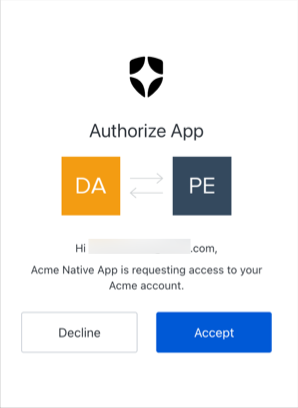 この確認プロンプトは、レガシーの非 OIDC 準拠フローでは表示されません。テナントおよびアプリケーションに対して保護を強化する方法については、[OIDC 準拠認証の採用](/docs/ja-JP/authenticate/login/oidc-conformant-authentication)を参照してください。
#### プロンプトのカスタマイズ
確認プロンプトには、既存のサードパーティ アプリケーション向けの同意画面で使用されているカスタムブランディングと設定が適用されます。詳細については、[Customize Universal Login Page Templates](/docs/ja-JP/customize/login-pages/universal-login/customize-templates) の **Prompts** セクションを参照してください。
Auth0 は、本番環境ではこの保護を無効にしないことを**強く推奨します**。デバイス上の悪意のあるアプリケーションが、ユーザーの操作やその他の気づける兆候が一切ないまま `id_tokens` や `access_tokens` を要求できてしまう可能性があります。
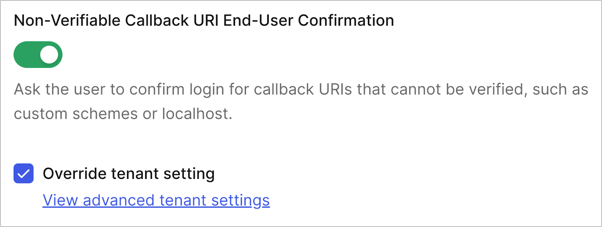
確認プロンプトは、グローバルなテナント設定、またはアプリケーションレベルで構成できます。アプリケーションレベルの設定は、グローバルなテナントレベルの設定より優先されます。
**アプリケーションレベル**
1. [Auth0 Dashboard > Applications > Application Settings > Advanced > OAuth](https://manage.auth0.com/#/applications/settings) に移動します。
2. **Non-Verifiable Callback URI End-User Confirmation** 設定までスクロールします。
3. トグルをオンにしてプロンプトを有効にするか、トグルをオフにしてプロンプトを無効にします。
 **グローバル**
1. [Auth0 Dashboard > Settings > Advanced](https://manage.auth0.com/#/tenant/advanced) に移動します。
2. **Non-Verifiable Callback URI End-User Confirmation** 設定を探します。
3. トグルをオンにしてプロンプトを無効にするか、トグルをオフにしてプロンプトを有効にします。
**グローバル**
1. [Auth0 Dashboard > Settings > Advanced](https://manage.auth0.com/#/tenant/advanced) に移動します。
2. **Non-Verifiable Callback URI End-User Confirmation** 設定を探します。
3. トグルをオンにしてプロンプトを無効にするか、トグルをオフにしてプロンプトを有効にします。
