> ## Documentation Index
> Fetch the complete documentation index at: https://auth0.generaltranslation.app/llms.txt
> Use this file to discover all available pages before exploring further.
> HTTPS ベースのコールバックを使用してセキュリティを強化し、アプリケーションなりすましのリスクを軽減する方法について学びます。
# 検証不能なコールバック URI のエンドユーザー確認への移行
Auth0 は、セキュリティを強化し、アプリケーションなりすましやフィッシング攻撃のリスクを軽減するため、可能な限り、[Authorization Code Flow](/docs/ja-JP/get-started/authentication-and-authorization-flow/authorization-code-flow-with-pkce) を使用するすべてのネイティブアプリケーションにおいて、[Android App Links](https://developer.android.com/training/app-links#android-app-link) および [Apple Universal Links](https://developer.apple.com/documentation/xcode/allowing-apps-and-websites-to-link-to-your-content) を利用した HTTPS ベースのコールバックへの移行を推奨しています。さらに、Auth0 ではカスタム URI スキームの扱い方法も変更します。
より具体的には、コールバックとしてカスタム URI スキームを指定する認証リクエストに対し、これまではユーザー操作を必要とせずにレスポンスを返していたシナリオでも、ログイン確認プロンプトを使用できるようになります。たとえば、シングルサインオン (SSO) シナリオで、認証リクエストの要件が既存の認証済みセッションで満たされる場合、サービスは指定されたカスタム URI スキーム/ループバック URI コールバックにシームレスにレスポンスを返すのではなく、新しいログイン確認プロンプトを表示します。新しいプロンプトの詳細については、[Measures Against Application Impersonation](/docs/ja-JP/secure/security-guidance/measures-against-app-impersonation) の「User Confirmation Prompt」セクションを参照してください。
新しい機能の提供開始より前から存在するテナントについては、予期しない動作変更を防ぐため、2026 年 4 月 28 日までは従来の動作がデフォルトのまま維持されます。ただし、これらのテナントでは、この日付より前に新しい動作を利用するようオプトインすることを強く推奨します。あるいは、厳密に必要な場合は、追加の確認プロンプトの使用をオプトアウトすることもできます。
## どのような影響がありますか?
既に、または今後カスタム URI スキームやループバック URI のコールバックを指定するクライアント アプリケーションにエンドユーザーがログインする場合、新しいログイン確認プロンプトでの操作を通じてログインを明示的に確認しなければならないことがあります。エンドユーザーは、この変更によってユーザーエクスペリエンスが低下したと感じる可能性があります。
さらに、新しいログイン確認プロンプトを使用するように構成されており、かつ検証不能なコールバック URI を使用しているアプリケーションでは、`prompt=none` を含む認証リクエストは拒否されます。
## Actions
**Auth0 では、Authorization Code Flow を使用するすべてのネイティブアプリケーションについて、可能な限り Android App Links および Apple Universal Links を用いた HTTPS ベースのコールバックへ移行することを強く推奨します。**
さらに、2026 年 4 月 28 日以降にデフォルト動作が変更されるテナントでは、システムのデフォルト変更に先立ち、カスタム URI スキームまたはループバック URI コールバックを使用する認証リクエストに対して必要な動作を明示的に選択する必要があります。
### アプリケーションで検証できないコールバック URI を使用しているかを確認する
`Unconfirmed Login with Non-Verifiable Callback URI Redirects` マイグレーション切り替えが利用可能で有効になっているテナントでは、カスタム URI スキームまたはループバック URI を指定する認証リクエストは、アプリケーションまたはテナントレベルで明示的に次のオプションを設定していない限り、**非推奨通知が記録されたテナントログを生成します**。
`skip_non_verifiable_callback_uri_confirmation_prompt`
これらのテナントログには、リクエストを実行しているアプリケーションのクライアント ID が含まれます。次のクエリを使用して、Auth0 Dashboard からこれらのテナントログを監視できます。
```bash theme={null}
type:depnotetype:depnote AND description:Unconfirmed\ Login\ with\ Non-Verifiable\ Callback\ URI\ Redirects*
```
### 新しいログイン確認プロンプトへのオプトイン
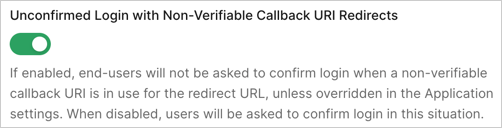
カスタム URI スキームまたはループバック URI を使用する認証フローのセキュリティをあらかじめ強化するために、新しいログイン確認プロンプトを有効にするには、Auth0 Dashboard で次の手順を実行します。
1. [**Auth0 Dashboard > Tenant Settings > Advanced**](https://manage.auth0.com/#/tenant/advanced) に移動します。
2. **Migrations** セクションで、**Unconfirmed Login with Non-Verifiable Callback URI Redirects** トグルをオフにします。
### 新しいログイン確認プロンプトを無効化する
セキュリティ上の考慮事項を評価した結果、新しいログイン確認プロンプトを使用しないと判断した場合は、特定のアプリケーションまたはテナント全体に対して、新しい動作からオプトアウトするように設定できます。この設定は Auth0 Dashboard から行うことができます。
アプリケーションレベルの設定は、テナントレベルの設定よりも優先されます。意図しない動作変更を避けるため、テナントレベルの設定を変更する前に、アプリケーション固有の設定を行ってください。たとえば、特定のアプリケーションでは Non-Verifiable Callback URI End-User Confirmation をスキップしつつ、他のアプリケーションではデフォルトで表示する、あるいはその逆の構成にしたい場合があります。
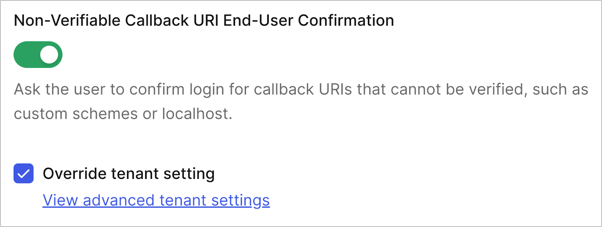
特定のアプリケーションで無効化するには:
1. [Auth0 Dashboard > Applications > Settings > Advanced Settings > OAuth](https://manage.auth0.com/applications/settings) に移動します。
2. **Non-Verifiable Callback URI End-User Confirmation** トグルを探して無効にし、**Save** を選択します。この構成を恒久的に管理できるようにするには、**Override the tenant setting** を有効にする必要がある場合があります。
 テナント全体で無効化するには:
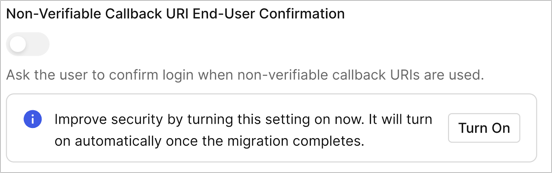
1. [Auth0 Dashboard > Tenant Settings > Advanced](https://manage.auth0.com/tenant/advanced) に移動します。
2. **Login and Logout** セクション内の **Non-Verifiable Callback URI End-User Confirmation** トグルを探して無効にし、**Save** を選択します。この構成を恒久的に管理できるようにするには、**turn the setting on** をオンにする必要がある場合があります。
テナント全体で無効化するには:
1. [Auth0 Dashboard > Tenant Settings > Advanced](https://manage.auth0.com/tenant/advanced) に移動します。
2. **Login and Logout** セクション内の **Non-Verifiable Callback URI End-User Confirmation** トグルを探して無効にし、**Save** を選択します。この構成を恒久的に管理できるようにするには、**turn the setting on** をオンにする必要がある場合があります。
 Unconfirmed Login with Non-Verifiable Callback URI Redirects の移行トグルは、新しい確認プロンプト機能の提供開始前から作成されているテナントにのみ適用されます。このトグルは Auth0 Dashboard からのみ設定できます。
移行トグルとは別に、テナントで必要な動作は Auth0 Management API を通じて設定することもできます。具体的には、次の 2 つのレベルで構成を行うことができます。
* **テナントレベルの構成**: [Update Tenant Settings](https://auth0.com/docs/api/management/v2#!/Tenants/patch_settings) エンドポイントを使用し、`skip_non_verifiable_callback_uri_confirmation_prompt` プロパティを設定することで、確認プロンプトの動作を管理できます。
* **アプリケーションレベルの構成**: 特定のアプリケーションについてテナントレベルの設定を上書きするには、同じ `skip_non_verifiable_callback_uri_confirmation_prompt` プロパティを [Update Client](https://auth0.com/docs/api/management/v2#!/Clients/patch_clients_by_id) エンドポイント経由で設定します。
アプリケーション構成に関する追加情報とガイダンスについては、「[Measures Against Application Impersonation](/docs/ja-JP/secure/security-guidance/measures-against-app-impersonation)」を参照してください。
Unconfirmed Login with Non-Verifiable Callback URI Redirects の移行トグルは、新しい確認プロンプト機能の提供開始前から作成されているテナントにのみ適用されます。このトグルは Auth0 Dashboard からのみ設定できます。
移行トグルとは別に、テナントで必要な動作は Auth0 Management API を通じて設定することもできます。具体的には、次の 2 つのレベルで構成を行うことができます。
* **テナントレベルの構成**: [Update Tenant Settings](https://auth0.com/docs/api/management/v2#!/Tenants/patch_settings) エンドポイントを使用し、`skip_non_verifiable_callback_uri_confirmation_prompt` プロパティを設定することで、確認プロンプトの動作を管理できます。
* **アプリケーションレベルの構成**: 特定のアプリケーションについてテナントレベルの設定を上書きするには、同じ `skip_non_verifiable_callback_uri_confirmation_prompt` プロパティを [Update Client](https://auth0.com/docs/api/management/v2#!/Clients/patch_clients_by_id) エンドポイント経由で設定します。
アプリケーション構成に関する追加情報とガイダンスについては、「[Measures Against Application Impersonation](/docs/ja-JP/secure/security-guidance/measures-against-app-impersonation)」を参照してください。