> ## Documentation Index
> Fetch the complete documentation index at: https://auth0.generaltranslation.app/llms.txt
> Use this file to discover all available pages before exploring further.
# ResetPasswordMfaWebAuthnRoamingChallenge
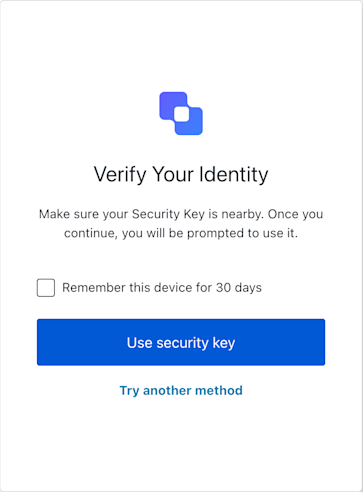 ResetPasswordMfaWebAuthnRoamingChallenge
```ts Example theme={null}
// In your UI component for the reset-password-mfa-webauthn-roaming-challenge screen:
const sdk = new ResetPasswordMfaWebAuthnRoamingChallenge();
async function handleSecurityKeyAuth() {
try {
const userWantsToRemember = document.getElementById('remember-device-checkbox')?.checked || false;
await sdk.useSecurityKey({ rememberDevice: sdk.screen.showRememberDevice && userWantsToRemember });
// On success, Auth0 typically handles redirection.
} catch (err) {
console.error("Security key authentication failed:", err);
// If it's a WebAuthn API error, report it to Auth0
if (err.name && err.message) { // Basic check for DOMException-like error
try {
await sdk.showError({ error: { name: err.name, message: err.message } });
} catch (reportError) {
console.error("Failed to report WebAuthn error:", reportError);
}
}
// Update UI to inform the user, e.g., "Security key verification failed. Please try again."
// Also check `sdk.transaction.errors` if the page might have reloaded with an error message from the server.
}
}
```
## Constructors
Initializes a new instance of the `ResetPasswordMfaWebAuthnRoamingChallenge` class.
It retrieves the necessary context (screen, transaction, etc.) from the global
#### Throws
If the Universal Login Context is not available or if the screen name
in the context does not match `ResetPasswordMfaWebAuthnRoamingChallenge.screenIdentifier`.
## Properties
BrandingMembers} />
ClientMembers} />
OrganizationMembers} />
PromptMembers} />
ScreenMembersOnResetPasswordMfaWebAuthnRoamingChallenge}>
Holds the specific screen data and properties for this screen,
(for the WebAuthn challenge) and `showRememberDevice`.
TenantMembers} />
TransactionMembers} />
UntrustedDataMembers} />
UserMembers} />
The unique identifier for this screen, used for internal SDK logic and telemetry.
## Methods
Error[]}>
Retrieves the array of transaction errors from the context, or an empty array if none exist.
An array of error objects from the transaction context.
Reports a client-side WebAuthn API error (from `navigator.credentials.get()`) to Auth0.
This method is intended to be called when [useSecurityKey](#usesecuritykey) (or a direct call to
`navigator.credentials.get()`) fails due to a standard WebAuthn API error
(e.g., `NotAllowedError` if the user cancels, `NotFoundError`, `SecurityError`, timeout).
It submits the error details with `action: "showError::{errorDetailsJsonString}"` and an empty `response`.
A promise that resolves when the error report is successfully submitted.
Auth0 may re-render the page with specific error messages in `this.transaction.errors` or redirect.
#### Throws
Throws an error if the form submission itself fails (e.g., network error, invalid state).
```typescript Example theme={null}
// In your UI, after catching an error from `sdk.useSecurityKey()` or `navigator.credentials.get()`:
if (webAuthnError instanceof DOMException) {
await sdk.showError({
error: { name: webAuthnError.name, message: webAuthnError.message },
rememberDevice: userWantsToRemember // if applicable
});
}
```
ResetPasswordMfaWebAuthnRoamingChallengeShowErrorOptions}>
**Properties**
Allows the user to opt-out of the WebAuthn roaming authenticator challenge and select a different MFA method.
This action submits `action: "pick-authenticator"` to Auth0, which should navigate
the user to an MFA factor selection screen.
A promise that resolves when the 'pick-authenticator' action is submitted.
#### Throws
Throws an error if the form submission fails (e.g., network error, invalid state).
```typescript Example theme={null}
// When the user clicks a "Try Another Way" button:
await sdk.tryAnotherMethod({ rememberDevice: userWantsToRemember });
// Auth0 handles redirection to the MFA selection screen.
```
ResetPasswordMfaWebAuthnRoamingChallengeTryAnotherMethodOptions}>
**Properties**
Initiates the WebAuthn security key challenge.
This method internally calls `navigator.credentials.get()` using the challenge
options provided in `this.screen.publicKey`.
If the user successfully authenticates with their security key, the resulting
`PublicKeyCredential` is stringified and submitted to Auth0 with `action: "default"`.
A promise that resolves when the verification attempt is submitted.
A successful operation usually results in Auth0 redirecting the user.
#### Throws
Throws an error if `this.screen.publicKey` is missing (indicating missing challenge options),
if `getPasskeyCredentials` (which wraps `navigator.credentials.get()`) fails (e.g., user cancellation,
no authenticator found, hardware error), or if the final form submission to Auth0 fails.
It is crucial to catch errors from this method. WebAuthn API errors (like `NotAllowedError`)
should be reported using [showError](#showerror).
```typescript Example theme={null}
// In your UI component for the reset-password-mfa-webauthn-roaming-challenge screen:
const sdk = new ResetPasswordMfaWebAuthnRoamingChallenge();
async function handleSecurityKeyAuth() {
try {
const userWantsToRemember = document.getElementById('remember-device-checkbox')?.checked || false;
await sdk.useSecurityKey({ rememberDevice: sdk.screen.showRememberDevice && userWantsToRemember });
// On success, Auth0 typically handles redirection.
} catch (err) {
console.error("Security key authentication failed:", err);
// If it's a WebAuthn API error, report it to Auth0
if (err.name && err.message) { // Basic check for DOMException-like error
try {
await sdk.showError({ error: { name: err.name, message: err.message } });
} catch (reportError) {
console.error("Failed to report WebAuthn error:", reportError);
}
}
// Update UI to inform the user, e.g., "Security key verification failed. Please try again."
// Also check `sdk.transaction.errors` if the page might have reloaded with an error message from the server.
}
}
```
ResetPasswordMfaWebAuthnRoamingChallengeUseSecurityKeyOptions}>
**Properties**
ResetPasswordMfaWebAuthnRoamingChallenge
```ts Example theme={null}
// In your UI component for the reset-password-mfa-webauthn-roaming-challenge screen:
const sdk = new ResetPasswordMfaWebAuthnRoamingChallenge();
async function handleSecurityKeyAuth() {
try {
const userWantsToRemember = document.getElementById('remember-device-checkbox')?.checked || false;
await sdk.useSecurityKey({ rememberDevice: sdk.screen.showRememberDevice && userWantsToRemember });
// On success, Auth0 typically handles redirection.
} catch (err) {
console.error("Security key authentication failed:", err);
// If it's a WebAuthn API error, report it to Auth0
if (err.name && err.message) { // Basic check for DOMException-like error
try {
await sdk.showError({ error: { name: err.name, message: err.message } });
} catch (reportError) {
console.error("Failed to report WebAuthn error:", reportError);
}
}
// Update UI to inform the user, e.g., "Security key verification failed. Please try again."
// Also check `sdk.transaction.errors` if the page might have reloaded with an error message from the server.
}
}
```
## Constructors
Initializes a new instance of the `ResetPasswordMfaWebAuthnRoamingChallenge` class.
It retrieves the necessary context (screen, transaction, etc.) from the global
#### Throws
If the Universal Login Context is not available or if the screen name
in the context does not match `ResetPasswordMfaWebAuthnRoamingChallenge.screenIdentifier`.
## Properties
BrandingMembers} />
ClientMembers} />
OrganizationMembers} />
PromptMembers} />
ScreenMembersOnResetPasswordMfaWebAuthnRoamingChallenge}>
Holds the specific screen data and properties for this screen,
(for the WebAuthn challenge) and `showRememberDevice`.
TenantMembers} />
TransactionMembers} />
UntrustedDataMembers} />
UserMembers} />
The unique identifier for this screen, used for internal SDK logic and telemetry.
## Methods
Error[]}>
Retrieves the array of transaction errors from the context, or an empty array if none exist.
An array of error objects from the transaction context.
Reports a client-side WebAuthn API error (from `navigator.credentials.get()`) to Auth0.
This method is intended to be called when [useSecurityKey](#usesecuritykey) (or a direct call to
`navigator.credentials.get()`) fails due to a standard WebAuthn API error
(e.g., `NotAllowedError` if the user cancels, `NotFoundError`, `SecurityError`, timeout).
It submits the error details with `action: "showError::{errorDetailsJsonString}"` and an empty `response`.
A promise that resolves when the error report is successfully submitted.
Auth0 may re-render the page with specific error messages in `this.transaction.errors` or redirect.
#### Throws
Throws an error if the form submission itself fails (e.g., network error, invalid state).
```typescript Example theme={null}
// In your UI, after catching an error from `sdk.useSecurityKey()` or `navigator.credentials.get()`:
if (webAuthnError instanceof DOMException) {
await sdk.showError({
error: { name: webAuthnError.name, message: webAuthnError.message },
rememberDevice: userWantsToRemember // if applicable
});
}
```
ResetPasswordMfaWebAuthnRoamingChallengeShowErrorOptions}>
**Properties**
Allows the user to opt-out of the WebAuthn roaming authenticator challenge and select a different MFA method.
This action submits `action: "pick-authenticator"` to Auth0, which should navigate
the user to an MFA factor selection screen.
A promise that resolves when the 'pick-authenticator' action is submitted.
#### Throws
Throws an error if the form submission fails (e.g., network error, invalid state).
```typescript Example theme={null}
// When the user clicks a "Try Another Way" button:
await sdk.tryAnotherMethod({ rememberDevice: userWantsToRemember });
// Auth0 handles redirection to the MFA selection screen.
```
ResetPasswordMfaWebAuthnRoamingChallengeTryAnotherMethodOptions}>
**Properties**
Initiates the WebAuthn security key challenge.
This method internally calls `navigator.credentials.get()` using the challenge
options provided in `this.screen.publicKey`.
If the user successfully authenticates with their security key, the resulting
`PublicKeyCredential` is stringified and submitted to Auth0 with `action: "default"`.
A promise that resolves when the verification attempt is submitted.
A successful operation usually results in Auth0 redirecting the user.
#### Throws
Throws an error if `this.screen.publicKey` is missing (indicating missing challenge options),
if `getPasskeyCredentials` (which wraps `navigator.credentials.get()`) fails (e.g., user cancellation,
no authenticator found, hardware error), or if the final form submission to Auth0 fails.
It is crucial to catch errors from this method. WebAuthn API errors (like `NotAllowedError`)
should be reported using [showError](#showerror).
```typescript Example theme={null}
// In your UI component for the reset-password-mfa-webauthn-roaming-challenge screen:
const sdk = new ResetPasswordMfaWebAuthnRoamingChallenge();
async function handleSecurityKeyAuth() {
try {
const userWantsToRemember = document.getElementById('remember-device-checkbox')?.checked || false;
await sdk.useSecurityKey({ rememberDevice: sdk.screen.showRememberDevice && userWantsToRemember });
// On success, Auth0 typically handles redirection.
} catch (err) {
console.error("Security key authentication failed:", err);
// If it's a WebAuthn API error, report it to Auth0
if (err.name && err.message) { // Basic check for DOMException-like error
try {
await sdk.showError({ error: { name: err.name, message: err.message } });
} catch (reportError) {
console.error("Failed to report WebAuthn error:", reportError);
}
}
// Update UI to inform the user, e.g., "Security key verification failed. Please try again."
// Also check `sdk.transaction.errors` if the page might have reloaded with an error message from the server.
}
}
```
ResetPasswordMfaWebAuthnRoamingChallengeUseSecurityKeyOptions}>
**Properties**